
Showing posts with label jndi. Show all posts
Showing posts with label jndi. Show all posts
Monday, March 30, 2015
Exposing JMS queues and topics with a JAX-WS webservice
Everyone can do HTTP calls and thus call most webservices. Interfacing with JMS queues or topics though is a bit more difficult (when not using Oracle SOA Suite). An alternative is using custom code. This usually requires libraries, JNDI lookups, opening connections and such. Because I wanted to make it easy for myself to put stuff on queues and topics, I created a simple JAX-WS wrapper service. By using this service, JMS suddenly becomes a whole lot easier.


Thursday, December 12, 2013
First steps into the Oracle Database Cloud
Oracle provides a Database Cloud Service. In a previous post I've looked at the Oracle Java Cloud Service (http://javaoraclesoa.blogspot.nl/2013/12/first-steps-into-oracle-java-cloud.html). The database is of course also an important component used in most applications. In this blog post I'll describe my first experiences with the Oracle Database Cloud service. I've used two methods to connect to the Oracle Database Cloud service. The first one from SQLDeveloper. Next I created a webservice, deployed it to the Oracle Java Cloud service and fetched data from the Oracle Database Cloud service with it.
There are of course other methods to interact with the Oracle Database Cloud service. It is for example possible using SQLWorkshop from the Apex interface to expose RESTful services to access the database. See for example http://multikoop.blogspot.nl/2012/11/oracle-java-and-database-cloud-services.html on how to create these services. By default, calls to the Oracle Cloud are encrypted. See https://weblogs.java.net/blog/bleonard/archive/2013/05/02/calling-oracle-cloud-service-java on how to call services.
There are of course other methods to interact with the Oracle Database Cloud service. It is for example possible using SQLWorkshop from the Apex interface to expose RESTful services to access the database. See for example http://multikoop.blogspot.nl/2012/11/oracle-java-and-database-cloud-services.html on how to create these services. By default, calls to the Oracle Cloud are encrypted. See https://weblogs.java.net/blog/bleonard/archive/2013/05/02/calling-oracle-cloud-service-java on how to call services.
Saturday, October 19, 2013
Java Unit testing: Mocking JNDI, final classes, statics and private parts
To improve quality of an application, it is a good practice to provide unit tests together with the code which is written. This makes it easier to determine the impact of changes and fix them early during development.
Writing unit tests can be challenging. Often applications run inside an application server which provides services and a unit test runs outside of the server. Applications can depend on the services provided by the application server which makes testing outside of this scope difficult. One of those services is JNDI. JNDI makes it possible for an application to look up for example a datasource. Luckily JNDI can be provided outside of application server scope.
To make mocking methods in unit tests easier, the Mockito framework (https://code.google.com/p/mockito/) can be used. Mockito however uses a subclassing mechanism which does not work when dealing with final classes. Also static and private methods cannot be mocked because of this. PowerMock provides solutions for those issues; https://code.google.com/p/powermock/.
Writing unit tests can be challenging. Often applications run inside an application server which provides services and a unit test runs outside of the server. Applications can depend on the services provided by the application server which makes testing outside of this scope difficult. One of those services is JNDI. JNDI makes it possible for an application to look up for example a datasource. Luckily JNDI can be provided outside of application server scope.
To make mocking methods in unit tests easier, the Mockito framework (https://code.google.com/p/mockito/) can be used. Mockito however uses a subclassing mechanism which does not work when dealing with final classes. Also static and private methods cannot be mocked because of this. PowerMock provides solutions for those issues; https://code.google.com/p/powermock/.
Friday, November 9, 2012
SOA Suite Cluster deployments and loadbalancers
When using Ant tasks to deploy to an Oracle SOA Suite cluster certain issues can occur. You deploy usually to one Managed Server and the cluster will propagate the deployment to the other nodes in the cluster. Often before this happens, the Ant script continues with the deployment of a next process (usually deployment is scripted this way. see for example http://biemond.blogspot.nl/2009/09/deploy-soa-suite-11g-composite.html). When resources are accessed using a loadbalancer, the loadbalancer can refer for certain resources to a managed server (node in the cluster) where the process is not deployed yet. This can cause deployment issues. You can not work around this by separately deploying to the nodes of the cluster. See http://www.oracle.com/technetwork/topics/soa/oracle-soa-suite-ha-faq-1-131459.pdf section 3.. Usually re-executing the deployment script is a workaround since the process is then usually already present on both cluster nodes.
Also when starting a managed server, a similar problem can arise. Take for example a cluster which consists of two managed servers. The first server is shutdown and started (changing certain settings requires a restart of the server) and when the first server has state 'Running' the second server is shutdown and started, the first server can get into problems loading composites since the loadbalancer might refer to resources on the second server when those resources are not loaded yet. Inconsistencies can arise between the two nodes; for example processes which are valid on the first node and invalid on the second.
Also see http://docs.oracle.com/cd/E28271_01/admin.1111/e10226/soainfra_config.htm#BHCCIJAE for this behavior; After the SOA Infrastructure is started, it may not be completely initialized to administer incoming requests until all deployed composites are loaded.I have not found a way to change this behavior. What you would want is that the loadbalancer does not refer to a server when it is not completely initialized.
The description below is the path I took to eventually find the best solution to both described issues above. If you're just interested in the solution, look at the bottom of this post and skip the 'Failed experiments' section. BEWARE: some users have reported stuck threads when using this code so it might require some work. If you're interested in a bit of background and would like to avoid certain pitfalls, I'd suggest reading the entire post. The issue is that the loadbalancer should be able to get an accurate reading concerning the availability of a server.
How to deal with the loadbalancer
If you have a smart loadbalancer, you can configure what it uses as probe to determine if a server is running. The Weblogic Server state is insufficient for that when running Oracle SOA Suite as described above.
Creating an efficient probe for the loadbalancer is not as straightforward as it might seem. The loadbalancer looks at individual nodes to determine if it is running. You can create a probe to determine loaded processes. This is however insufficient since you will not be able to tackle the problem of deployment to one node and at a later time to the other node; both nodes will show lists of loaded processes, however one node will show less processes.
The Locator class (http://docs.oracle.com/cd/E21043_01/apirefs.1111/e10659/oracle/soa/management/facade/Locator.html) can be used to obtain a list of composites. A Locator instance can be created from within a deployed composite or by using JNDI connection properties. Both are however server instance specific and you are not able to compare the two nodes.
It is possible to obtain the managed server instances from the admin server by using MBeans. See; http://middlewaremagic.com/weblogic/?p=913. I've adapted this to allow remote connections for local testing and local connections from BPEL. When calling the code from BPEL I've used a Java embedding activity. Required libraries (JDeveloper) for compilation are;
- Weblogic 10.3 remote client
- SOA Runtime
- SOA Designtime
- BPEL Runtime
Failed experiments
'Failed experiments' would suggest I tried to achieve certain functionality but couldn't get the code to perform what I wanted. In this case the code produced does what I wanted to achieve, however my way of thinking was wrong. The below code examples look at the server state based on loaded composites and comparing managed servers. This is not an accurate measure of server availability and is not usuable by a loadbalancer. The code can however be used in other usecases. That's why I included it in this post.
Remote client for local testing
The getServerUpRemote method in the code below returns true or false. It asks the AdminServer for all Managed Servers which are up. It then goes to the managed servers and asks for the Composites running in those servers and compares the lists. True means everything is ok. False means that one or more managed servers in the cluster have differences in loaded composites, states or versions.
In order to get the managed servers I first access the AdminServer by using JMX in order to obtain a MBeanServerConnection. This connection can be used to determine the Managed Servers. Next, I use JNDI to find the Locator class on the Managed Servers in order to get the list of Composites.
See for the code; https://dl.dropbox.com/u/6693935/blog/remoteconnections.txt
Local connection from deployed composite/servlet
Of course the loadbalancer would not be able to access my local JDeveloper installation so I wanted to deploy the code to run on the server. Also I wanted to avoid having to use server credentials. I first tried wrapping the code in a servlet and deploying the servlet on the AdminServer. This was not succesful since I had difficulties accessing resources on the Managed Servers without providing credentials. I encountered for example the following error;
java.security.PrivilegedActionException: javax.naming.NameNotFoundException: Unable to resolve 'FacadeFinderBean'. Resolved ''; remaining name 'FacadeFinderBean'
When I deployed the code in a BPEL process, there would be difficulties to access AdminServer resources and resources on other Managed Servers in the cluster.
To avoid above issues, I split the code in two parts. A servlet running on the AdminServer and a BPEL process running on the Managed Servers. The servlet would be able to provide the managed servers and the BPEL processes would be able to provide information on their runtime. The servlet could call the processes on the managed servers and compare the results.
The below code also illustrates how to call a webservice from Java and deal with the result without the requirement to generate webservice specific Java proxy classes. I used http://www.coderanch.com/t/206857/sockets/java/Http-Post-XML-example as an example.
See for the code;
https://dl.dropbox.com/u/6693935/blog/localconnections.txt
This however was still insufficient because I would need to ask the AdminServer via the servlet if the Managed Servers are up and all processes are in the same state. A loadbalancer would be unable to determine which node is up, only if the state as a whole is safe. This total state can be used during an installation to check if it is already time to deploy the next process or if a wait is required to propagate the deployment to the other nodes. This does not fix the node start-up issues. If I proxy the AdminServer servlet on the managed servers, during deployment, both managed servers would seem to be down if the responses of loaded processes are not equal. This can cause the loadbalancer to not send requests to a server which is actually up. When I return the Ok status for the managed server which has most processes loaded, I still am not sure that server is fully started.
The right path
The magic bean I couldn't access
What I needed to solve the issues in the introduction is an MBean on the Managed Servers indicating is the Managed Server has loaded all processes or is still 'initializing'.

Eventually I found this MBean; oracle.soa.config:Application=soa-infra,j2eeType=CompositeLifecycleConfig,name=soa-infra
It can be accessed using an MBeanServerConnection found by using JMX looking for weblogic.management.mbeanservers.runtime. I also used http://www.albinsblog.com/2011/10/oracle-soa-11g-getting-default-version.html#.UJvMYoaJXsc for a bit of the JMX part.
This is illustrated in the following code. To get this to compile I used the following libraries;
- Weblogicv 10.3 remote client
- Servlet runtime
- wljmxclient.jar and wlclient.jar (wlserver_10.3/server/lib). these are required for the t3 protocol used when connecting from a client (code in public static void main). Else you will encounter 'java.net.MalformedURLException: Unsupported protocol: t3' (see; http://code.google.com/p/wlsagent/issues/detail?id=3)
The below code illustrates how to get to the MBean you want. I followed the following procedure to determine how to get there;
- browsed the MBeans using Fusion Middleware Control to find the correct MBean
- used the post mentioned before to get to the correct MBeanServerConnection (this differs from the MBeanServerConnection used in the 2 code samples earlier in this post!)
- illustrated in comments at the end of the code; used the following to obtain the correct ObjectName; Set<ObjectName> myObjs = myCon.queryNames(new ObjectName("*:j2eeType=CompositeLifecycleConfig,*"), null);
- determined the class of the attribute (in this case SOAPlatformStatus) I wanted. it appeared to be a javax.management.openmbean.CompositeDataSupport. I did this like; connection.getAttribute(getSOAInfraServiceName(),"SOAPlatformStatus").getClass().toString()
- get the value from the obtained object by using the key ('isReady' in this case)
package ms.testapp.soa.utils;
import java.io.IOException;
import java.io.PrintWriter;
import java.io.StringWriter;
import java.net.MalformedURLException;
import java.util.Hashtable;
import javax.management.MBeanServer;
import javax.management.MBeanServerConnection;
import javax.management.MalformedObjectNameException;
import javax.management.ObjectName;
import javax.management.remote.JMXConnector;
import javax.management.remote.JMXConnectorFactory;
import javax.management.remote.JMXServiceURL;
import javax.naming.Context;
import javax.naming.InitialContext;
import javax.naming.NamingException;
import javax.servlet.ServletException;
import javax.servlet.http.HttpServlet;
import javax.servlet.http.HttpServletRequest;
import javax.servlet.http.HttpServletResponse;
public class DetermineServerStatus extends HttpServlet {
public DetermineServerStatus() {
super();
}
private static MBeanServerConnection getRemoteConnection(String hostname,
String portString,
String username,
String password) throws IOException,
MalformedURLException {
JMXConnector connector = null;
MBeanServerConnection connection = null;
//System.out.println("ServerDetails---Started in initConnection");
String protocol = "t3";
Integer portInteger = Integer.valueOf(portString);
int port = portInteger.intValue();
String jndiroot = "/jndi/";
String mserver = "weblogic.management.mbeanservers.runtime";
//String mserver = "weblogic.management.mbeanservers.domainruntime";
JMXServiceURL serviceURL =
new JMXServiceURL(protocol, hostname, port, jndiroot + mserver);
Hashtable h = new Hashtable();
h.put(Context.SECURITY_PRINCIPAL, username);
h.put(Context.SECURITY_CREDENTIALS, password);
h.put(JMXConnectorFactory.PROTOCOL_PROVIDER_PACKAGES,
"weblogic.management.remote");
connector = JMXConnectorFactory.connect(serviceURL, h);
connection = connector.getMBeanServerConnection();
return connection;
}
private static MBeanServerConnection getLocalConnection() throws NamingException {
InitialContext ctx = new InitialContext();
MBeanServer server = (MBeanServer)ctx.lookup("java:comp/env/jmx/runtime");
//(MBeanServer)ctx.lookup("java:comp/env/jmx/domainRuntime");
return server;
}
private static ObjectName getSOAInfraServiceName() {
ObjectName service = null;
try {
service =
new ObjectName("oracle.soa.config:Application=soa-infra,j2eeType=CompositeLifecycleConfig,name=soa-infra");
} catch (MalformedObjectNameException e) {
throw new AssertionError(e.getMessage());
}
return service;
}
private static javax.management.openmbean.CompositeDataSupport getSOAPlatformStatusObjects(MBeanServerConnection connection) throws Exception {
//System.out.println(connection.getAttribute(getSOAInfraServiceName(),
// "SOAPlatformStatus").getClass().toString());
return (javax.management.openmbean.CompositeDataSupport)connection.getAttribute(getSOAInfraServiceName(),
"SOAPlatformStatus");
}
private static String getSOAPlatformStatus(MBeanServerConnection connection) {
try {
return ((Boolean)getSOAPlatformStatusObjects(connection).get("isReady")).toString();
} catch (Exception e) {
//in case bean not accessible -> server not ready
return stackTraceToString(e);
}
}
private static String stackTraceToString(Throwable e) {
String retValue = null;
StringWriter sw = null;
PrintWriter pw = null;
try {
sw = new StringWriter();
pw = new PrintWriter(sw);
e.printStackTrace(pw);
retValue = sw.toString();
} finally {
try {
if (pw != null)
pw.close();
if (sw != null)
sw.close();
} catch (IOException ignore) {
//System.out.println(stackTraceToString(e));
}
}
return retValue;
}
public void doPost(HttpServletRequest request,
HttpServletResponse response) throws ServletException,
IOException {
doGet(request, response);
}
public void doGet(HttpServletRequest request,
HttpServletResponse response) throws ServletException,
IOException {
PrintWriter out = response.getWriter();
try {
out.println(getServerStatusLocal());
} catch (Exception e) {
out.println(stackTraceToString(e));
}
}
public String getServerStatusLocal() {
MBeanServerConnection myCon;
try {
myCon = getLocalConnection();
} catch (NamingException e) {
//no MBean connection; server not ready
return stackTraceToString(e);
}
return getSOAPlatformStatus(myCon);
}
public static void main(String[] args) {
String host = "192.168.178.17";
String port = "7001";
String user = "weblogic";
String password = "xxx";
MBeanServerConnection myCon;
try {
myCon = getRemoteConnection(host, port, user, password);
//Set<ObjectName> myObjs = myCon.queryNames(new ObjectName("*:j2eeType=CompositeLifecycleConfig,*"), null);
//for (ObjectName myObj : myObjs) {
// System.out.println(myObj.getCanonicalName());
//}
System.out.println(getSOAPlatformStatus(myCon));
} catch (Exception e) {
System.out.println(stackTraceToString(e));
}
}
}
This servlet I could deploy to the managed servers to get the status. This however... failed because of;
javax.management.RuntimeMBeanException: java.lang.SecurityException: MBean attribute access denied.
MBean: oracle.soa.config:name=soa-infra,j2eeType=CompositeLifecycleConfig,Application=soa-infra
Getter for attribute SOAPlatformStatus
Detail: Access denied. Required roles: Admin, Operator, Monitor, executing subject: principals=[]
at com.sun.jmx.interceptor.DefaultMBeanServerInterceptor.rethrow(DefaultMBeanServerInterceptor.java:856)
at com.sun.jmx.interceptor.DefaultMBeanServerInterceptor.rethrowMaybeMBeanException(DefaultMBeanServerInterceptor.java:869)
at com.sun.jmx.interceptor.DefaultMBeanServerInterceptor.getAttribute(DefaultMBeanServerInterceptor.java:670)
at com.sun.jmx.mbeanserver.JmxMBeanServer.getAttribute(JmxMBeanServer.java:638)
So I thought I could maybe deploy this as part of a BPEL process. When running in another context, these SecurityExceptions might not be raised. When refactoring the code and testing the BPEL process however I still got the same exception.
Accessing the MBean
I found; http://docs.oracle.com/cd/E11035_01/wls100/security/thin_client.html#wp1046345 and got back to my servlet code. Then I added a weblogic.xml deployment descriptor, a role to web.xml and a role mapping to weblogic.xml and it worked! The code can be downloaded from; https://dl.dropbox.com/u/6693935/blog/DetermineServerStatus.zip
The BPEL code is for reference purposes only. I haven't applied the role assignment to the BPEL code. The servlet has an additional benefit that it is more easily tweakable to the response wanted by the loadbalancer
Below a screenshot of the result when the server is fully started.

We performed the following test to confirm the expected behavior.
- first deploy the servlet to the managed servers in a cluster
- confirm the servlet output for the managed servers is true (by accessing them directly, not via a loadbalancer)
- shutdown one node and confirm the servlet cannot be accessed. confirm the other node still replies 'true'
- start the node and wait till it has state Running
- confirm the servlet output for that node is false and for the other node is true
- wait a while (until all processes are loaded)
- confirm that for both nodes the servlet output is true
Also when starting a managed server, a similar problem can arise. Take for example a cluster which consists of two managed servers. The first server is shutdown and started (changing certain settings requires a restart of the server) and when the first server has state 'Running' the second server is shutdown and started, the first server can get into problems loading composites since the loadbalancer might refer to resources on the second server when those resources are not loaded yet. Inconsistencies can arise between the two nodes; for example processes which are valid on the first node and invalid on the second.
Also see http://docs.oracle.com/cd/E28271_01/admin.1111/e10226/soainfra_config.htm#BHCCIJAE for this behavior; After the SOA Infrastructure is started, it may not be completely initialized to administer incoming requests until all deployed composites are loaded.I have not found a way to change this behavior. What you would want is that the loadbalancer does not refer to a server when it is not completely initialized.
The description below is the path I took to eventually find the best solution to both described issues above. If you're just interested in the solution, look at the bottom of this post and skip the 'Failed experiments' section. BEWARE: some users have reported stuck threads when using this code so it might require some work. If you're interested in a bit of background and would like to avoid certain pitfalls, I'd suggest reading the entire post. The issue is that the loadbalancer should be able to get an accurate reading concerning the availability of a server.
How to deal with the loadbalancer
If you have a smart loadbalancer, you can configure what it uses as probe to determine if a server is running. The Weblogic Server state is insufficient for that when running Oracle SOA Suite as described above.
Creating an efficient probe for the loadbalancer is not as straightforward as it might seem. The loadbalancer looks at individual nodes to determine if it is running. You can create a probe to determine loaded processes. This is however insufficient since you will not be able to tackle the problem of deployment to one node and at a later time to the other node; both nodes will show lists of loaded processes, however one node will show less processes.
The Locator class (http://docs.oracle.com/cd/E21043_01/apirefs.1111/e10659/oracle/soa/management/facade/Locator.html) can be used to obtain a list of composites. A Locator instance can be created from within a deployed composite or by using JNDI connection properties. Both are however server instance specific and you are not able to compare the two nodes.
It is possible to obtain the managed server instances from the admin server by using MBeans. See; http://middlewaremagic.com/weblogic/?p=913. I've adapted this to allow remote connections for local testing and local connections from BPEL. When calling the code from BPEL I've used a Java embedding activity. Required libraries (JDeveloper) for compilation are;
- Weblogic 10.3 remote client
- SOA Runtime
- SOA Designtime
- BPEL Runtime
Failed experiments
'Failed experiments' would suggest I tried to achieve certain functionality but couldn't get the code to perform what I wanted. In this case the code produced does what I wanted to achieve, however my way of thinking was wrong. The below code examples look at the server state based on loaded composites and comparing managed servers. This is not an accurate measure of server availability and is not usuable by a loadbalancer. The code can however be used in other usecases. That's why I included it in this post.
Remote client for local testing
The getServerUpRemote method in the code below returns true or false. It asks the AdminServer for all Managed Servers which are up. It then goes to the managed servers and asks for the Composites running in those servers and compares the lists. True means everything is ok. False means that one or more managed servers in the cluster have differences in loaded composites, states or versions.
In order to get the managed servers I first access the AdminServer by using JMX in order to obtain a MBeanServerConnection. This connection can be used to determine the Managed Servers. Next, I use JNDI to find the Locator class on the Managed Servers in order to get the list of Composites.
See for the code; https://dl.dropbox.com/u/6693935/blog/remoteconnections.txt
Local connection from deployed composite/servlet
Of course the loadbalancer would not be able to access my local JDeveloper installation so I wanted to deploy the code to run on the server. Also I wanted to avoid having to use server credentials. I first tried wrapping the code in a servlet and deploying the servlet on the AdminServer. This was not succesful since I had difficulties accessing resources on the Managed Servers without providing credentials. I encountered for example the following error;
java.security.PrivilegedActionException: javax.naming.NameNotFoundException: Unable to resolve 'FacadeFinderBean'. Resolved ''; remaining name 'FacadeFinderBean'
When I deployed the code in a BPEL process, there would be difficulties to access AdminServer resources and resources on other Managed Servers in the cluster.
To avoid above issues, I split the code in two parts. A servlet running on the AdminServer and a BPEL process running on the Managed Servers. The servlet would be able to provide the managed servers and the BPEL processes would be able to provide information on their runtime. The servlet could call the processes on the managed servers and compare the results.
The below code also illustrates how to call a webservice from Java and deal with the result without the requirement to generate webservice specific Java proxy classes. I used http://www.coderanch.com/t/206857/sockets/java/Http-Post-XML-example as an example.
See for the code;
https://dl.dropbox.com/u/6693935/blog/localconnections.txt
This however was still insufficient because I would need to ask the AdminServer via the servlet if the Managed Servers are up and all processes are in the same state. A loadbalancer would be unable to determine which node is up, only if the state as a whole is safe. This total state can be used during an installation to check if it is already time to deploy the next process or if a wait is required to propagate the deployment to the other nodes. This does not fix the node start-up issues. If I proxy the AdminServer servlet on the managed servers, during deployment, both managed servers would seem to be down if the responses of loaded processes are not equal. This can cause the loadbalancer to not send requests to a server which is actually up. When I return the Ok status for the managed server which has most processes loaded, I still am not sure that server is fully started.
The right path
The magic bean I couldn't access
What I needed to solve the issues in the introduction is an MBean on the Managed Servers indicating is the Managed Server has loaded all processes or is still 'initializing'.

Eventually I found this MBean; oracle.soa.config:Application=soa-infra,j2eeType=CompositeLifecycleConfig,name=soa-infra
It can be accessed using an MBeanServerConnection found by using JMX looking for weblogic.management.mbeanservers.runtime. I also used http://www.albinsblog.com/2011/10/oracle-soa-11g-getting-default-version.html#.UJvMYoaJXsc for a bit of the JMX part.
This is illustrated in the following code. To get this to compile I used the following libraries;
- Weblogicv 10.3 remote client
- Servlet runtime
- wljmxclient.jar and wlclient.jar (wlserver_10.3/server/lib). these are required for the t3 protocol used when connecting from a client (code in public static void main). Else you will encounter 'java.net.MalformedURLException: Unsupported protocol: t3' (see; http://code.google.com/p/wlsagent/issues/detail?id=3)
The below code illustrates how to get to the MBean you want. I followed the following procedure to determine how to get there;
- browsed the MBeans using Fusion Middleware Control to find the correct MBean
- used the post mentioned before to get to the correct MBeanServerConnection (this differs from the MBeanServerConnection used in the 2 code samples earlier in this post!)
- illustrated in comments at the end of the code; used the following to obtain the correct ObjectName; Set<ObjectName> myObjs = myCon.queryNames(new ObjectName("*:j2eeType=CompositeLifecycleConfig,*"), null);
- determined the class of the attribute (in this case SOAPlatformStatus) I wanted. it appeared to be a javax.management.openmbean.CompositeDataSupport. I did this like; connection.getAttribute(getSOAInfraServiceName(),"SOAPlatformStatus").getClass().toString()
- get the value from the obtained object by using the key ('isReady' in this case)
package ms.testapp.soa.utils;
import java.io.IOException;
import java.io.PrintWriter;
import java.io.StringWriter;
import java.net.MalformedURLException;
import java.util.Hashtable;
import javax.management.MBeanServer;
import javax.management.MBeanServerConnection;
import javax.management.MalformedObjectNameException;
import javax.management.ObjectName;
import javax.management.remote.JMXConnector;
import javax.management.remote.JMXConnectorFactory;
import javax.management.remote.JMXServiceURL;
import javax.naming.Context;
import javax.naming.InitialContext;
import javax.naming.NamingException;
import javax.servlet.ServletException;
import javax.servlet.http.HttpServlet;
import javax.servlet.http.HttpServletRequest;
import javax.servlet.http.HttpServletResponse;
public class DetermineServerStatus extends HttpServlet {
public DetermineServerStatus() {
super();
}
private static MBeanServerConnection getRemoteConnection(String hostname,
String portString,
String username,
String password) throws IOException,
MalformedURLException {
JMXConnector connector = null;
MBeanServerConnection connection = null;
//System.out.println("ServerDetails---Started in initConnection");
String protocol = "t3";
Integer portInteger = Integer.valueOf(portString);
int port = portInteger.intValue();
String jndiroot = "/jndi/";
String mserver = "weblogic.management.mbeanservers.runtime";
//String mserver = "weblogic.management.mbeanservers.domainruntime";
JMXServiceURL serviceURL =
new JMXServiceURL(protocol, hostname, port, jndiroot + mserver);
Hashtable h = new Hashtable();
h.put(Context.SECURITY_PRINCIPAL, username);
h.put(Context.SECURITY_CREDENTIALS, password);
h.put(JMXConnectorFactory.PROTOCOL_PROVIDER_PACKAGES,
"weblogic.management.remote");
connector = JMXConnectorFactory.connect(serviceURL, h);
connection = connector.getMBeanServerConnection();
return connection;
}
private static MBeanServerConnection getLocalConnection() throws NamingException {
InitialContext ctx = new InitialContext();
MBeanServer server = (MBeanServer)ctx.lookup("java:comp/env/jmx/runtime");
//(MBeanServer)ctx.lookup("java:comp/env/jmx/domainRuntime");
return server;
}
private static ObjectName getSOAInfraServiceName() {
ObjectName service = null;
try {
service =
new ObjectName("oracle.soa.config:Application=soa-infra,j2eeType=CompositeLifecycleConfig,name=soa-infra");
} catch (MalformedObjectNameException e) {
throw new AssertionError(e.getMessage());
}
return service;
}
private static javax.management.openmbean.CompositeDataSupport getSOAPlatformStatusObjects(MBeanServerConnection connection) throws Exception {
//System.out.println(connection.getAttribute(getSOAInfraServiceName(),
// "SOAPlatformStatus").getClass().toString());
return (javax.management.openmbean.CompositeDataSupport)connection.getAttribute(getSOAInfraServiceName(),
"SOAPlatformStatus");
}
private static String getSOAPlatformStatus(MBeanServerConnection connection) {
try {
return ((Boolean)getSOAPlatformStatusObjects(connection).get("isReady")).toString();
} catch (Exception e) {
//in case bean not accessible -> server not ready
return stackTraceToString(e);
}
}
private static String stackTraceToString(Throwable e) {
String retValue = null;
StringWriter sw = null;
PrintWriter pw = null;
try {
sw = new StringWriter();
pw = new PrintWriter(sw);
e.printStackTrace(pw);
retValue = sw.toString();
} finally {
try {
if (pw != null)
pw.close();
if (sw != null)
sw.close();
} catch (IOException ignore) {
//System.out.println(stackTraceToString(e));
}
}
return retValue;
}
public void doPost(HttpServletRequest request,
HttpServletResponse response) throws ServletException,
IOException {
doGet(request, response);
}
public void doGet(HttpServletRequest request,
HttpServletResponse response) throws ServletException,
IOException {
PrintWriter out = response.getWriter();
try {
out.println(getServerStatusLocal());
} catch (Exception e) {
out.println(stackTraceToString(e));
}
}
public String getServerStatusLocal() {
MBeanServerConnection myCon;
try {
myCon = getLocalConnection();
} catch (NamingException e) {
//no MBean connection; server not ready
return stackTraceToString(e);
}
return getSOAPlatformStatus(myCon);
}
public static void main(String[] args) {
String host = "192.168.178.17";
String port = "7001";
String user = "weblogic";
String password = "xxx";
MBeanServerConnection myCon;
try {
myCon = getRemoteConnection(host, port, user, password);
//Set<ObjectName> myObjs = myCon.queryNames(new ObjectName("*:j2eeType=CompositeLifecycleConfig,*"), null);
//for (ObjectName myObj : myObjs) {
// System.out.println(myObj.getCanonicalName());
//}
System.out.println(getSOAPlatformStatus(myCon));
} catch (Exception e) {
System.out.println(stackTraceToString(e));
}
}
}
This servlet I could deploy to the managed servers to get the status. This however... failed because of;
javax.management.RuntimeMBeanException: java.lang.SecurityException: MBean attribute access denied.
MBean: oracle.soa.config:name=soa-infra,j2eeType=CompositeLifecycleConfig,Application=soa-infra
Getter for attribute SOAPlatformStatus
Detail: Access denied. Required roles: Admin, Operator, Monitor, executing subject: principals=[]
at com.sun.jmx.interceptor.DefaultMBeanServerInterceptor.rethrow(DefaultMBeanServerInterceptor.java:856)
at com.sun.jmx.interceptor.DefaultMBeanServerInterceptor.rethrowMaybeMBeanException(DefaultMBeanServerInterceptor.java:869)
at com.sun.jmx.interceptor.DefaultMBeanServerInterceptor.getAttribute(DefaultMBeanServerInterceptor.java:670)
at com.sun.jmx.mbeanserver.JmxMBeanServer.getAttribute(JmxMBeanServer.java:638)
So I thought I could maybe deploy this as part of a BPEL process. When running in another context, these SecurityExceptions might not be raised. When refactoring the code and testing the BPEL process however I still got the same exception.
Accessing the MBean
I found; http://docs.oracle.com/cd/E11035_01/wls100/security/thin_client.html#wp1046345 and got back to my servlet code. Then I added a weblogic.xml deployment descriptor, a role to web.xml and a role mapping to weblogic.xml and it worked! The code can be downloaded from; https://dl.dropbox.com/u/6693935/blog/DetermineServerStatus.zip
The BPEL code is for reference purposes only. I haven't applied the role assignment to the BPEL code. The servlet has an additional benefit that it is more easily tweakable to the response wanted by the loadbalancer
Below a screenshot of the result when the server is fully started.

We performed the following test to confirm the expected behavior.
- first deploy the servlet to the managed servers in a cluster
- confirm the servlet output for the managed servers is true (by accessing them directly, not via a loadbalancer)
- shutdown one node and confirm the servlet cannot be accessed. confirm the other node still replies 'true'
- start the node and wait till it has state Running
- confirm the servlet output for that node is false and for the other node is true
- wait a while (until all processes are loaded)
- confirm that for both nodes the servlet output is true
Friday, September 7, 2012
Monitoring DataSources on Weblogic
As an Oracle SOA developer, I've often heard the phrase; 'BPEL doesn't work!'. Almost always the cause can be found in backend systems which do not function as expected. This error becomes visible when executing a service which uses a specific resource. When people start complaining about BPEL, usually this is an indication you should work on process feedback and error handling so the responsible party can quickly be identified. A trial and error mechanism is however often not what you want. A dashboard or script to monitor backend databases can help prevent such issues.
Often development and system test databases are not monitored as thoroughly as acceptance test or production environments. To be able to quickly identify for example a database which is malfunctioning (for example put down for maintenance without informing the developers) it is useful to have some tools and scripts available which you can run for the occasion. Usually this is quicker then using the Enterprise Manager. This is especially useful in complex environments where multiple systems are linked. In these scripts/tools, it is not a good idea to have the databases/users/passwords hardcoded, because that would require maintenance of the scripts in case of changes and as a lazy developer you of course don't want that.
In this article I will describe two possible options for monitoring DataSources on Weblogic servers.
- The first option is a servlet which uses JNDI to obtain JDBC DataSources. This has the drawback that if the DataSource is not loaded correctly or has been disabled, it cannot be looked up using JNDI and is not visible. It can however also be used when the Db/Aq adapter is not used. A servlet can be accessed by anyone, reducing the amount of technical knowledge required to monitor the databases.
- The second option is by using WLST to obtain DataSources defined in the DbAdapter/AqAdapter and provide statistics. This is specific to the Db/Aq adapter and it's a WLST script, so a Middleware installation and login credentials to the server are required in order to execute it.
Both methods query for available DataSources. The DataSource is used so no usernames/passwords/hostnames/sids etc are required.
Implementation
Java
The below servlet does a JNDI lookup of JDBC DataSources and does a 'select sysdate from dual' on them. If the DataSource is not available (can not be looked up via JNDI), it will not appear in the list. If for example a tablespace is full or an account is locked, you will however see it in the list as NOK (short for Not OK). It has not been extensively tested in error situations!
Output of the servlet can be for example;

When I lock the testuseraccount and reset the connectionpool;

Below is the servlet code. It can of course easily be improved (some people like colors and nice layouts while I tend to focus on functionality).
package ms.testapp;
import java.io.IOException;
import java.io.PrintWriter;
import java.io.StringWriter;
import java.sql.Connection;
import java.sql.Statement;
import java.util.ArrayList;
import java.util.Collections;
import java.util.Date;
import java.util.Hashtable;
import javax.naming.Binding;
import javax.naming.Context;
import javax.naming.InitialContext;
import javax.naming.NamingEnumeration;
import javax.naming.NamingException;
import javax.servlet.ServletException;
import javax.servlet.http.HttpServlet;
import javax.servlet.http.HttpServletRequest;
import javax.servlet.http.HttpServletResponse;
import javax.sql.DataSource;
public class CheckDb extends HttpServlet {
@SuppressWarnings("compatibility:-5693855291723951046")
private static final long serialVersionUID = 1L;
public CheckDb() {
super();
}
public void doGet(HttpServletRequest request,
HttpServletResponse response) throws ServletException,
IOException {
response.setContentType("text/html");
PrintWriter out = response.getWriter();
out.println("<!DOCTYPE HTML PUBLIC \"-//W3C//DTD HTML 4.0 " +
"Transitional//EN\">\n" +
"<HTML>\n" +
"<HEAD><TITLE>Datasource status</TITLE></HEAD>\n" +
"<BODY>\n" +
listJDBCContextTable
() + "</BODY></HTML>");
}
private Context getContext() throws NamingException {
Hashtable myCtx = new Hashtable();
myCtx.put(Context.INITIAL_CONTEXT_FACTORY,
"weblogic.jndi.WLInitialContextFactory");
Context ctx = new InitialContext(myCtx);
return ctx;
}
private String checkDataSource(DataSource ds) {
try {
Connection conn = ds.getConnection();
Statement st = conn.createStatement();
st.execute("select sysdate mydate from dual");
st.getResultSet().next();
Date mydate = st.getResultSet().getDate("mydate");
conn.close();
String date = mydate.toString();
if (date.length() == 10 && date.indexOf("-") == 4 && date.
lastIndexOf("-") == 7) {
return "OK";
} else {
return "NOK";
}
} catch (Exception e) {
return "NOK"; //getStackTrace(e);
}
}
private static String getStackTrace(Throwable e) {
StringWriter sw = new StringWriter();
PrintWriter pw = new PrintWriter(sw);
e.printStackTrace(pw);
return sw.toString();
}
private String listJDBCContextTable() {
String output = "<table>";
ArrayList<String> tab = new ArrayList<String>();
String line = "";
try {
tab = listContext((Context)getContext().lookup("jdbc"), "", tab);
Collections.sort(tab);
for (int i = 0; i < tab.size(); i++) {
output += tab.get(i);
}
output += "</table>";
return output;
} catch (NamingException e) {
return getStackTrace(e);
}
}
private ArrayList<String> listContext(Context ctx, String indent,
ArrayList<String> output) throws NamingException {
String name = "";
try {
NamingEnumeration list = ctx.listBindings("");
while (list.hasMore()) {
Binding item = (Binding)list.next();
String className = item.getClassName();
name = item.getName();
if (!(item.getObject() instanceof DataSource)) {
//output = output+indent + className + " " + name+"\n";
} else {
output.add("<tr><td>" + name + "</td><td>" +
checkDataSource((DataSource)item.getObject()) +
"</td></tr>");
}
Object o = item.getObject();
if (o instanceof javax.naming.Context) {
listContext((Context)o, indent + " ", output);
}
}
} catch (NamingException ex) {
output.add("<tr><td>" + name + "</td><td>" + getStackTrace(ex) +
"</td></tr>");
}
return output;
}
}
You can download the JDev 11.1.1.6 project here; https://dl.dropbox.com/u/6693935/blog/DbUtils.zip
Also I found that not all DataSources allow remote JDBC calls such as the MDS DataSource. When using a servlet, this is not a problem since the Java code runs on the server. When running a piece of Java code locally (from your laptop for example) however, it will not work and will throw; java.lang.UnsupportedOperationException: Remote JDBC disabled.
WLST
The below script is based on http://albinoraclesoa.blogspot.nl/2012/06/monitoring-jca-adapters-through-wlst.html and http://davidmichaelkarr.blogspot.nl/2008/10/make-wlst-scripts-more-flexible-with.html and was created by Marcel Bellinga. It contains an example on how to pass arguments to a WLST script and how to query / test DataSources from a WLST script. The DataSources for which statistics are printed, are determined by querying the DbAdapter and AqAdapter connectionpools.
import sys
import os
from java.lang import System
import getopt
user = ''
credential = ''
host = ''
port = ''
targetServerName = ''
def usage():
print "Usage:"
print "ResourceAdapterMonitor -u user -c credential -h host -p port -s serverName"
def monitorDBAdapter(serverName):
cd("ServerRuntimes/"+str(serverName)+"/ApplicationRuntimes/DbAdapter/ComponentRuntimes/DbAdapter/ConnectionPools")
connectionPools = ls(returnMap='true')
print '--------------------------------------------------------------------------------'
print 'DBAdapter Runtime details for '+ serverName
print '--------------------------------------------------------------------------------'
print '%10s %13s %15s %18s' % ('Connection Pool', 'State', 'Current', 'Created')
print '%10s %10s %24s %21s' % ('', '', 'Capacity', 'Connections')
print '--------------------------------------------------------------------------------'
for connectionPool in connectionPools:
if connectionPool!='eis/DB/SOADemo':
cd('/')
cd("ServerRuntimes/"+str(serverName)+"/ApplicationRuntimes/DbAdapter/ComponentRuntimes/DbAdapter/ConnectionPools/"+str(connectionPool))
print '%15s %15s %10s %20s' % (cmo.getName(), cmo.getState(), cmo.getCurrentCapacity(), cmo.getConnectionsCreatedTotalCount())
print '--------------------------------------------------------------------------------'
def monitorAQAdapter(serverName):
cd("ServerRuntimes/"+str(serverName)+"/ApplicationRuntimes/AqAdapter/ComponentRuntimes/AqAdapter/ConnectionPools")
connectionPools = ls(returnMap='true')
print '--------------------------------------------------------------------------------'
print 'AqAdapter Runtime details for '+ serverName
print '--------------------------------------------------------------------------------'
print '%10s %13s %15s %18s' % ('Connection Pool', 'State', 'Current', 'Created')
print '%10s %10s %24s %21s' % ('', '', 'Capacity', 'Connections')
print '--------------------------------------------------------------------------------'
for connectionPool in connectionPools:
if connectionPool!='eis/DB/SOADemo':
cd('/')
cd("ServerRuntimes/"+str(serverName)+"/ApplicationRuntimes/AqAdapter/ComponentRuntimes/AqAdapter/ConnectionPools/"+str(connectionPool))
print '%15s %15s %10s %20s' % (cmo.getName(), cmo.getState(), cmo.getCurrentCapacity(), cmo.getConnectionsCreatedTotalCount())
print '--------------------------------------------------------------------------------'
def parameters():
global user
global credential
global host
global port
global targetServerName
try:
opts, args = getopt.getopt(sys.argv[1:], "u:c:h:p:s:",
["user=", "credential=", "host=", "port=",
"targetServerName="])
except getopt.GetoptError, err:
print str(err)
usage()
sys.exit(2)
for opt, arg in opts:
if opt == "-n":
reallyDoIt = false
elif opt == "-u":
user = arg
elif opt == "-c":
credential = arg
elif opt == "-h":
host = arg
elif opt == "-p":
port = arg
elif opt == "-s":
targetServerName = arg
if user == "":
print "Missing \"-u user\" parameter."
usage()
sys.exit(2)
if credential == "":
print "Missing \"-c credential\" parameter."
usage()
sys.exit(2)
if host == "":
print "Missing \"-h host\" parameter."
usage()
sys.exit(2)
if port == "":
print "Missing \"-p port\" parameter."
usage()
sys.exit(2)
if targetServerName == "":
print "Missing \"-s targetServerName\" parameter."
usage()
sys.exit(2)
def main():
parameters()
#connect(username, password, admurl)
connect(user,credential,'t3://'+host+':'+port)
servers = cmo.getServers()
domainRuntime()
cd("/ServerLifeCycleRuntimes/" + targetServerName)
if cmo.getState() == 'RUNNING':
monitorAQAdapter(targetServerName)
monitorDBAdapter(targetServerName)
disconnect()
main()
Conclusion
There are various ways to monitor backend systems and databases . It is useful to create your own dashboards, especially when there are a lot of systems involved and you don't want to (or can't) login to the Enterprise Manager on every one of them. Make sure though such unsecured dashboards don't end up on production systems. Depending on the problem with a database, a JNDI lookup might or might not work. The DbAdapter and AqAdapter have JDBC DataSources configured. It is useful to create a script which determines the DataSources based on the DbAdapter/AqAdapter configuration since that listing contains all DataSources used by the adapter, even if they are not loaded succesfully. That is the list of DataSources that should be tested. This can be done with WLST as shown in this post. Using a servlet however is more convenient then using WLST scripts since the URL of the servlet can be mailed to for example testers so they can monitor the databases. WLST requires a usuable Middleware installation and connection properties, which are not always available. I might create a Java servlet which provides the functionality of the WLST script mentioned in this post in the near future.
Friday, February 24, 2012
Distributed transaction error and binding exception
ORA-00164: distributed autonomous transaction disallowed within migratable distributed transaction / ORA-24777: use of non-migratable database link not allowed
Situation
A BPEL process used an XA datasource with Global transaction support to call a PL/SQL function. This function used a private database link to insert data in a local table. The following exceptions occurred;
ORA-24777: use of non-migratable database link not allowed
when using pragma autonomous transaction in the function;
ORA-00164: distributed autonomous transaction disallowed within migratable distributed transaction
Splitting the fetching of data from the view and the inserting in the local table by using collections, did not help. Also adding commit statements made no difference.
Solution
The best solution is not to use an XA datasource. Other solutions include using a shared public database link or setting the database server to MTS (this is not advisable!).
Below illustrates how to configure a datasource not to support distributed transactions.
In the JDBC datasource configuration, Configuration, Connection pool, use the following driver for Oracle databases; oracle.jdbc.OracleDriver.

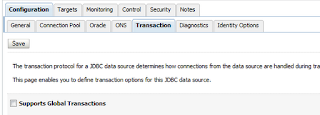
Under Configuration, transactions; disable Supports Global Transactions.
Under the DbAdapter configuration, Outbound Connection Pools, (specific) connection factory; make sure under properties that the dataSourceName is filled and not xADataSourceName.

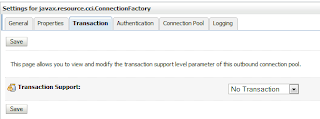
Under transaction support specify; No transaction
I had to restart the domain for the changes to become effective.
Exception occured when binding was invoked
Situation
After adding a ConnectionFactory to the DbAdapter, I notived the JNDI name was incorrect. I changed the JNDI name. I made sure a DataSource was created and specified by the ConnectionFactory. After using a BPEL process to connect to the database (using the ConnectionFactory specified in the DbAdapter), I got the following error.
Error
<bindingFault>
<part name="summary">
<summary>Exception occured when binding was invoked. Exception occured during invocation of JCA binding: "JCA Binding execute of Reference operation 'censored_DB' failed due to: Could not create/access the TopLink Session. This session is used to connect to the datastore. Caused by javax.resource.spi.InvalidPropertyException: Missing Property Exception. Missing Property: [ConnectionFactory> xADataSourceName or dataSourceName]. You may have set a property (in _db.jca) which requires another property to be set also. Make sure the property is set in the interaction (activation) spec by editing its definition in _db.jca. . You may need to configure the connection settings in the deployment descriptor (i.e. DbAdapter.rar#META-INF/weblogic-ra.xml) and restart the server. This exception is considered not retriable, likely due to a modelling mistake. ". The invoked JCA adapter raised a resource exception. Please examine the above error message carefully to determine a resolution. </summary>
</part>
<part name="detail">
<detail>Missing Property Exception. Missing Property: [ConnectionFactory> xADataSourceName or dataSourceName]. You may have set a property (in _db.jca) which requires another property to be set also. Make sure the property is set in the interaction (activation) spec by editing its definition in _db.jca. </detail>
</part>
<part name="code">
<code>null</code>
</part>
</bindingFault>
Solution
I had not specified any unusual properties in the .jca files. At first I of course checked I had correctly specified the DataSource in the connectionfactory. I restarted the JDBC connection pool and updated the DbAdapter. This did not help. Recreating the ConnectionFactory however, solved my issue.
Situation
A BPEL process used an XA datasource with Global transaction support to call a PL/SQL function. This function used a private database link to insert data in a local table. The following exceptions occurred;
ORA-24777: use of non-migratable database link not allowed
when using pragma autonomous transaction in the function;
ORA-00164: distributed autonomous transaction disallowed within migratable distributed transaction
Splitting the fetching of data from the view and the inserting in the local table by using collections, did not help. Also adding commit statements made no difference.
Solution
The best solution is not to use an XA datasource. Other solutions include using a shared public database link or setting the database server to MTS (this is not advisable!).
Below illustrates how to configure a datasource not to support distributed transactions.
In the JDBC datasource configuration, Configuration, Connection pool, use the following driver for Oracle databases; oracle.jdbc.OracleDriver.

Under Configuration, transactions; disable Supports Global Transactions.

Under the DbAdapter configuration, Outbound Connection Pools, (specific) connection factory; make sure under properties that the dataSourceName is filled and not xADataSourceName.

Under transaction support specify; No transaction

I had to restart the domain for the changes to become effective.
Exception occured when binding was invoked
Situation
After adding a ConnectionFactory to the DbAdapter, I notived the JNDI name was incorrect. I changed the JNDI name. I made sure a DataSource was created and specified by the ConnectionFactory. After using a BPEL process to connect to the database (using the ConnectionFactory specified in the DbAdapter), I got the following error.
Error
<bindingFault>
<part name="summary">
<summary>Exception occured when binding was invoked. Exception occured during invocation of JCA binding: "JCA Binding execute of Reference operation 'censored_DB' failed due to: Could not create/access the TopLink Session. This session is used to connect to the datastore. Caused by javax.resource.spi.InvalidPropertyException: Missing Property Exception. Missing Property: [ConnectionFactory> xADataSourceName or dataSourceName]. You may have set a property (in _db.jca) which requires another property to be set also. Make sure the property is set in the interaction (activation) spec by editing its definition in _db.jca. . You may need to configure the connection settings in the deployment descriptor (i.e. DbAdapter.rar#META-INF/weblogic-ra.xml) and restart the server. This exception is considered not retriable, likely due to a modelling mistake. ". The invoked JCA adapter raised a resource exception. Please examine the above error message carefully to determine a resolution. </summary>
</part>
<part name="detail">
<detail>Missing Property Exception. Missing Property: [ConnectionFactory> xADataSourceName or dataSourceName]. You may have set a property (in _db.jca) which requires another property to be set also. Make sure the property is set in the interaction (activation) spec by editing its definition in _db.jca. </detail>
</part>
<part name="code">
<code>null</code>
</part>
</bindingFault>
Solution
I had not specified any unusual properties in the .jca files. At first I of course checked I had correctly specified the DataSource in the connectionfactory. I restarted the JDBC connection pool and updated the DbAdapter. This did not help. Recreating the ConnectionFactory however, solved my issue.
Subscribe to:
Posts (Atom)