Friday, June 29, 2012

FileAdapter pipelines and valves for pre- and postprocessing

Introduction

In a previous post I've written about using the Spring component in order to process files, which the FileAdapter cannot process (http://javaoraclesoa.blogspot.nl/2012/03/file-processing-using-spring-component.html). Another alternative for this is using a pre-processing step in the FileAdapter by implementing pipelines and valves. This is described on; http://docs.oracle.com/cd/E17904_01/integration.1111/e10231/adptr_file.htm#BABJCJEH

I of course had to try this out in order to make an informed judgement when asked about the preferred method for a specific use case. I've used the example provided by Oracle in their documentation; encrypting and decrypting files. I created two processes. One for encrypting and one for decrypting.

The below image from the Oracle documentation shows how the mechanism of using pipelines and valves works. The FileAdapter can be configured (a property in the JCA file) to call a pipeline (described in an XML file). The pipeline consists of references to valve Java classes and some configuration properties. Valves can be chained. It is also possible to do some debatching in the form of a so-called Re-Entrant Valve. This can for example be used if the FileAdapter picks up a ZIP file and the separate files need to be offered to the subsequent processing steps one at a time. I would suggest reading the documentation on this.
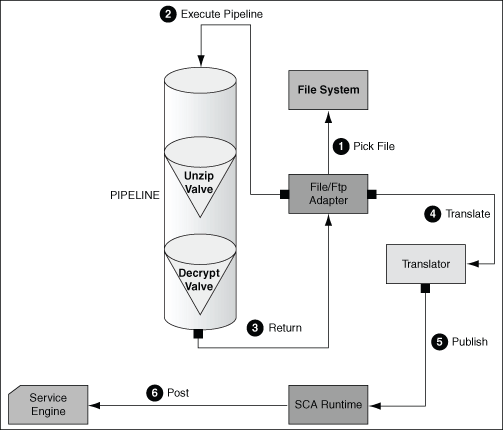


In this post I will describe my tryout of the FileAdapter pipelines and valves and the problems I've encountered. I will describe the steps which I have done and provide a sample project for download. In order to describe the steps, I will repeat some of the actions described in the manual.

Implementation

Java

First you need to create a Java project containing the code for the (custom) valves. You need to include the libraries as shown in the screenshot below. I needed to add the bpm-infra.jar. It is located in; <JDev home>\soa\modules\oracle.soa.fabric_11.1.1

I noticed the SimpleEncryptValve example code provided by Oracle missed some code. In the sample projects which are for download at the end of this post, I've corrected this.

When you've created the valves package and added the Java code examples, you can create a new JAR deployment profile in order to package the files.


When you have the JAR, you can put it in; $MW_HOME/user_projects/domains/soainfra/lib on the application server.

In the Oracle supplied example, the Cipher key needs to be 8 bytes long, else (in case you for example use 9 bytes) the following error will occur;

faultName: {{http://schemas.oracle.com/bpel/extension}remoteFault} messageType: {{http://schemas.oracle.com/bpel/extension}RuntimeFaultMessage} parts: {{ summary=<summary>Exception occured when binding was invoked. Exception occured during invocation of JCA binding: "JCA Binding execute of Reference operation 'Write' failed due to: Unable to execute outbound interaction. Unable to execute outbound interaction. Unable to execute outbound interaction. Please make sure that the file outbound interaction has been configured correctly. ". The invoked JCA adapter raised a resource exception. Please examine the above error message carefully to determine a resolution. </summary> ,detail=<detail>Invalid key length: 9 bytes</detail> ,code=<code>null</code>}

A nice feature which can be used to obtain the filename and path from the context inside a valve can be found here; https://forums.oracle.com/forums/thread.jspa?messageID=10410343. inputStreamContext.getMessageOriginReference() returns a String which contains filename/path.

SCA

In order to configure the FileAdapter to call the created valves, there are two options. You can specify them comma separated as the jca FileAdapter property PipelineValves. For example;

<property name="PipelineValves" value="valves.SimpleUnzipValve,valves.SimpleDecryptValve"/>

This is however not very flexable; it is not possible to specify additional parameters. The second option is to create a pipeline definition and refer to that definition with the property PipelineFile. For example;

<property name="PipelineFile" value="simpleencryptpipeline.xml"/>

Pipeline definition: simpleencryptpipeline.xml;

<?xml version="1.0"?>
<pipeline xmlns="http://www.oracle.com/adapter/pipeline">
<valves>
        <valve>valves.SimpleEncryptValve</valve>
</valves>
</pipeline>


If a valve is reentrant (can be called more then once returning a new InputStreamContext when for example unzipping multiple files), you can specify that as follows;

<?xml version="1.0"?>
<pipeline xmlns="http://www.oracle.com/adapter/pipeline">
<valves>
        <valve reentrant="true">valves.ReentrantUnzipValve</valve>
        <valve> valves.SimpleDecryptValve </valve>
</valves>
</pipeline>


My tryout did not result in correct encoding and decoding back to the original file. After having encoded the file and offering it to the decoder, the result differs from the original file. Because the decoded result is different from the encoded file I offered to the process and I did not do any further processing on the file I read, one can conclude that the valve did get executed, however the logic in the valve is incorrect

Since I'm not interested in diving deeply into security algorithms (that's a different although related specialty), I've not spend more time on finding out what the actual problem is. Suggestions are welcome ;)

Conclusion

Using pipelines and valves allows pre- and post processing of files. This allows the FileAdapter to be used in more situations, which can limit the requirement to build certain functionality from scratch in (for example) a Spring component when the input/output files differ slightly from what the FileAdapter can handle.

Valves and pipelines also have several other nice options for usage as for example listed on; http://technology.amis.nl/2011/10/24/soa-suite-file-adapter-pre-and-post-processing-using-valves-and-pipelines/

Valves however when placed on the application server classpath and not deployed as part of a composite, become available to all deployed composites. This limits the flexibility; replacing the valves will impact all composites using them.

If application specific libraries are required, putting Jar's in a composite and use them in a Spring component, can be preferable to making these libraries available to all applications by implementing them in valves put on the application server.

However, debugging and error handling of pipelines/valves is quite nice. Error messages are clear and you can use properties as defined in the composite in valves by using methods like; getPipeline().getPipelineContext().getProperty("myCipherKey"). These properties can be maintained at runtime; http://beatechnologies.wordpress.com/tag/persist-the-values-of-preferences-in-bpel/. When using Spring components, you don't have the SCA context available without feeding it as parameters to the component (maybe it is available but I did not spend enough time looking for it. Please correct me if I'm wrong on this).

You can download my sample projects here

Thursday, June 21, 2012

Exception handling; fault management and priority messages

Introduction

Exception handling is often a topic which is paid too little attention to. Functional people often consider this a technical topic and technical people consider the handling of error situations to mostly be functional in nature. This difference in opinion can result in software going to a production environment which is difficult to maintain.

It is suggested to first read the following two articles to understand the background of this article;
http://javaoraclesoa.blogspot.nl/2012/05/exception-handling-in-soa-suite-10g-and.html
http://javaoraclesoa.blogspot.nl/2012/05/re-enqueueing-faulted-bpel-messages.html

The below article describes a combination of exception handling by using a custom Java class in a fault policy to retire the process and a BPEL catch branch to reenqueue a message with a higher priority.

The implementation will satisfy the following requirements;

If an error occurs
- the process will be retired to prevent future faults in case a service invocation fails (fault management framework and custom Java fault handler)
- the faulted message must be put on a queue so it can easily be re-offered to the process after the error has been resolved (catch branch in BPEL using AQ adapter to re-enqueue a message)
- the faulted message must be picked up before the other messages in the queue if the problem is fixed in order to retain the order of messages processed (AQ with sorting on priority)

The fault management framework

Summary

The fault management framework does not handle all exceptions which occur but only invoke exceptions. The fault management framework takes precedence over the BPEL catch branch. The fault management framework makes it easy to use custom Java fault handlers to for example retire a process.

The BPEL catch branch does not allow a custom Java class to handle the exception. You can however use Java embedding. See for an example; http://javaoraclesoa.blogspot.nl/2012/03/base64encode-and-base64decode-in-bpel.html. Mind that when an exception is rethrown in a Catch branch and a CatchAll branch is present on the same level, the exception is propagated to the higher level and not caught by the CatchAll branch!

Example

The following example will retire a process when errors occur in invoke activities. The rethrow action makes sure that after the process has been retired, the error is propagated to the catch activities in the BPEL process.

The following code can be put in the <SCA-project>/SCA-INF/src/ms/exceptiontest.soa.faultHandlers folder;

package ms.exceptiontest.soa.faultHandlers;

import com.collaxa.cube.engine.fp.BPELFaultRecoveryContextImpl;
import java.util.logging.Logger;
import oracle.integration.platform.faultpolicy.IFaultRecoveryContext;
import oracle.integration.platform.faultpolicy.IFaultRecoveryJavaClass;
import oracle.soa.management.facade.Composite;
import oracle.soa.management.facade.Locator;
import oracle.soa.management.facade.LocatorFactory;

public class retireFaultHandler implements IFaultRecoveryJavaClass {
    private final static Logger logger =
        Logger.getLogger(retireFaultHandler.class.getName());

    public void handleRetrySuccess(IFaultRecoveryContext iFaultRecoveryContext) {
    }

    public String handleFault(IFaultRecoveryContext iFaultCtx) {
        try {
            BPELFaultRecoveryContextImpl bpelCtx =
                (BPELFaultRecoveryContextImpl)iFaultCtx;
            Locator loc = LocatorFactory.createLocator();
            Composite comp =
                loc.lookupComposite(bpelCtx.getProcessDN().getCompositeDN());
            comp.retire();
            System.out.println("retired " + comp.getDN());

        } catch (Exception e) {
            logger.severe("Error in FaultHandler " +
                          retireFaultHandler.class.getName());
            e.printStackTrace();
        }
        return "OK";
    }
}

Then you can use the following fault-policies.xml

<?xml version="1.0" encoding="UTF-8"?>
<faultPolicies xmlns="http://schemas.oracle.com/bpel/faultpolicy"
               xmlns:xsi="http://www.w3.org/2001/XMLSchema-instance">
  <faultPolicy version="2.1.3" id="ConnectionFaults">
    <Conditions>
      <faultName>
        <condition>
          <action ref="retireProcess"/>
        </condition>
      </faultName>
    </Conditions>
    <Actions>
      <Action id="retireProcess">
        <javaAction className="ms.exceptiontest.soa.faultHandlers.retireFaultHandler"
                    defaultAction="ora-rethrow-fault">
          <returnValue value="OK" ref="ora-rethrow-fault"/>
        </javaAction>
      </Action>
      <!-- Generics -->
      <Action id="ora-terminate">
        <abort/>
      </Action>
      <Action id="ora-replay-scope">
        <replayScope/>
      </Action>
      <Action id="ora-rethrow-fault">
        <rethrowFault/>
      </Action>
      <Action id="ora-human-intervention">
        <humanIntervention/>
      </Action>
    </Actions>
  </faultPolicy>
</faultPolicies>

And fault-bindings.xml

<?xml version="1.0" encoding="UTF-8"?>
<faultPolicyBindings version="2.0.1"
                     xmlns="http://schemas.oracle.com/bpel/faultpolicy"
                     xmlns:xsi="http://www.w3.org/2001/XMLSchema-instance">
    <composite faultPolicy="ConnectionFaults"/>
</faultPolicyBindings>

Re-enqueue messages using a higher priority

PL/SQL queue code

To be able to re-enqueue messages using a higher priority, a multiconsumer queue is created. Creating a multiconsumer queue is not required but allows more flexibility since multiple parties can become subscriber on the queue.

The queue uses a sort_list of priority,enq_time making sure messages with higher priority are dequeued first. The retention time is set to 1 week since even if messages are dequeued, it is handy if we can still find them to check their contents. The user holding the queues (and queue package), should have the following grants;

GRANT EXECUTE ON DBMS_AQADM TO testuser;
GRANT EXECUTE ON DBMS_AQ TO testuser;
GRANT AQ_ADMINISTRATOR_ROLE TO testuser;

--creating queue tables
BEGIN
  DBMS_AQADM.CREATE_QUEUE_TABLE( Queue_table => '"TESTUSER"."SOA_MULTI_QT"', Queue_payload_type => 'SYS.XMLTYPE', Sort_list => 'PRIORITY,ENQ_TIME', Multiple_consumers => TRUE, Compatible => '8.1.3');
END;

--creating queues
BEGIN
  DBMS_AQADM.CREATE_QUEUE( Queue_name => 'TESTUSER.SOA_MULTI_QUEUE', Queue_table => 'TESTUSER.SOA_MULTI_QT', Queue_type => 0, Max_retries => 5, Retry_delay => 0, Retention_time => '604800', dependency_tracking => FALSE, COMMENT => 'multi queue');
END;

--adding subscribers
begin
DBMS_AQADM.ADD_SUBSCRIBER ('TESTUSER.SOA_MULTI_QUEUE',sys.aq$_agent('FAULTTEST', null, null));
DBMS_AQADM.Start_queue( Queue_name => 'TESTUSER.SOA_MULTI_QUEUE',TRUE,TRUE );
end;

To drop the queue, queuetable, etc, the following can be used

BEGIN
  DBMS_AQADM.Stop_queue( Queue_name => 'TESTUSER.SOA_MULTI_QUEUE' );
  DBMS_AQADM.DROP_QUEUE( Queue_name => 'TESTUSER.SOA_MULTI_QUEUE' );
  DBMS_AQADM.DROP_QUEUE_TABLE( Queue_table => '"TESTUSER"."SOA_MULTI_QT"');
END;

To allow other users to enqueue messages without having to grant them rights to the DBMS_AQ package, the following package can be used;

CREATE OR REPLACE
PACKAGE soa_queue_pack
IS
type t_recipients_list IS TABLE OF VARCHAR2 (50); -- index by binary_integer;

PROCEDURE vul_multi_queue(
    p_queue_naam      IN VARCHAR2 ,
    p_xml_payload     IN xmltype ,
    p_priority        IN BINARY_INTEGER ,
    p_recipients_list IN t_recipients_list);
END soa_queue_pack;

create or replace
PACKAGE BODY soa_queue_pack
IS
PROCEDURE vul_multi_queue(
    p_queue_naam      IN VARCHAR2 ,
    p_xml_payload     IN xmltype ,
    p_priority        IN BINARY_INTEGER ,
    p_recipients_list IN t_recipients_list )
IS
  l_msg_aq raw(18);
  l_enq_opt dbms_aq.enqueue_options_t;
  l_msg_prop dbms_aq.message_properties_t;
  l_recipients_list dbms_aq.aq$_recipient_list_t;
BEGIN
  FOR i IN p_recipients_list.FIRST .. p_recipients_list.LAST
  LOOP
    l_recipients_list(i) := sys.aq$_agent(p_recipients_list(i),NULL,NULL);
  END LOOP;
  l_msg_prop.priority       := p_priority;
  l_msg_prop.recipient_list := l_recipients_list;
  dbms_aq.enqueue(p_queue_naam, l_enq_opt, l_msg_prop, p_xml_payload, l_msg_aq);
END;
END;

Other users can then do the following to enqueue messages ('testuser' is the user who owns the package and queues);

DECLARE
l_recipients          testuser.soa_queue_pack.t_recipients_list;
l_message_id RAW(16);
l_message SYS.XMLType;
BEGIN
l_recipients := testuser.soa_queue_pack.t_recipients_list('FAULTTEST');
l_message := sys.XMLType.createXML('<itemCollectionArray xmlns:msg_out="http://test.ms/itemcollections" xmlns="http://test.ms/itemcollections"><msg_out:itemsCollection><msg_out:item><msg_out:name>name</msg_out:name><msg_out:value>Piet</msg_out:value></msg_out:item></msg_out:itemsCollection></itemCollectionArray>');
testuser.soa_queue_pack.vul_multi_queue('TESTUSER.SOA_MULTI_QUEUE',l_message,5,l_recipients);
END;

This can for example be used in a PL/SQL table trigger in a different schema to enqueue a message on a certain status change or insert.

BPEL dequeueing and enqueueing

In BPEL you can specify the consumer a property in the AQ wizard for the dequeue operation;


For enqueueing, you can specify the enqueue priority to for example make sure messages causing errors, are picked up first when the problem is fixed.


To make sure no loops are caused and to throttle the speed at which messages are processed by the AQ adapter, the following properties can be used in the composite.xml;

  <service name="soa_multi_queue_AQ"
           ui:wsdlLocation="soa_multi_queue_AQ.wsdl">
    <interface.wsdl interface="http://xmlns.oracle.com/pcbpel/adapter/aq/bpel/multiqueue/soa_multi_queue_AQ#wsdl.interface(Dequeue_ptt)"/>
    <binding.jca config="soa_multi_queue_AQ_aq.jca"/>
    <property name="minimumDelayBetweenMessages">10000</property>
    <property name="adapter.aq.dequeue.threads" type="xs:string" many="false">1</property>
  </service>

The above setting causes 1 message every 10 seconds to be picked up from the queue.

Demonstration

The following BPEL process has been created;
This process calls an HelloWorld webservice. This webservice can be shutdown or retired in order to simulate a RemoteException (failure to invoke the webservice). The fault policy will call the custom Java action to retire the process. After retirement, the fault is rethrown and caught by the catchall block. This will re-enqueue the message with a higher priority. Upon fixing the error and enabling the process, the faulted message is picked up first and processed correctly.

First a message is put on the queue by executing;
DECLARE
l_recipients          testuser.soa_queue_pack.t_recipients_list;
l_message_id RAW(16);
l_message SYS.XMLType;
BEGIN
l_recipients := testuser.soa_queue_pack.t_recipients_list('FAULTTEST');
l_message := sys.XMLType.createXML('<itemCollectionArray xmlns:msg_out="http://test.ms/itemcollections" xmlns="http://test.ms/itemcollections"><msg_out:itemsCollection><msg_out:item><msg_out:name>name</msg_out:name><msg_out:value>Piet</msg_out:value></msg_out:item></msg_out:itemsCollection></itemCollectionArray>');
testuser.soa_queue_pack.vul_multi_queue('TESTUSER.SOA_MULTI_QUEUE',l_message,5,l_recipients);
END;

Then confirm the message is processed succesfully;

Next, disable the HelloWorld service by retiring it and re-enqueue a message. Check how CallHelloWorld handles the exception. The process is retired and the message is re-enqueued with a higher priority.


You can also confirm that after enabling the HelloWorld service and Activating the CallHelloWorld process, it first picks up the faulted message. You can download the sample (BPEL/Java code) at; http://dl.dropbox.com/u/6693935/blog/ExceptionTest.zip

Monday, June 4, 2012

Increasing BPEL performance

Introduction

Performance is a difficult topic with many variables. If the overall performance of an application is considered insufficient by a customer, then the people creating and maintaining (amongst others) the application, database, operating-system and server are first confronted with the task to determine the most important bottlenecks and then tackle them.

This post provides some suggestions on how to improve BPEL performance, should BPEL be a bottleneck. There are of course a lot more optimization options then the ones listed here like Weblogic tuning, JVM tuning and database tuning to get a BPEL process to run more smoothly.

Large dehydration store

A large dehydration store is a common cause for performance issues. Asynchronous callbacks for example, can become slow when the dehydration store contains a long history of process instances. This can become a significant portion of the processing-time. The solution for this is purging the dehydration store of old messages.

To purge old instance data, several scripts can be used depending on the precise version and requirements for purging. Truncating of tables is drastic. Deleting instances is less drastic and can be done more selectively (do keep long running processes in mind if you use them!) and using the Oracle supplied scripts is the supported way of purging.

Truncate tables
The below script is fast and truncates several tables; http://www.emarcel.com/soa-suit/152-deleteinstancessoasuite11gwls (example 4). It removes all instances and frees the space previously occupied.

Delete instances older then a specific date
If you don't use long running processes and workflows, the below script can help; http://orasoa.blogspot.nl/2011/07/purging-soa-suite-11g-extreme-edition.html. It deletes instances before a specific date (but does not take into account that the process might still be running).

Oracle purging scripts
See for more information; 
https://support.oracle.com/CSP/main/article?cmd=show&type=NOT&doctype=REFERENCE&id=1384379.1

Grant rights for execution

>sqlplus / as sysdba

Grant the privileges:

SQL> GRANT EXECUTE ON DBMS_LOCK TO DEV_SOAINFRA;

Grant succeeded.

SQL> GRANT CREATE ANY JOB TO DEV_SOAINFRA;

Grant succeeded.


Add the purge procedures;

cd <FMW_HOME>/rcuHome/rcu/integration/soainfra/sql/soa_purge/

>sqlplus DEV_SOAINFRA/<password>

SQL> @soa_purge_scripts.sql

Procedure created.
Function created.
Type created.
Type body created.
PL/SQL procedure successfully completed.
Package created.
Package body created.
SQL>


Execute the purge action (below example is single threaded)

DECLARE
MAX_CREATION_DATE timestamp;
MIN_CREATION_DATE timestamp;
batch_size integer;
max_runtime integer;
retention_period timestamp;
BEGIN
MIN_CREATION_DATE := to_timestamp('2010-01-01','YYYY-MM-DD');
MAX_CREATION_DATE := to_timestamp('2010-01-31','YYYY-MM-DD');
max_runtime := 60;
retention_period := to_timestamp('2010-01-31','YYYY-MM-DD');
batch_size := 10000;
soa.delete_instances(
min_creation_date => MIN_CREATION_DATE,
max_creation_date => MAX_CREATION_DATE,
batch_size => batch_size,
max_runtime => max_runtime,
retention_period => retention_period,
purge_partitioned_component => false);
END;
/


Rebuilding indexes and reclaiming free space
Based on http://www.emarcel.com/soa-suit/152-deleteinstancessoasuite11gwls and https://forums.oracle.com/forums/thread.jspa?threadID=2286397 I've created my own script to rebuild indexes and reclaim space for Oracle SOA Suite 11.1.1.6. Execute the script under the SOA Infra schema;

ALTER TABLE XML_DOCUMENT enable row movement;
ALTER TABLE XML_DOCUMENT shrink space compact;
ALTER TABLE XML_DOCUMENT shrink space;
ALTER TABLE XML_DOCUMENT shrink space cascade;
ALTER TABLE XML_DOCUMENT disable row movement;
ALTER INDEX DOC_STORE_PK rebuild online;

ALTER TABLE AUDIT_TRAIL enable row movement;
ALTER TABLE AUDIT_TRAIL shrink space compact;
ALTER TABLE AUDIT_TRAIL shrink space;
ALTER TABLE AUDIT_TRAIL shrink space cascade;
ALTER TABLE AUDIT_TRAIL disable row movement;
ALTER INDEX AT_PK rebuild online;

ALTER TABLE HEADERS_PROPERTIES enable row movement;
ALTER TABLE HEADERS_PROPERTIES shrink space compact;
ALTER TABLE HEADERS_PROPERTIES shrink space;
ALTER TABLE HEADERS_PROPERTIES shrink space cascade;
ALTER TABLE HEADERS_PROPERTIES disable row movement;

ALTER TABLE CUBE_SCOPE enable row movement;
ALTER TABLE CUBE_SCOPE shrink space compact;
ALTER TABLE CUBE_SCOPE shrink space;
ALTER TABLE CUBE_SCOPE shrink space cascade;
ALTER TABLE CUBE_SCOPE disable row movement;
ALTER INDEX CS_PK rebuild online;

ALTER INDEX REFERENCE_INSTANCE_CDN_STATE rebuild online;
ALTER INDEX REFERENCE_INSTANCE_CO_ID rebuild online;
ALTER INDEX REFERENCE_INSTANCE_ECID rebuild online;
ALTER INDEX REFERENCE_INSTANCE_ID rebuild online;
ALTER INDEX REFERENCE_INSTANCE_STATE rebuild online;
ALTER INDEX REFERENCE_INSTANCE_TIME_CDN rebuild online;

ALTER TABLE DLV_MESSAGE enable row movement;
ALTER TABLE DLV_MESSAGE shrink space compact;
ALTER TABLE DLV_MESSAGE shrink space;
ALTER TABLE DLV_MESSAGE shrink space cascade;
ALTER TABLE DLV_MESSAGE disable row movement;
ALTER INDEX DM_CONVERSATION rebuild online;

ALTER TABLE CUBE_INSTANCE enable row movement;
ALTER TABLE CUBE_INSTANCE shrink space compact;
ALTER TABLE CUBE_INSTANCE shrink space;
ALTER TABLE CUBE_INSTANCE shrink space cascade;
ALTER TABLE CUBE_INSTANCE disable row movement;
ALTER INDEX CI_CREATION_DATE rebuild online;
ALTER INDEX CI_CUSTOM3 rebuild online;
ALTER INDEX CI_ECID rebuild online;
ALTER INDEX CI_NAME_REV_STATE rebuild online;
ALTER INDEX CI_PK rebuild online;

ALTER TABLE INSTANCE_PAYLOAD enable row movement;
ALTER TABLE INSTANCE_PAYLOAD shrink space compact;
ALTER TABLE INSTANCE_PAYLOAD shrink space;
ALTER TABLE INSTANCE_PAYLOAD shrink space cascade;
ALTER TABLE INSTANCE_PAYLOAD disable row movement;
ALTER INDEX INSTANCE_PAYLOAD_KEY rebuild online;

ALTER TABLE XML_DOCUMENT_REF enable row movement;
ALTER TABLE XML_DOCUMENT_REF shrink space compact;
ALTER TABLE XML_DOCUMENT_REF shrink space;
ALTER TABLE XML_DOCUMENT_REF shrink space cascade;
ALTER TABLE XML_DOCUMENT_REF disable row movement;

ALTER INDEX COMPOSITE_INSTANCE_CIDN rebuild online;
ALTER INDEX COMPOSITE_INSTANCE_CO_ID rebuild online;
ALTER INDEX COMPOSITE_INSTANCE_CREATED rebuild online;
ALTER INDEX COMPOSITE_INSTANCE_ECID rebuild online;
ALTER INDEX COMPOSITE_INSTANCE_ID rebuild online;
ALTER INDEX COMPOSITE_INSTANCE_STATE rebuild online;

ALTER TABLE DOCUMENT_DLV_MSG_REF enable row movement;
ALTER TABLE DOCUMENT_DLV_MSG_REF shrink space compact;
ALTER TABLE DOCUMENT_DLV_MSG_REF shrink space;
ALTER TABLE DOCUMENT_DLV_MSG_REF shrink space cascade;
ALTER TABLE DOCUMENT_DLV_MSG_REF disable row movement;
ALTER INDEX DOC_DLV_MSG_GUID_INDEX rebuild online;

ALTER TABLE DLV_SUBSCRIPTION enable row movement;
ALTER TABLE DLV_SUBSCRIPTION shrink space compact;
ALTER TABLE DLV_SUBSCRIPTION shrink space;
ALTER TABLE DLV_SUBSCRIPTION shrink space cascade;
ALTER TABLE DLV_SUBSCRIPTION disable row movement;
ALTER INDEX DS_CONV_STATE rebuild online;
ALTER INDEX DS_CONVERSATION rebuild online;
ALTER INDEX DS_FK rebuild online;

ALTER TABLE AUDIT_DETAILS enable row movement;
ALTER TABLE AUDIT_DETAILS shrink space compact;
ALTER TABLE AUDIT_DETAILS shrink space;
ALTER TABLE AUDIT_DETAILS shrink space cascade;
ALTER TABLE AUDIT_DETAILS disable row movement;
ALTER INDEX AD_PK rebuild online;

ALTER TABLE WI_FAULT enable row movement;
ALTER TABLE WI_FAULT shrink space compact;
ALTER TABLE WI_FAULT shrink space;
ALTER TABLE WI_FAULT shrink space cascade;
ALTER TABLE WI_FAULT disable row movement;
ALTER INDEX WF_CRDATE_CIKEY rebuild online;
ALTER INDEX WF_CRDATE_TYPE rebuild online;
ALTER INDEX WF_FK2 rebuild online;

ALTER TABLE WORK_ITEM enable row movement;
ALTER TABLE WORK_ITEM shrink space compact;
ALTER TABLE WORK_ITEM shrink space;
ALTER TABLE WORK_ITEM shrink space cascade;
ALTER TABLE WORK_ITEM disable row movement;
ALTER INDEX WI_EXPIRED rebuild online;
ALTER INDEX WI_STRANDED rebuild online;

--LOBs

ALTER TABLE XML_DOCUMENT MODIFY lob (DOCUMENT) (shrink space);
ALTER TABLE AUDIT_DETAILS MODIFY lob (bin) (shrink space);
ALTER TABLE WI_FAULT MODIFY lob (MESSAGE) (shrink space);
ALTER TABLE CUBE_SCOPE MODIFY lob (SCOPE_BIN) (shrink space);
ALTER TABLE REFERENCE_INSTANCE MODIFY lob (STACK_TRACE) (shrink space);
ALTER TABLE REFERENCE_INSTANCE MODIFY lob (ERROR_MESSAGE) (shrink space);
ALTER TABLE COMPOSITE_INSTANCE_FAULT MODIFY lob (STACK_TRACE) (shrink space);
ALTER TABLE COMPOSITE_INSTANCE_FAULT MODIFY lob (ERROR_MESSAGE) (shrink space);
ALTER TABLE TEST_DEFINITIONS MODIFY lob (DEFINITION) (shrink space);

Audit trail logging

Production audit trail logging is synchronous. This causes a delay in the execution of a BPEL process. It can be made asynchronous;

https://supporthtml.oracle.com/epmos/faces/ui/km/SearchDocDisplay.jspx?_afrLoop=4432510064434000&type=DOCUMENT&id=1328382.1&displayIndex=14&_afrWindowMode=0&_adf.ctrl-state=169zpsk90p_218

(Oracle Support ID 1328382.1)

Log in to the Fusion Middleware Console (at http://soaserver:7001/em)
Navigate to Farm_soa_domain --> SOA --> (right-click on) soa-infra --> SOA Administration --> Common Properties --> More SOA Infra Advanced Configuration Properties (bottom of page)
Click on "Audit Config"
Set the following values and click on "Apply" afterwards

AuditConfig/compositeInstanceStateEnabled = false
AuditConfig/level = Production
AuditConfig/policies/Element_0/isActive = false
AuditConfig/policies/Element_0/name = Immediate
AuditConfig/policies/Element_1/isActive = true
AuditConfig/policies/Element_1/name = Deferred

(sample values)
AuditConfig/policies/Element_1/properties/Element_0/name = maxThreads
AuditConfig/policies/Element_1/properties/Element_0/value = 10
AuditConfig/policies/Element_1/properties/Element_1/name = flushDelay
AuditConfig/policies/Element_1/properties/Element_1/value = 5000
AuditConfig/policies/Element_1/properties/Element_2/name = batchSize
AuditConfig/policies/Element_1/properties/Element_3/value = 100

I did a small test on how much performance was improved by changing this setting. I created a synchronous HelloWorld BPEL process. Input string output Hello string. I first tested the process in the Fusion Middleware Control test console before starting a loadtest from SOAP UI (to make sure the first request would not incur additional overhead for loading of the process).

I used the Simple strategy, no randomness, 100 requests, 5 threads. Results are in ms.

Default audit config

Development
min 35
max 178
avg 57.76

Production
min 33
max 122
avg 56.83

Off
min 28
max 155
avg 47.87

After change audit config

Development
min 32
max 207
avg 53.45

Production
min 31
max 161
avg 51.82

Off
min 25
max 172
avg 48.65

As you can see there is performance improvement on the averages in development and production audit setting. The improvement is about 10% in this test situation. My process is however not heavy on audit logging (receive, assign, reply). The differences found might have been greater if the process contained more activities. No difference was expected in Off situation (averages slightly differ but not much) and also as expected, Production setting is faster then Development setting. I tested this on a customers development environment. My home system is of course a lot faster ;)

Several other options

The following document; http://docs.oracle.com/cd/E21764_01/core.1111/e10108/bpel.htm describes several other options which can be used to increase BPEL performance. Some examples;

- inMemoryOptimization component property indicates the process is transient and dehydration can be performed on completion or not at all (depending on completionPersistPolicy). Reduces dehydration store traffic.

- validateXML (domain or composite property) allows validation of XML to be skipped. reduces memory and CPU usage.


One setting to mind is the nonBlockingInvoke partnerlink property; new threads are spawned for invokes instead of using the same threads for all invokes. I've done several measures on this on several machines in several configurations (Oracle VM, custum installed machine with separate Admin / Managed domain and a customer system). Performance was reduced in all cases. Even when increasing the BPEL engine properties DispatcherInvokeThreads and DispatcherNonBlockInvokeThreads.


Of course when using the DbAdapter a lot, it can be worthwhile to consider your polling strategy (DbAdapter settings, datasource settings, connection pool settings, connection factory settings (e.g. XA datasources cause some overhead. often a regular datasource is sufficient)). It can also be worthwhile to consider alternatives for polling since polling is an active asynchronous process. A different trigger such as an EDN event (http://javaoraclesoa.blogspot.nl/2012/04/scheduling-edn-business-events-using.html) or a webservice call (http://javaoraclesoa.blogspot.nl/2012/02/scheduling-bpel-processes.html) can be more efficient (also considering clustering/load-balancing).


General suggestions

Also process design is important. As a rule of thumb; Assign activities are often relatively slow and transformations are fast. If parallel processing is possible, why not use it?

Try to make the messages processed to be as small as possible. Smaller is faster and you don't need to have every piece of data available all the time. 


If possible, avoid batch processes and process messages as they arrive (picking up a file for processing at once can seem a good idea at first, but what if the file offered, becomes very large? if the customer says it won't, don't trust him/her!). 

Use queues whenever possible. This makes throttling and error handling easier (http://javaoraclesoa.blogspot.nl/2012/05/re-enqueueing-faulted-bpel-messages.html).

Conclusion

I've suggested several options for performance improvements of BPEL processes. There are a lot of factors involved in the total performance of an application and to improve performance, probably several specialisms are needed; a database performance expert is not necessarily good at tuning application servers. The developer also plays an important role in building processes which are efficient. We have to work together to get the best results.

Wednesday, May 23, 2012

Exception handling in SOA Suite 10g and SOA Suite 11g

Introduction

Sometimes, the longer you think about how to solve a problem, the less complex the solution becomes. Error handling in SOA Suite 11g is one of those examples. It is tempting to implement an own mechanism for exception/error handling (for example http://javaoraclesoa.blogspot.com/2012/05/re-enqueueing-faulted-bpel-messages.html), although there already is an extensive fault management framework part of the SOA Suite. In this post I describe the method used in SOA Suite 10g to implement fault-policies using a custom Java class. I implement a similar exception handling mechanism in Oracle SOA Suite 11g.

Marcel Bellinga has provided most code in the below example.

Challenges to tackle

Some of the challenges involved when implementing exception handling;
- how do I make it easy for the people monitoring and maintaining the application to detect and recover from errors?
- how do I make sure no messages are lost?
- how do I make sure the order in which messages are offered to the application, does not change when exceptions occur?
- how do I prevent 'hammering' a system (continuously retrying faulted messages)

With these questions in mind, the following solution provides a good option.

A bit of background

Oracle BPEL 10g has the option to use fault-policies and fault-bindings (and use custom Java classes in the policies), which are put on the application server and referred to by a bpel process in the bpel.xml. See; http://docs.oracle.com/cd/E14101_01/doc.1013/e15342/bpelrn.htm#BABCHCED.

Oracle SOA Suite 11g has (in addition to the method described above) the option to deploy custom Java classes, fault-policies and fault-bindings as part of the composite to the application server. This mechanism makes it easier to use the fault management framework on a per-composite basis. See http://docs.oracle.com/cd/E12839_01/integration.1111/e10224/bp_faults.htm

Keep in mind, when using the fault management framework that the fault-policies get triggered before a catch branch as defined in a BPEL process. If you want the catch branch to be activated, the action to rethrow the fault, needs to be part of the policy.

Solution in short

The solution for handling faults while taking into account the above questions, will use the following method;
- in Oracle BPEL 10g, a custom Java class and a specific policy xml-file is deployed on the application server
- the bpel.xml file will refer to the policy defined in the specific policy XML file
- the custom Java class will first deactivate the activation agents of the process and then retire the process (avoiding the issue that messages are picked up while the process is already retired causing loss of messages)
- the faulted message is put in manual recovery mode so the error hospital can be used to recover (retry) the message after the problem is fixed
- if the problem is fixed, the process can be activated again
- the ORABPEL schema tables can be monitored for messages which can be recovered or to trigger someone something has gone wrong and a recovery action is required

In Oracle SOA Suite 11g the method is similar, however, the activation agents do not need to be deactivated explicitly, the API calls are a bit different (due to the SCA implementation) and the error handling is deployed as part of the composite (in this example, see http://mazanatti.info/index.php?/archives/75-SOA-Fault-Framework-Creating-and-using-a-Java-action-fault-policy.html for an example on how to deploy custom Java code centrally on the server).

Implementation

Implementation BPEL 10g exception handling

Custom Java action

Create a new Java project and include the orabpel.jar from your BPEL distribution in the root folder of your project. Update the project libraries to include the library.
Create a new Java class. I've used the following;

package testapi;

import com.oracle.bpel.client.BPELProcessMetaData;
import com.oracle.bpel.client.IBPELProcessConstants;
import com.oracle.bpel.client.IBPELProcessHandle;
import com.oracle.bpel.client.Locator;
import com.oracle.bpel.client.config.faultpolicy.IFaultRecoveryContext;
import com.oracle.bpel.client.config.faultpolicy.IFaultRecoveryJavaClass;

public class RetireProcess implements IFaultRecoveryJavaClass {
    public RetireProcess() {
    }

    /**     * This method is called by the BPEL Error Hospital framework when this    
     * * action is selected as retrySuccessAction (with the retry option) or    
     * * when this action is selected as successor in the human intervention    
     * * screen in the BPEL Console.     *     
     * * @param iFaultRecoveryContext     */
    public void handleRetrySuccess(IFaultRecoveryContext iFaultRecoveryContext) {
        System.out.println("RetireProcess RetrySucces start");
        setLifeCycle(iFaultRecoveryContext,
                     IBPELProcessConstants.LIFECYCLE_ACTIVE);
        System.out.println("RetireProcess RetrySucces einde");
    }

    /**     * This method is called by the BPEL Error Hospital framework when this    
     * * class is configured as action in the fault handling policy     *     
     * * @param iFaultRecoveryContext   
     * * @return String that can be used to influence choice for next action (not used in this case)     */
    public String handleBPELFault(IFaultRecoveryContext iFaultRecoveryContext) {
        System.out.println("RetireProcess HandleFault start");
        setLifeCycle(iFaultRecoveryContext,
                     IBPELProcessConstants.LIFECYCLE_RETIRED);
        System.out.println("RetireProcess HandleFault Einde");
        return null;
    }

    private void setLifeCycle(IFaultRecoveryContext iFaultRecoveryContext,
                              int status) {
        IBPELProcessHandle procHandle = null;
        Locator loc = null;
        BPELProcessMetaData bpelProcessMetadata = null;
        String processName;
        String revision;

        try {
            processName = iFaultRecoveryContext.getProcessId().getProcessId();
            revision = iFaultRecoveryContext.getProcessId().getRevisionTag();
            /*
                 * get Locator Instance
                */
            loc = iFaultRecoveryContext.getLocator();
            /*
                 * Lookup Process. Revision optional.
                */
            if (revision == null || revision.trim().equals("")) {
                procHandle = loc.lookupProcess(processName);
            } else {
                procHandle = loc.lookupProcess(processName, revision);
            }
            if (procHandle == null) {
                throw new Exception("Unable to find process: " + processName);
            }

            System.out.println("RetireProcess set lifecycle to retired");
            /*
                 * Get Metadata of the process.
                */
            bpelProcessMetadata = procHandle.getMetaData();
            if (bpelProcessMetadata.getLifecycle() != status) {
                /*
                 * Set Lifecycle to Retired.
                 * Use setState(IBPELProcessConstants.STATE_OFF) to change process state to off.
                 */
                bpelProcessMetadata.setLifecycle(status);
                System.out.println("RetireProcess Lifecycle set to retired");

                /*
                 * Stop activation agents
                 */
                if (status == IBPELProcessConstants.LIFECYCLE_RETIRED) {
                    procHandle.stopAllActivationAgents();
                } else {
                    procHandle.startAllActivationAgents();
                    ;
                }
                /*
                 * Finally update the process with the modified metadata.
                 */
                procHandle.updateMetaData(bpelProcessMetadata);
            }
        } catch (Exception e) {
            e.printStackTrace();
        }
    }
}


Noteworthy here are the method to retire the process; obtain a locator, use the locator to get a processhandle, use the processhandle to get to the metadata, update the metadata. The processhandle can also be used to stop the activation agents. Compile the project using JDK 1.5.0.06.

Place this class in;
[ORACLE_HOME]/bpel/system/classes/

Fault policy and fault binding

Create a fault policy like for example

<?xml version="1.0" encoding="UTF-8"?>
<faultPolicy version="2.0.1" id="RetireProcessPolicy" xmlns:env="http://schemas.xmlsoap.org/soap/envelope/" xmlns:xs="http://www.w3.org/2001/XMLSchema" xmlns="http://schemas.oracle.com/bpel/faultpolicy" xmlns:xsi="http://www.w3.org/2001/XMLSchema-instance">
    <!-- This section describes fault conditions. Build more conditions with faultName, test and action -->
    <Conditions>
        <!-- Fault ALL -->
        <faultName>
            <condition>
                <action ref="RetireProcess"/>
            </condition>
        </faultName>
    </Conditions>
    <Actions>
        <!-- This action will attempt 8 retries at increasing intervals of 2, 4, 8, 16, 32, 64, 128, and 256 seconds. -->
        <Action id="ora-retry">
            <retry>
                <retryCount>8</retryCount>
                <retryInterval>2</retryInterval>
                <retryFailureAction ref="ora-terminate"/>
                <exponentialBackoff/>
            </retry>
        </Action>
        <!-- This is an action will cause a replay scope fault-->
        <Action id="ora-replay-scope">
            <replayScope/>
        </Action>
        <!-- This is an action will bubble up the fault-->
        <Action id="ora-rethrow-fault">
            <rethrowFault/>
        </Action>
        <!-- This is an action will mark the work item to be "pending recovery from console"-->
        <Action id="ora-human-intervention">
            <humanIntervention/>
        </Action>
        <!-- This action will cause the instance to terminate-->
        <Action id="ora-terminate">
            <abort/>
        </Action>
        <Action id="RetireProcess">
            <javaAction className="testapi.RetireProcess" defaultAction="ora-human-intervention"/>
        </Action>
    </Actions>
</faultPolicy>


Place the fault policy in
[ORACLE_HOME}/bpel/domains/{domain}/config/fault-policies

Create a reference to the faultpolicy in the bpel.xml of the process like;
(below </activationAgents>)
     <faultPolicyBindings>
         <process faultPolicy="
RetireProcessPolicy"/>
         <partnerLink faultPolicy="
RetireProcessPolicy"/>
      </faultPolicyBindings>


Noteworthy in this policy is the defaultAction. My custom Java class returns null. This triggers the defaultAction which is set to ora-human-intervention. This causes the invoke to be visible in the error hospital (Activities tab in the process manager). From the error hospital it is also possible to specify an on retry success method to be executed (by clicking the specific error).


Result

When an error occurs, the failed messages arrive (in order) in the error hospital (usually a small number before the process is retired). The process instances which have faulted, remain open. The process is retired. You can retry the activities to check whether the error is fixed. In the error is fixed, the process can be activated again resuming normal action. This way the order of messages is guaranteed, there is no useless hammering and retrying the action which has failed. The process can be activated when the problem is fixed avoiding a lot of manual re-offering of messages.

Implementation BPEL 11g Exception handling

The 11g implementation is very similar to the 10g implementation. Deployment does not require any server side configuration. You can download the example project here; http://dl.dropbox.com/u/6693935/blog/TestExceptionHandling.zip. If you encounter errors deploying the project, you should remove the MDS entry in .adf\META-INF\adf-config.xml causing the issue. The example project requires the setup as described in; http://javaoraclesoa.blogspot.com/2012/05/re-enqueueing-faulted-bpel-messages.html. Also mind that when importing the project, your MDS configuration might differ. Remove the entries not relevant for your configuration from the .adf/META-INF/adf-config.xml file.

Custom Java class


I've used the following Java class (created in SCA-INF/src). No additional project configuration (like including libraries) is required in 11g.


package ms.testapp.exceptionhandling;
import com.collaxa.cube.engine.fp.BPELFaultRecoveryContextImpl;
import java.util.logging.Logger;
import oracle.integration.platform.faultpolicy.IFaultRecoveryContext;
import oracle.integration.platform.faultpolicy.IFaultRecoveryJavaClass;
import oracle.soa.management.facade.Composite;
import oracle.soa.management.facade.Locator;
import oracle.soa.management.facade.LocatorFactory;
public class RetireProcess implements IFaultRecoveryJavaClass {
    private final static Logger logger = Logger.getLogger(RetireProcess.class.getName());
    public RetireProcess() {
        super();
    }
    public void handleRetrySuccess(IFaultRecoveryContext iFaultRecoveryContext) {
    }
    public String handleFault(IFaultRecoveryContext iFaultRecoveryContext) {
            System.out.println("handleFault started");
            BPELFaultRecoveryContextImpl bpelCtx =
                (BPELFaultRecoveryContextImpl)iFaultRecoveryContext;
        try{
            Locator loc = LocatorFactory.createLocator();
            System.out.println("locator obtained");
            Composite comp = loc.lookupComposite(bpelCtx.getProcessDN().getCompositeDN());
            System.out.println("compisite found");
            comp.retire();
            //bpelCtx.addAuditTrailEntry("retired " + comp.getDN());
            System.out.println("process retired");
            logger.info("retired " + comp.getDN());
        } catch (Exception e) {
            System.out.println("fault in handler");
            //bpelCtx.addAuditTrailEntry("Error in FaultHandler " + RetireProcess.class.getName());
            logger.severe("Error in FaultHandler " + RetireProcess.class.getName());
            e.printStackTrace();
        }
        return null;
        }
}

Fault policy and fault binding

My fault-policy file is called fault-policies.xml (the composite.xml picks that file by default but a different file can be specified in the composite.xml file if required) and it looks like;

<?xml version="1.0" encoding="UTF-8"?>
<faultPolicies xmlns="http://schemas.oracle.com/bpel/faultpolicy"
               xmlns:xsi="http://www.w3.org/2001/XMLSchema-instance">
  <faultPolicy version="2.1.3" id="ConnectionFaults">
    <Conditions>
      <faultName>
        <condition>
          <action ref="handle-fault-through-custom-java"/>
        </condition>
      </faultName>
    </Conditions>
    <Actions>
      <Action id="handle-fault-through-custom-java">
        <javaAction className="
ms.testapp.exceptionhandling.RetireProcess"
                    defaultAction="ora-human-intervention">
        </javaAction>
      </Action>
      <Action id="ora-rethrow-fault">
        <rethrowFault/>
      </Action>
<Action id="ora-human-intervention">
 <humanIntervention/></Action>
    </Actions>
  </faultPolicy>
</faultPolicies>


My fault-bindings.xml looks like;


<?xml version="1.0" encoding="UTF-8"?>
<faultPolicyBindings version="2.0.1"
                     xmlns="http://schemas.oracle.com/bpel/faultpolicy"
                     xmlns:xsi="http://www.w3.org/2001/XMLSchema-instance">
    <composite  faultPolicy="ConnectionFaults"/>
</faultPolicyBindings>


These files are placed in the same folder as the composite.xml.

Result

The behavior in 11g is similar to the behavior described in 10g in both examples. One thing to notice is that the API works on composite level and I've not found a way to directly stop of start the activation agents. I did however not encounter the 10g error that the JCA adapter tried to start a retired process.
First the correct situation. Use the testscript to enqueue a message.

DECLARE
  queue_options DBMS_AQ.ENQUEUE_OPTIONS_T;
  message_properties DBMS_AQ.MESSAGE_PROPERTIES_T;
  recipients          DBMS_AQ.aq$_recipient_list_t;
  message_id RAW(16);
  message SYS.XMLType;
BEGIN
  recipients(1) := sys.aq$_agent('EXCEPTIONTEST', NULL, NULL);
  message_properties.recipient_list := recipients;
  message := sys.XMLType.createXML('<itemCollectionArray xmlns:msg_out="http://test.ms/itemcollections" xmlns="http://test.ms/itemcollections"><msg_out:itemsCollection><msg_out:item><msg_out:name>Name</msg_out:name><msg_out:value>Piet</msg_out:value></msg_out:item></msg_out:itemsCollection></itemCollectionArray>');
  DBMS_AQ.ENQUEUE( queue_name => 'TESTUSER.TEST_SOURCE_QUEUE',
                   enqueue_options => queue_options,
                   message_properties => message_properties,
                   payload => message,
                   msgid => message_id);
  COMMIT;
END;

The result is a correct execution of the process;
Next disable the TEST_TARGET_QUEUE


Again submit a test message and confirm the error handler has activated in the Enterprise Manager.

Conclusion

Error handling in SOA Suite 11g is more extensive (has more options) then error handling in SOA Suite 10g. Also SOA Suite 11g provides options for implementing fault handling on a per process basis. This was absent in SOA Suite 10g. For accessing the API, there have been many changes going from 10g to 11g. The most significant changes have been caused by the implementation of the SCA framework. SOA Suite 11g makes it a lot easier to use the Java API.

Also a lesson learned is to think about error handling very early on in a project and not start with the implementation which seems logical to a single developer but discuss the different options and requirements with the customer and other developers. In this case a relatively simple solution using standard Oracle functionality causes many requirements to be met. However if the purpose is to make as many hours as possible and tackling every requirement as a new change, then this solution is not for you!

Friday, May 4, 2012

Re-enqueueing faulted BPEL messages using Oracle AQ

Introduction

Exception handling is an important topic to consider when using Middleware solutions to link different systems together. Often for example the 24/7 database appears to be more like 23/7 (no 100% up-time) or database packages a composite depends on, get changed without the SOA developer being informed about it. This can cause BPEL processes not to be able to complete successfully.

In a development environment, this is no big deal but in a production environment, where possibly large numbers of messages are processed, you'd better make sure you've thought about how to deal with for example unreachable databases. You don't want to lose messages or have a hard time restoring the faulted messages.

The below pattern provides an option for error handling using Advanced Queues (AQ). It uses an error queue to store messages which have gone wrong in BPEL and allows for an easy mechanism to offer the failed messages again to the process.

The pattern involves three queues. Messages are read from the SourceQueue. A database procedure is called to enrich the source message. If enrichment fails, the message is put on an ErrorQueue and the process is terminated. If all goes well, the resulting message is put on a TargetQueue. Messages from the ErrorQueue can be re-enqueued on the SourceQueue to reinitiate processing of failed messages.

It is suggested that the ErrorQueue and the SourceQueue are in the same database; if the message can be picked up from the source and the process is started, you can be pretty sure the source is available.

An additional benefit of using this pattern is that Oracle Advanced Queues can be used for throttling BPEL processing when BPEL is misused for batch processing.

Setup

Database

I've used http://docs.oracle.com/cd/B10501_01/appdev.920/a96587/apexampl.htm#33919 as a reference to put the PL/SQL AQ code together.

Grants

First create a test user in your database. I've called this user 'testuser'. Then grant the user the required privileges to be able to do some Advanced Queueing;

Execute as system user the following;
GRANT EXECUTE ON DBMS_AQADM TO testuser;
GRANT Aq_administrator_role TO testuser;

Create queue tables and queues

BEGIN
   DBMS_AQADM.CREATE_QUEUE_TABLE
      (queue_table => 'TEST_SOURCE_QUEUE_QT',
       queue_payload_type => 'SYS.XMLType',
       multiple_consumers => TRUE);
END;
/
BEGIN
   DBMS_AQADM.CREATE_QUEUE_TABLE
      (queue_table => 'TEST_TARGET_QUEUE_QT',
       queue_payload_type => 'SYS.XMLType',
       multiple_consumers => TRUE);
END;
/
BEGIN
   DBMS_AQADM.CREATE_QUEUE_TABLE
      (queue_table => 'TEST_ERROR_QUEUE_QT',
       queue_payload_type => 'SYS.XMLType',
       multiple_consumers => TRUE);
END;
/
begin
DBMS_AQADM.CREATE_QUEUE ('TEST_SOURCE_QUEUE', 'TEST_SOURCE_QUEUE_QT');
DBMS_AQADM.CREATE_QUEUE ('TEST_TARGET_QUEUE', 'TEST_TARGET_QUEUE_QT');
DBMS_AQADM.CREATE_QUEUE ('TEST_ERROR_QUEUE', 'TEST_ERROR_QUEUE_QT');
DBMS_AQADM.START_QUEUE ('TEST_SOURCE_QUEUE');
DBMS_AQADM.START_QUEUE ('TEST_TARGET_QUEUE');
DBMS_AQADM.START_QUEUE ('TEST_ERROR_QUEUE');
end;

Now you've created three queue tables and three queues using those tables. I've made the queues multiconsumer for additional flexibility maybe at a later stage. Multiconsumer queues allow for different parties to produce and consume messages from the queue without interfering with each other. Especially for an error queue, this can come in handy.

You don't have to register subscribers to the queue since that's done automatically upon deployment of the BPEL process (in SOA Suite 11.1.1.6 on an 11.2 database). If you're running older software, you can use a script like;
begin
DBMS_AQADM.ADD_SUBSCRIBER ('SOA_GDI.TEST_SOURCE_QUEUE',sys.aq$_agent('EXCEPTIONTEST', null, null));
end;
To add subscribers.

I've used a small database package to simulate an often encountered error; the procedure I want to call is not valid. I wanted to use a database call for the example and was not interested in the functionality of the package.

CREATE OR REPLACE PACKAGE "TESTUSER"."SOA_TEST" AS
  function getsystimestamp return timestamp;
END SOA_TEST;
/
create or replace
PACKAGE BODY SOA_TEST AS
  function getsystimestamp return timestamp AS
  BEGIN
    RETURN systimestamp;
  END getsystimestamp;
END SOA_TEST;

BPEL

The configuration of the database adapter should be familiar and will not be described in detail here. Configure the database connection in the Weblogic console (add a datasource, go to the DbAdapter configuration and add a connection factory. Refer to the just created datasource in the connection factory. update the DbAdapter configuration). You should also add a connection factory for the AqAdapter referencing the same datasource. It's a good idea to use a datasource which only supports local transactions and is not XA capable. This will avoid some issues.

The below screenshots should be self-explanatory. The process can be downloaded here;
http://dl.dropbox.com/u/6693935/blog/ExceptionDemo.zip


Demonstration

Without error

First I offer a message on the source queue;

DECLARE
  queue_options DBMS_AQ.ENQUEUE_OPTIONS_T;
  message_properties DBMS_AQ.MESSAGE_PROPERTIES_T;
  recipients          DBMS_AQ.aq$_recipient_list_t;
  message_id RAW(16);
  message SYS.XMLType;
BEGIN
  recipients(1) := sys.aq$_agent('SOURCEQUEUETEST', NULL, NULL);
  message_properties.recipient_list := recipients;
  message := sys.XMLType.createXML('<itemCollectionArray xmlns:msg_out="http://test.ms/itemcollections" xmlns="http://test.ms/itemcollections"><msg_out:itemsCollection><msg_out:item><msg_out:name>Name</msg_out:name><msg_out:value>Piet</msg_out:value></msg_out:item></msg_out:itemsCollection></itemCollectionArray>');
  DBMS_AQ.ENQUEUE( queue_name => 'TESTUSER.TEST_SOURCE_QUEUE',
                   enqueue_options => queue_options,
                   message_properties => message_properties,
                   payload => message,
                   msgid => message_id);
  COMMIT;
END;

I confirm that the message is processed successfully by looking at the Enterprise Manager console

And by looking at the TargetQueue


With error

I invalidated the SOA_TEST.gettimestamp function by adding invalid code and recompiling the package. Then I executed the same procedure as in the 'without error' situation. As expected, my process has faulted. The CatchAll caught the exception, put the message on the error queue and terminated the process.


Restoring the faulted messages

The messages on the ErrorQueue can be restored by putting them on the SourceQueue after the problem is fixed. First fix the problem by making the package compilable again. Then execute the following;

DECLARE
  dequeue_options DBMS_AQ.dequeue_options_t;
  message_properties_d DBMS_AQ.message_properties_t;
  message_handle_d RAW(16);
  MESSAGE sys.XMLType;
  no_messages EXCEPTION;
  enqueue_options DBMS_AQ.enqueue_options_t;
  message_properties_e DBMS_AQ.message_properties_t;
  recipients DBMS_AQ.aq$_recipient_list_t;
  message_handle_e RAW(16);
  pragma exception_init (no_messages, -25228);
BEGIN
  recipients(1)                       := sys.aq$_agent('SOURCEQUEUETEST', NULL, NULL);
  message_properties_e.recipient_list := recipients;
  dequeue_options.wait                := DBMS_AQ.NO_WAIT;
  dequeue_options.consumer_name       := 'ERRORQUEUETEST';
  dequeue_options.navigation          := dbms_aq.FIRST_MESSAGE;
  LOOP
    DBMS_AQ.DEQUEUE(queue_name => 'TESTUSER.TEST_ERROR_QUEUE', dequeue_options => dequeue_options, message_properties => message_properties_d, payload => MESSAGE, msgid => message_handle_d);
    DBMS_AQ.ENQUEUE(queue_name => 'TESTUSER.TEST_SOURCE_QUEUE', enqueue_options => enqueue_options, message_properties => message_properties_e, payload => MESSAGE, msgid => message_handle_e);
    dequeue_options.navigation := dbms_aq.NEXT_MESSAGE;
  END LOOP;
EXCEPTION
WHEN no_messages THEN
  DBMS_OUTPUT.PUT_LINE ('No more messages for ERRORQUEUETEST');
  COMMIT;
END;

Confirm that the message is picked up by BPEL and succesfully processed and put in the TargetQueue. If the problem is not fixed, the message will be put back again on the ErrorQueue. Since there's only one commit at the end, the messages will be dequeued and re-enqueued after all the messages are done. This avoids loops such as ErrorQueue -> (re-enqueue) SourceQueue -> (new error in BPEL) -> ErrorQueue and so forth.