Showing posts with label for-each. Show all posts

Friday, August 10, 2012

Issues and solutions when testing and developing asynchronous BPEL processes

Webservices, when developed, need testing. Some difficulties with testing webservices are the following;


- asynchronous services are not easily tested outside Fusion Middleware Control if there is no service available handling the correlation
- often it is not visible directly what the raw HTTP message is which is transmitted. HTTP headers are often hidden from the monitoring tooling. Also in case for example the Oracle HTTP binding adapter is used to do a JSON call, the adapter proxies the message. This causes only the adapter call to be visible in the audit trail in the Enterprise Manager.
- metrics for load tests are often needed. the start situation needs to be reproduced for subsequent tests and thus these metrics need to allow resetting

In this post I will describe solutions to these issues. A collegue Marcel Bellinga has provided suggestions on resetting of the metrics, usage of the JDeveloper HTTP Analyzer and has solved the issue when calling an asynchronous proces using a synchronous one in JDeveloper 11.1.1.6.

Setup

I've created a synchronous HelloWorldAsync service. This service is wrapped by a synchronous HelloWorldAsyncCaller service. I want to know exactly (including HTTP headers) which message is send to the HelloWorldAsync service by the HelloWorldAsyncCaller service. In addition to this I want to be able to test the HelloWorldAsync service from SOAP-UI and collect metrics on the requests on the application server (SOAP UI can provide load tests but those are influenced by network latency and I'm not interested to take that also into account since it is time and customer dependant).

One first thing to mind in this setup is the following; when calling an asynchronous service from a synchronous one with a project created in JDeveloper 11.1.1.6, you will encounter the following error;

[2012-08-10T01:09:32.472-07:00] [AdminServer] [ERROR] [] [oracle.soa.bpel.engine.delivery] [tid: [ACTIVE].ExecuteThread: '0' for queue: 'weblogic.kernel.Default (self-tuning)'] [userId: <anonymous>] [ecid: 11d1def534ea1be0:7c9113cc:1390f864b2c:-8000-0000000000000579,0:9] [WEBSERVICE_PORT.name: HelloWorldAsyncCaller_pt] [APP: soa-infra] [composite_name: HelloWorldAsyncCaller] [J2EE_MODULE.name: fabric] [WEBSERVICE.name: helloworldasynccaller_client_ep] [J2EE_APP.name: soa-infra] No response found for the reply for conversation id urn:99E85AE0E2C211E1BF3487E7CAA738F8

And then

[2012-08-10T01:09:32.836-07:00] [AdminServer] [ERROR] [OWS-04086] [oracle.webservices.service] [tid: [ACTIVE].ExecuteThread: '0' for queue: 'weblogic.kernel.Default (self-tuning)'] [userId: <anonymous>] [ecid: 11d1def534ea1be0:7c9113cc:1390f864b2c:-8000-0000000000000579,0:9] [APP: soa-infra] [composite_name: HelloWorldAsyncCaller] javax.xml.rpc.soap.SOAPFaultException: Waiting for response has timed out. The conversation id is null. Please check the process instance for detail.[[

This is caused by the following setting in the composite.xml file;

  <component name="HelloWorldAsyncCaller" version="2.0">
    <implementation.bpel src="HelloWorldAsyncCaller.bpel"/>
    <property name="bpel.config.transaction" type="xs:string" many="false">required</property>
  </component>

If this line is removed or changed to

    <property name="bpel.config.transaction" type="xs:string" many="false">requiresNew</property>

This error will not occur.

This property (Transaction in the below screenshot) is created when creating a synchronous BPEL process in JDeveloper 11.1.1.6. In previous versions (11.1.1.4 was checked), the property was not added by default.


Asynchronous correlation issues with parallel execution in foreach

In order to increase performance, parallel execution in the foreach construct in BPEL 2.0 can be used. In a synchronous process when calling asynchronous services inside a loop in which all branches are executed simultaneously, the 'Conflicting receive' error can occur. To avoid this, correlation sets can be used. Using correlation sets is however relatively complex and requires the response message to contain correlation information in the message content. In order to avoid having to use correlation sets to achieve this, it is of course possible to wrap the asynchronous service in a synchronous one as described above (if the asynchronous service doesn't take too long) and call the synchronous process from the loop in the calling synchronous process (Synchronous process with loop -> synchronous process wrapper -> asynchronous process). It is however a better solution to define the partnerlink on the level of the scope which is executed in parallel. If you define the same partnerlink in global BPEL scope and in the scope which is executed in parallel, you can assign values to the request/response messages more easily. If a partnerlink is defined locally only, this is not always possible.

Monitoring

Monitoring service calls

JDeveloper has has an HTTP Analyzer and it is possible to specify the HTTP Analyzer as proxy in Fusion Middleware Control. This causes webservice requests to be proxied by the analyzer and allows the complete request to be monitored.

Start the HTTP Analyzer


Specify the IP of the machine running the HTTP Analyzer as HTTP proxy

 Test the webservice and look at the results
 

I was however surprised I couldn't see the HelloWorldAsyncCaller HTTP requests to the HelloWorldAsync process. I created a simple JAX-WS webservice instead to test this. Actually, this was correct; there were no HTTP requests to find here. If a BPEL process calls another BPEL process running in the same container, the transformation to HTTP is not done, which has of course benefits for performance. Load balancing however is something to think about as it requires more then just setting the load balancer as HTTP proxy in the services.

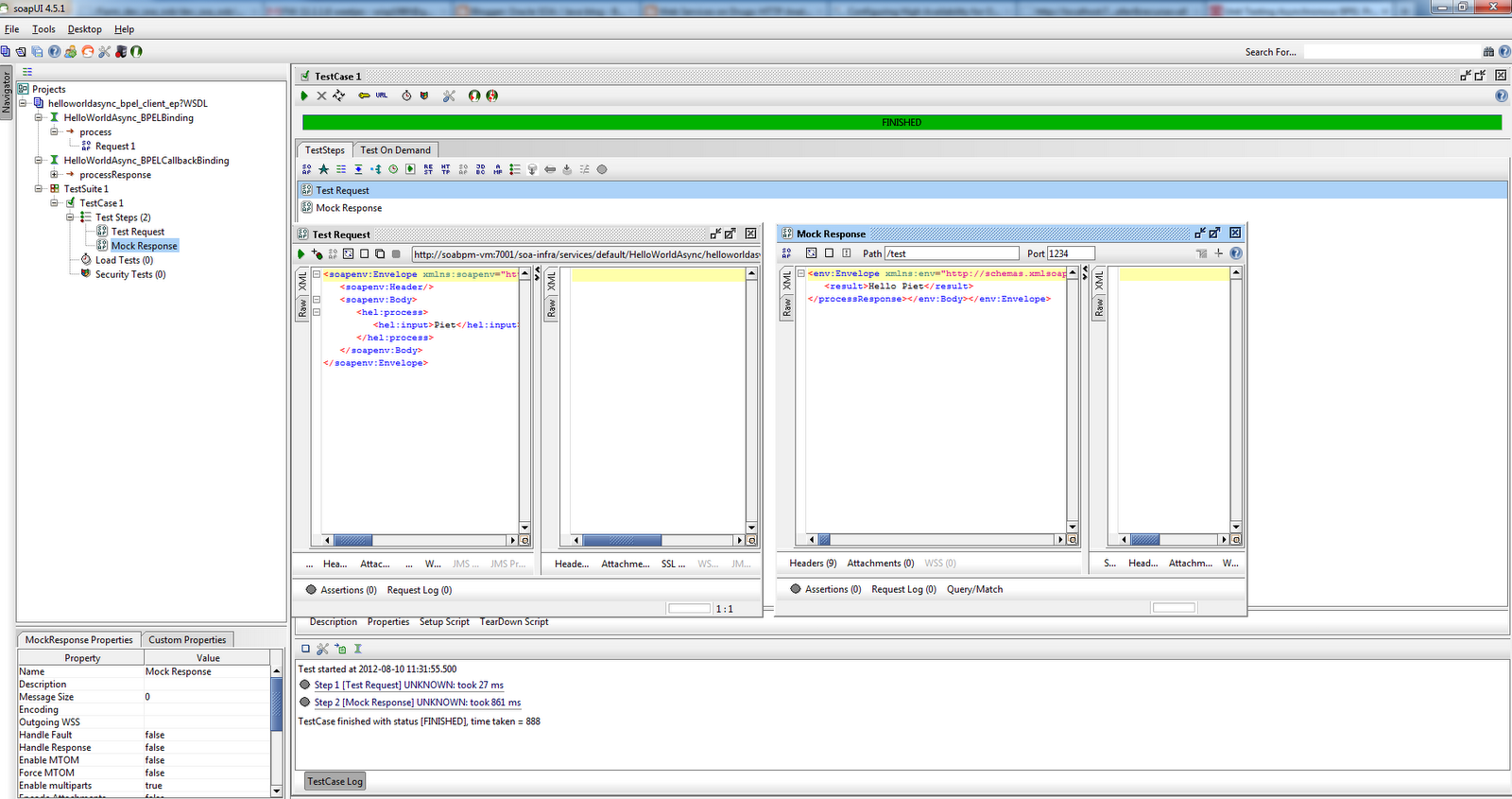
Testing asynchronous services with SOAP-UI

SOAP-UI (http://www.soapui.org/) is a tool which is often used for testing of webservices. Testing of asynchronous services is explained on; http://www.oracle.com/technetwork/articles/soa/bpel-amadei-1518001.html.

Key is creating a test suite with two steps; a request and a mock response. The request contains WS-Adressing headers and a ReplyTo indication so the response is send to the Mock Response listener in SOAP UI.


Things to mind in the previously mentioned post; the specified path in step 8 under 'Testing it' should correspond to the ReplyTo path specified in the WS-Adressing section of the request. Also the ReplyTo address should point to the machine running SOAP UI. If the development environment is not running locally, the IP address of your machine should be specified here.



Process metrics

A servlet is available to analyze process metrics. See section 6.4.1 of http://docs.oracle.com/cd/E25178_01/core.1111/e10108.pdf for more information on this DMS Spy servlet. It can be started by going to http://<host>:<port>/dms/Spy.

How these metrics can be reset, can be found on; https://blogs.oracle.com/soaproactive/entry/how_to_reset_a_soa

An example URL for resetting metrics; http://localhost:7001/dms/Spy?operation=reset&format=raw&cache=refreshall&name=/dev_soa_osb/AdminServer/soainfra/default/HelloWorldAsyncCaller&recurse=all

The sample projects can be downloaded here; https://dl.dropbox.com/u/6693935/blog/TestApp.zip

Saturday, March 3, 2012

Loops in BPEL 1.1 and 2.0

Introduction

When programming in BPEL, an often used construction is the following;
- the input of a process contains a collection of elements
- the elements need to be processed one at a time

There are several solutions to implement this. A couple of these solutions will be discussed here.

SOA Suite 10g and SOA Suite 11g have some differences in usage of extension functions such as the one used for transformations. SOA Suite 11g (of course) provides several improvements over 10g. Also BPEL 1.1 and BPEL 2.0 standards provide different activities for handling loops.

An alternative for using loop constructions in BPEL when XML needs to be send to the database is by using XML object types. See http://javaoraclesoa.blogspot.nl/2013/03/using-plsql-object-types-to-get-nested.html for more information.

Example processes

The complete BPEL 1.1 and BPEL 2.0 example (including XSD and XSLT) can be downloaded here; http://dl.dropbox.com/u/6693935/blog/TestXSLT.zip

The example used will use the following input and output schema definitions;


<?xml version="1.0" encoding="UTF-8"?>
<schema attributeFormDefault="unqualified" elementFormDefault="qualified"
        targetNamespace="http://test.ms/itemcollections"
        xmlns="http://www.w3.org/2001/XMLSchema"
        xmlns:me="http://test.ms/itemcollections">

 <element name="item" type="me:itemType"/>
<complexType name="itemType">
  <sequence>
   <element name="name" type="string"/>
   <element name="value" type="string"/>
  </sequence>
 </complexType>

 <element name="itemsCollection" type="me:itemsCollectionType"/>
 <complexType name="itemsCollectionType">
  <sequence>
   <element ref="me:item" minOccurs="0" maxOccurs="unbounded"/>
  </sequence>
 </complexType>

<element name="itemCollectionArray" type="me:itemCollectionArrayType"/>
 <complexType name="itemCollectionArrayType">
  <sequence>
   <element ref="me:itemsCollection" minOccurs="0" maxOccurs="unbounded"/>
  </sequence>
 </complexType>

 <element name="simpleString" type="me:simpleStringType"/>
 <complexType name="simpleStringType">
  <sequence>
   <element name="value" type="string"/>
  </sequence>
 </complexType>

<element name="simpleNumber" type="me:simpleNumberType"/>
 <complexType name="simpleNumberType">
  <sequence>
   <element name="value" type="decimal"/>
  </sequence>
 </complexType>

</schema>

This schema has been created to illustrate how collections can be handled.

It is advisable to define your element and type definitions inside a separate XSD. This promotes re-use and maintainability. The XSD can for example be put in the MDS (as described in http://javaoraclesoa.blogspot.com/2012/02/using-mds.html). It is also very useful to define separate types for every element used. This makes defining variables containing only a part of the message easier.

The workspace contains a BPEL 1.1 and a BPEL 2.0 process which are both exposed as webservices. The BPEL 1.1 process uses a While activity together with Assign activities to process a collection. The BPEL 2.0 process uses the For Each activity and a transformation to achieve the same.

BPEL 1.1 (SOA Suite 10g + 11g)

BPEL 1.1 contains the While activity and the FlowN activity which can both be used to process collections. The While activity allows to loop over a set of activities until a certain condition is met. The FlowN activity provides the option for parallel execution and an index variable to indicate the branche which is processed. FlowN has been described in; http://javaoraclesoa.blogspot.com/2012/02/parallel-execution-and-variable-scoping.html. This part will focus on the While activity. The part describing how to get a parameter inside an XSLT transformation or use it inside an assign activity, can of course also be applied for FlowN.

The below picture shows my BPEL 1.1 sample process. It transforms the input collection on a per item basis to a local variable (which would allow processing of the individual item). Then it adds the result to the output variable.


The While condition

You can create a variable inside the scope of the while activity and increase this. The condition can be set to check whether the counter is smaller then or equal to the count of elements in the message that need processing.

Getting to your element; The element is an XSLT element

There are several ways to obtain the element you want to process. Depending on the circumstances, some options might not be available.

The easiest option is creating a variable of the type of one of the items of the collection. Then use the assign activity to assign the element.

The empty activity in the process symbolizes actions on the l_item variable. This can for example be a transformation followed by a call to a DbAdapter. The result can be transformed to a different format which can then be used to generate the output. The example is meant as a bare-bones illustration of the functionality.

Things to mind;
- it is advisable to create a scope inside the While activity and use local variables inside this scope
- in the Assign activity where you assign the item to be processed, cast the local counter variable to a number like in the following example (else the condition which selects which item to be processed, doesn't work correctly);

bpws:getVariableData('inputVariable','payload','/ns1:itemsCollection/ns1:item')[number(bpws:getVariableData('l_counter'))]

- Use the Assign append rule type and append an item to the collection for creating output.

            <assign name="AssignOutputItemProcessToOutputProcess">
              <bpelx:append>
                <bpelx:from expression="bpws:getVariableData('l_item')"/>
                <bpelx:to variable="outputVariable" part="payload"
                          query="/ns1:itemsCollection"/>
              </bpelx:append>
            </assign>

- use >= and not => in the While activity condition!

Getting to your element; The element is not an XSLT element type. BPEL 1.1 SOA Suite 10g.

BPEL 1.1 in 10g uses a different transformation function as BPEL 1.1 in 11g. The transformation activity is an Oracle extension and not part of the BPEL specification (actually it's implemented as an Assign which is part of the specification and made easier to use with a wizard). The below part is for using the BPEL 10g version.

Sometimes the element of the collection is not available as a type. This makes processing less straightforward, since a variable of the item can not readily be created in BPEL. A solution for this is using an XSLT transformation with a parameter. It is important to think about to what type you are going to transform to, since the type of the element is not available. You can create a custom element type for this., for example the name/value pair items (as specified in the introduction), can be used for that.

Using a parameter inside an XSLT transformation can for example be found on;  http://rigterink.blogspot.com/2009/09/passing-xml-as-parameter-to-xslt.html

The parameter can be assigned the counter value of the While loop and be passed to the XSLT transformation. This XSLT parameter can then be used to select the correct element of the source XML to be used.

Selecting the correct element from the source XML inside an XSLT transformation, will be illustrated in the BPEL 2.0 part.

BPEL 2.0

BPEL 2.0 is only available in SOA Suite 11g and not in 10g. It has several new features which make it more easy to deal with loops. Also the bpws:getVariableData does not need to be used anymore; the syntax for accessing variables has been simplified. A dot notation can be used, for example an assign activity;

          <assign name="AssignCounter">
            <copy>
              <from>$ForEach1Counter</from>
              <to>$l_counter/ns1:value</to>
            </copy>
          </assign>

For Each activity

The For Each activity can be compared with the While activity, however it is more specific.
- It provides a scope for a loop (in a While activity you have to create the scope yourself)
- It provides a start and endpoint for the counter variable and the counter variable can be created in the For Each activity wizard.
- It provides an option for an additional completion expression
- It provides the option of parallel execution of the individual branches (similar to the FlowN activity in BPEL 1.1)
- it provides a variable which can be used in Assign activities, however not in XSLT transformations without some additions!


The below picture shows the BPEL 2.0 process using the For Each activity. Noticable is that I have to use less activities to achieve the same as with a While activity in BPEL 1.1.


XSLT transformations allow more input variables

The function which is used in the transformation for SOA Suite 10g BPEL 1.1 is different from the transformation function used in SOA Suite 11g BPEL 1.1 and BPEL 2.0. In SOA Suite 11g it is easier to add multiple input parameters to a single transformation in the wizard and the input parameters do not need to confer to a specific schema.

The source types for the transformation all need to be simple or complex types. it is thus easiest to use a complex type. A complex types can be selected when using the wizard to define the type of BPEL variable and by choosing one from the 'Element' or 'Message type' category. you can see examples in the schema shown at the start of this post; simpleNumberType and simpleStringType. These types are complex type wrappers for the simple types string and decimal. They allow the simple types to be used as complex types inside transformations.

Using the counter variable of a For Each activity inside an XSLT transformation, can be done as followed;
- assign the For Each counter variable to a complextype (for example the simpleNumberType)
- use the variable inside a for-each XSLT construction with a selection on the passed simpleNumberType by using the position() function.

The transformation without namespaces used, is the following (see the example ZIP for the complete XSLT);

  <xsl:param name="l_counter"/>
  <xsl:template match="/">
    <xsl:for-each select="/ns1:itemsCollection/ns1:item[position()=$l_counter/ns1:simpleNumber/ns1:value]">
      <ns1:item>
        <ns1:name>
          <xsl:value-of select="ns1:name"/>
        </ns1:name>
        <ns1:value>
          <xsl:value-of select="ns1:value"/>
        </ns1:value>
      </ns1:item>
    </xsl:for-each>
  </xsl:template>
</xsl:stylesheet>


Note on Assigns

Changing the rule type for the assign is in SOA Suite 11g in BPEL 1.1 different then in BPEL 2.0.

BPEL 1.1
Select the rule type from the drop-down box

BPEL 2.0
Right click the From / To rule, Change rule type
