WebLogic Server allows you to customize your access.log. This can be very powerful if you want to monitor for example service response times in a tool like Splunk (see here). When working with SOAP services though, especially those with many operations, it can be insufficient to monitor services to the level of the individual endpoint. You want to also know with which intent the endpoint is called. In this blog I will show how this can be achieved.
Showing posts with label weblogic server. Show all posts
Showing posts with label weblogic server. Show all posts
Thursday, January 12, 2017


Monday, December 19, 2016
WebLogic Server: Automate obtaining performance metrics from DMS
Oracle provides the Dynamic Monitoring Service (DMS) as part of WebLogic Server which is extremely useful if you want to obtain aggregated data of an environment in case of for example a performance test. The data which can be obtained from DMS is extensive. This varies from average duration of service calls to JVM garbage collects to datasource statistics. DMS can be queried with WLST. See for example here. On example script based on this can be found here. You can also directly go to a web-interface such as: http://<host>:<port>/dms/Spy. The DMS Spy servlet is by default only enabled on development environments but can be deployed on production environments (see here).
Obtaining data from DMS in an automated fashion, even with the WLST support, can be a challenge. In this blog I provide a Python 2.7 script which allows you to get information from the DMS and dump it in a CSV file for further processing. The script first logs and uses the obtained session information to download information from a specific table in XML. This XML is converted to CSV. The code does not require an Oracle Home (it is not WLST based). The purpose here is to provide an easy to use starting point which can be expanded to suit specific use-cases. The script works against WebLogic 11g and 12c environments (has been tested against 11.1.1.7 and 12.2.1). Do mind that the example URL given in the script obtains performance data on webservice operations. This works great on composites but not on Service Bus or JAX-WS services. You can download a general script here (which requires minimal changes to use) and a (more specific) script with examples of how to preprocess data in the script here.
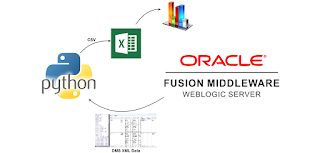
Obtaining data from DMS in an automated fashion, even with the WLST support, can be a challenge. In this blog I provide a Python 2.7 script which allows you to get information from the DMS and dump it in a CSV file for further processing. The script first logs and uses the obtained session information to download information from a specific table in XML. This XML is converted to CSV. The code does not require an Oracle Home (it is not WLST based). The purpose here is to provide an easy to use starting point which can be expanded to suit specific use-cases. The script works against WebLogic 11g and 12c environments (has been tested against 11.1.1.7 and 12.2.1). Do mind that the example URL given in the script obtains performance data on webservice operations. This works great on composites but not on Service Bus or JAX-WS services. You can download a general script here (which requires minimal changes to use) and a (more specific) script with examples of how to preprocess data in the script here.

Sunday, July 19, 2015
Overview of WebLogic RESTful Management Services
Inspired by a presentation given by Shukie Ganguly on the free Oracle Virtual Technology Summit in July (see here); "New APIs and Tools for Application Development in WebLogic 12c", I decided to take a look at an interesting new feature in WebLogic Server 12c: the RESTful Management Services. You can see here how to enable them. In this post I will provide an overview of my short study on the topic.
RESTful management services consist of two sets of resources. tenant-monitoring resources and 'wls' resources. The first is more flexible in response format (JSON, XML, HTML) and more suitable for monitoring. With the latter you can for example update datasource properties and create entire servers. It however only supports JSON as return format. The 'wls' resources also provide links so you can automagically traverse the resource tree which is very useful. I've provided a Python script to do just that at the end of this post.
RESTful management services consist of two sets of resources. tenant-monitoring resources and 'wls' resources. The first is more flexible in response format (JSON, XML, HTML) and more suitable for monitoring. With the latter you can for example update datasource properties and create entire servers. It however only supports JSON as return format. The 'wls' resources also provide links so you can automagically traverse the resource tree which is very useful. I've provided a Python script to do just that at the end of this post.
Monday, May 18, 2015
WebLogic Server and OpenLDAP. Using Dynamic groups
Dynamic groups in an LDAP are groups which contain a query to specify its members instead of specifying every member separately. Efficient usage of dynamic groups makes user maintenance a lot easier. Dynamic groups are implemented differently in different LDAP server implementations. Weblogic Server can be configured to use dynamic groups in order to fetch users for a specific group. In this blog I will describe how dynamic groups can be created in OpenLDAP and used in Weblogic Server.
In this example I use two users. smeetsm the developer and doej the operator. As shown in the image below, there are many servers which follow a similar access pattern for operators and developers. We are considering a case here where users do not use a shared account (e.g. weblogic) to login to different systems. This is for trace-ability and security purposes a better practice than when everyone uses the same shared user. See http://otechmag.com/magazine/2015/spring/maarten-smeets.html for a more thorough explanation on why you would want this.

In this example I use two users. smeetsm the developer and doej the operator. As shown in the image below, there are many servers which follow a similar access pattern for operators and developers. We are considering a case here where users do not use a shared account (e.g. weblogic) to login to different systems. This is for trace-ability and security purposes a better practice than when everyone uses the same shared user. See http://otechmag.com/magazine/2015/spring/maarten-smeets.html for a more thorough explanation on why you would want this.

A small note though. I'm a developer and this is not my main area of expertise. I have not implemented this specific pattern in any large scale organization.
Monday, December 29, 2014
Weblogic LDAPAuthenticator configuration; the GUID Attribute
LDAP servers can be configured to use as authenticator in Weblogic Server. In order to efficiently use an LDAP server, it must be possible to uniquely identify LDAP objects. GUID attributes can be considered a unique identifier for an LDAP object. There are several specific and some more generic LDAP authentication providers available for Weblogic Server. The specific authentication providers have default GUID (global universal identifier) attributes (see here at 'Use of GUID and LDAP DN Data in WebLogic Principals'). When using the generic Weblogic Server LDAPAuthenticator, there is no default GUID attribute. In order for LDAP caching to work and to allow browsing of group memberships for users, the GUID attribute needs to be defined. The entryUUID is a good candidate for this since every LDAP server should support it. See RFC 4530. Also see here.

Subscribe to:
Comments (Atom)