Friday, November 23, 2012

DbAdapter, connection factories, connection pools and datasources

Going from a BPMN,BPEL or Mediator process instance to the database is not a short road. On this road, several abstraction layers need to be passed. If the configuration for a layer is not in accordance with the configuration of the other layers, problems can arise. This becomes apparent when the database load is high.

In this post I will describe some problems. First I cause a problem  and then I describe how it can be avoided.

The Oracle SOA Suite DbAdapter has connection factories. These connection factories have connection pools.

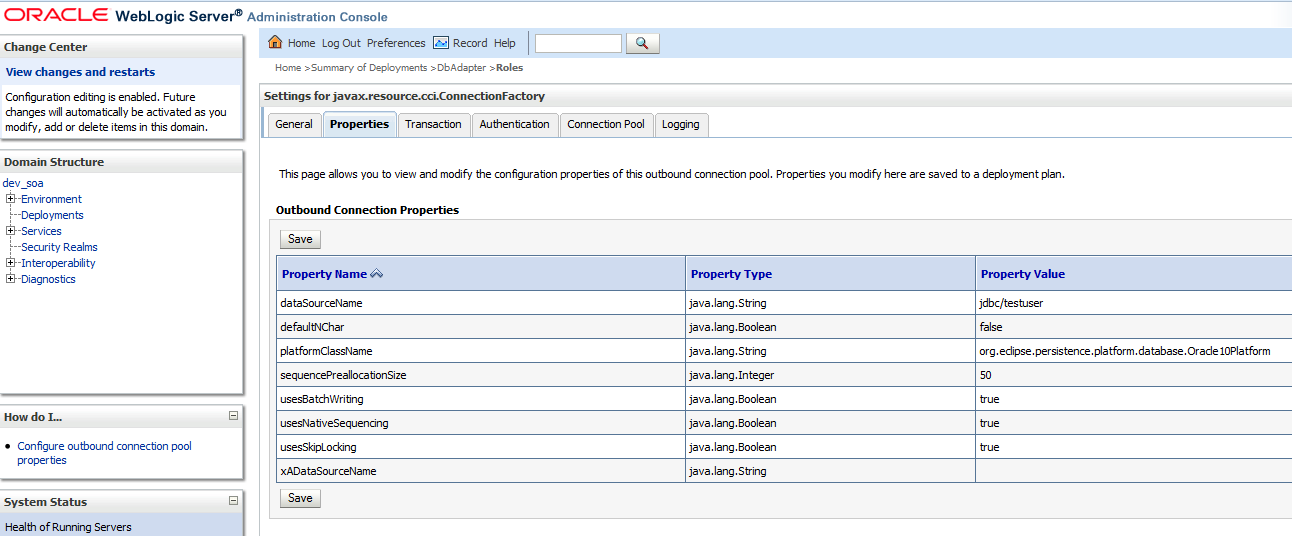
The connection factories also refer to datasources


These datasources also have connection pools

Setup

What happens when the connection pool of the adapter is insufficient and what happens if the connectionpool of the datasource is insufficient?

In order to test the situations, a large number of open database connections is needed. I needed a procedure which would not reply immediately making the calling process wait for a response so I could instantiate a large number of calling processes and keep the connections open for a while. I created a small database procedure to wait a while;

create or replace
procedure waitawhile as
 stime TIMESTAMP(9);
 etime TIMESTAMP(9);
begin
  stime := SYSTIMESTAMP;
  dbms_lock.sleep( 60 );
  etime := SYSTIMESTAMP;
  dbms_output.put_line(etime-stime);
end;

I created a BPEL process which did nothing but call this procedure. The default settings were;

Database adapter connection factory connection pool settings
Initial capacity: 50
Max capacity: 200

Datasource connection pool setting
Initial capacity: 1
Max capacaty: 15

Results

When starting 500 processes (SOAP UI) which all use the connection pool, the following errors occur;

No resources currently available


Connection factory;

Datasource;


Errors in log file;

BINDING.JCA-11812
Interaction processing error.
Error while processing the execution of the WAITAWHILE API interaction.
An error occurred while processing the interaction for invoking the WAITAWHILE API. Cause: Exception [EclipseLink-4002] (Eclipse Persistence Services - 2.3.1.v20111018-r10243): org.eclipse.persistence.exceptions.DatabaseException
Internal Exception: java.sql.SQLException: Internal error: Cannot obtain XAConnection weblogic.common.resourcepool.ResourceLimitException: No resources currently available in pool testuser to allocate to applications, please increase the size of the pool and retry..
at weblogic.common.resourcepool.ResourcePoolImpl.reserveResourceInternal(ResourcePoolImpl.java:591)
at weblogic.common.resourcepool.ResourcePoolImpl.reserveResource(ResourcePoolImpl.java:343)
at weblogic.jdbc.common.internal.ConnectionPool.reserve(ConnectionPool.java:471)
at weblogic.jdbc.common.internal.ConnectionPool.reserve(ConnectionPool.java:363)

As you can see, the datasource is overloaded. The connection factory of the DbAdapter doesn't show problems. Increasing the datasource might help solve this issue. Do keep in might that you might encounter the bottlenecks described below.

java.sql.SQLException: Connection closed

When increasing the datasource connection pool size to 300, the following occurred;

Connection factory;


Datasource;

The log file when performing the test without resetting the datasource and updating the database adapter

[2012-11-16T04:17:11.257-08:00] [AdminServer] [ERROR] [] [oracle.soa.bpel.engine] [tid: orabpel.invoke.pool-4.thread-18] [userId: <anonymous>] [ecid: 11d1def534ea1be0:4e20b7b7:13b089a2423:-8000-0000000000002eec,1:31310] [APP: soa-infra] Attempt (1/2): caught GLOBAL_RETRY exception. Retry after 3 seconds.
[2012-11-16T04:17:11.264-08:00] [AdminServer] [ERROR] [] [oracle.soa.bpel.engine.dispatch] [tid: orabpel.invoke.pool-4.thread-5] [userId: <anonymous>] [ecid: 11d1def534ea1be0:4e20b7b7:13b089a2423:-8000-0000000000002eeb,1:31308] [APP: soa-infra] database communication failure[[
java.sql.SQLException: Connection closed

    at weblogic.jdbc.wrapper.JTAConnection.getXAConn(JTAConnection.java:213)
    at weblogic.jdbc.wrapper.JTAConnection.checkConnection(JTAConnection.java:84)
    at weblogic.jdbc.wrapper.JTAConnection.checkConnection(JTAConnection.java:74)
    at weblogic.jdbc.wrapper.Connection.preInvocationHandler(Connection.java:100)
    at weblogic.jdbc.wrapper.Connection.prepareStatement(Connection.java:545)

The most likely cause here is the sessions parameter of the database. See; https://forums.oracle.com/forums/thread.jspa?threadID=1025872 on how to set this. It happens often that this parameter is not set high enough. Especially on SOA Infra databases.

JCA Binding Component is unable to create an outbound JCA (CCI) connection.

The log file when performing the same test as above after resetting the datasource and updating the database adapter

[2012-11-16T04:34:18.471-08:00] [AdminServer] [ERROR] [] [oracle.soa.bpel.engine.dispatch] [tid: orabpel.invoke.pool-4.thread-20] [userId: <anonymous>] [ecid: 11d1def534ea1be0:4e20b7b7:13b089a2423:-8000-00000000000034f7,1:32093] [APP: soa-infra] failed to handle message[[
com.oracle.bpel.client.BPELFault: faultName: {{http://schemas.oracle.com/bpel/extension}bindingFault}
messageType: {{http://schemas.oracle.com/bpel/extension}RuntimeFaultMessage}
parts: {{
summary=<summary>Exception occured when binding was invoked.
Exception occured during invocation of JCA binding: "JCA Binding execute of Reference operation 'WaitAWhileDB' failed due to: JCA Binding Component connection issue.
JCA Binding Component is unable to create an outbound JCA (CCI) connection.
CallWaitAWhile:WaitAWhileDB [ WaitAWhileDB_ptt::WaitAWhileDB(InputParameters) ] : The JCA Binding Component was unable to establish an outbound JCA CCI connection due to the following issue: BINDING.JCA-12510
JCA Resource Adapter location error.
Unable to locate the JCA Resource Adapter via .jca binding file element &lt;connection-factory/>
The JCA Binding Component is unable to startup the Resource Adapter specified in the &lt;connection-factory/> element:  location='eis/DB/testuser'.
The reason for this is most likely that either
 1) the Resource Adapters RAR file has not been deployed successfully to the WebLogic Application server or
 2) the '&lt;jndi-name>' element in weblogic-ra.xml has not been set to eis/DB/testuser. In the last case you will have to add a new WebLogic JCA connection factory (deploy a RAR).
Please correct this and then restart the Application Server

Please make sure that the JCA connection factory and any dependent connection factories have been configured with a sufficient limit for max connections. Please also make sure that the physical connection to the backend EIS is available and the backend itself is accepting connections.
".
The invoked JCA adapter raised a resource exception.
Please examine the above error message carefully to determine a resolution.
</summary>

In this case the connection factory is the limiting factor. Increasing the number connections in the connection pool of the connection factory might help with this issue.

Friday, November 9, 2012

SOA Suite Cluster deployments and loadbalancers

When using Ant tasks to deploy to an Oracle SOA Suite cluster certain issues can occur. You deploy usually to one Managed Server and the cluster will propagate the deployment to the other nodes in the cluster. Often before this happens, the Ant script continues with the deployment of a next process (usually deployment is scripted this way. see for example http://biemond.blogspot.nl/2009/09/deploy-soa-suite-11g-composite.html). When resources are accessed using a loadbalancer, the loadbalancer can refer for certain resources to a managed server (node in the cluster) where the process is not deployed yet. This can cause deployment issues. You can not work around this by separately deploying to the nodes of the cluster. See http://www.oracle.com/technetwork/topics/soa/oracle-soa-suite-ha-faq-1-131459.pdf section 3.. Usually re-executing the deployment script is a workaround since the process is then usually already present on both cluster nodes.

Also when starting a managed server, a similar problem can arise. Take for example a cluster which consists of two managed servers. The first server is shutdown and started (changing certain settings requires a restart of the server) and when the first server has state 'Running' the second server is shutdown and started, the first server can get into problems loading composites since the loadbalancer might refer to resources on the second server when those resources are not loaded yet. Inconsistencies can arise between the two nodes; for example processes which are valid on the first node and invalid on the second.

Also see http://docs.oracle.com/cd/E28271_01/admin.1111/e10226/soainfra_config.htm#BHCCIJAE for this behavior; After the SOA Infrastructure is started, it may not be completely initialized to administer incoming requests until all deployed composites are loaded.I have not found a way to change this behavior. What you would want is that the loadbalancer does not refer to a server when it is not completely initialized.

The description below is the path I took to eventually find the best solution to both described issues above. If you're just interested in the solution, look at the bottom of this post and skip the 'Failed experiments' section. BEWARE: some users have reported stuck threads when using this code so it might require some work. If you're interested in a bit of background and would like to avoid certain pitfalls, I'd suggest reading the entire post. The issue is that the loadbalancer should be able to get an accurate reading concerning the availability of a server.

How to deal with the loadbalancer

If you have a smart loadbalancer, you can configure what it uses as probe to determine if a server is running. The Weblogic Server state is insufficient for that when running Oracle SOA Suite as described above.

Creating an efficient probe for the loadbalancer is not as straightforward as it might seem. The loadbalancer looks at individual nodes to determine if it is running. You can create a probe to determine loaded processes. This is however insufficient since you will not be able to tackle the problem of deployment to one node and at a later time to the other node; both nodes will show lists of loaded processes, however one node will show less processes.

The Locator class (http://docs.oracle.com/cd/E21043_01/apirefs.1111/e10659/oracle/soa/management/facade/Locator.html) can be used to obtain a list of composites. A Locator instance can be created from within a deployed composite or by using JNDI connection properties. Both are however server instance specific and you are not able to compare the two nodes.

It is possible to obtain the managed server instances from the admin server by using MBeans. See; http://middlewaremagic.com/weblogic/?p=913. I've adapted this to allow remote connections for local testing and local connections from BPEL. When calling the code from BPEL I've used a Java embedding activity. Required libraries (JDeveloper) for compilation are;

- Weblogic 10.3 remote client
- SOA Runtime
- SOA Designtime
- BPEL Runtime

Failed experiments

'Failed experiments' would suggest I tried to achieve certain functionality but couldn't get the code to perform what I wanted. In this case the code produced does what I wanted to achieve, however my way of thinking was wrong. The below code examples look at the server state based on loaded composites and comparing managed servers. This is not an accurate measure of server availability and is not usuable by a loadbalancer. The code can however be used in other usecases. That's why I included it in this post.

Remote client for local testing

The getServerUpRemote method in the code below returns true or false. It asks the AdminServer for all Managed Servers which are up. It then goes to the managed servers and asks for the Composites running in those servers and compares the lists. True means everything is ok. False means that one or more managed servers in the cluster have differences in loaded composites, states or versions.

In order to get the managed servers I first access the AdminServer by using JMX in order to obtain a MBeanServerConnection. This connection can be used to determine the Managed Servers. Next, I use  JNDI to find the Locator class on the Managed Servers in order to get the list of Composites.

See for the code; https://dl.dropbox.com/u/6693935/blog/remoteconnections.txt

Local connection from deployed composite/servlet

Of course the loadbalancer would not be able to access my local JDeveloper installation so I wanted to deploy the code to run on the server. Also I wanted to avoid having to use server credentials. I first tried wrapping the code in a servlet and deploying the servlet on the AdminServer. This was not succesful since I had difficulties accessing resources on the Managed Servers without providing credentials. I encountered for example the following error;

java.security.PrivilegedActionException: javax.naming.NameNotFoundException: Unable to resolve 'FacadeFinderBean'. Resolved ''; remaining name 'FacadeFinderBean'

When I deployed the code in a BPEL process, there would be difficulties to access AdminServer resources and resources on other Managed Servers in the cluster.

To avoid above issues, I split the code in two parts. A servlet running on the AdminServer and a BPEL process running on the Managed Servers. The servlet would be able to provide the managed servers and the BPEL processes would be able to provide information on their runtime. The servlet could call the processes on the managed servers and compare the results.

The below code also illustrates how to call a webservice from Java and deal with the result without the requirement to generate webservice specific Java proxy classes. I used http://www.coderanch.com/t/206857/sockets/java/Http-Post-XML-example as an example.

See for the code;

https://dl.dropbox.com/u/6693935/blog/localconnections.txt

This however was still insufficient because I would need to ask the AdminServer via the servlet if the Managed Servers are up and all processes are in the same state. A loadbalancer would be unable to determine which node is up, only if the state as a whole is safe. This total state can be used during an installation to check if it is already time to deploy the next process or if a wait is required to propagate the deployment to the other nodes. This does not fix the node start-up issues. If I proxy the AdminServer servlet on the managed servers, during deployment, both managed servers would seem to be down if the responses of loaded processes are not equal. This can cause the loadbalancer to not send requests to a server which is actually up. When I return the Ok status for the managed server which has most processes loaded, I still am not sure that server is fully started.

The right path

The magic bean I couldn't access

What I needed to solve the issues in the introduction is an MBean on the Managed Servers indicating is the Managed Server has loaded all processes or is still 'initializing'.


Eventually I found this MBean; oracle.soa.config:Application=soa-infra,j2eeType=CompositeLifecycleConfig,name=soa-infra

It can be accessed using an MBeanServerConnection found by using JMX looking for weblogic.management.mbeanservers.runtime. I also used http://www.albinsblog.com/2011/10/oracle-soa-11g-getting-default-version.html#.UJvMYoaJXsc for a bit of the JMX part.

This is illustrated in the following code. To get this to compile I used the following libraries;
- Weblogicv 10.3 remote client
- Servlet runtime
- wljmxclient.jar and wlclient.jar (wlserver_10.3/server/lib). these are required for the t3 protocol used when connecting from a client (code in public static void main). Else you will encounter 'java.net.MalformedURLException: Unsupported protocol: t3' (see; http://code.google.com/p/wlsagent/issues/detail?id=3)

The below code illustrates how to get to the MBean you want. I followed the following procedure to determine how to get there;

- browsed the MBeans using Fusion Middleware Control to find the correct MBean
- used the post mentioned before to get to the correct MBeanServerConnection (this differs from the MBeanServerConnection used in the 2 code samples earlier in this post!)
- illustrated in comments at the end of the code; used the following to obtain the correct ObjectName; Set<ObjectName> myObjs = myCon.queryNames(new ObjectName("*:j2eeType=CompositeLifecycleConfig,*"), null);
- determined the class of the attribute (in this case SOAPlatformStatus) I wanted. it appeared to be a javax.management.openmbean.CompositeDataSupport. I did this like; connection.getAttribute(getSOAInfraServiceName(),"SOAPlatformStatus").getClass().toString()
- get the value from the obtained object by using the key ('isReady' in this case)

package ms.testapp.soa.utils;

import java.io.IOException;
import java.io.PrintWriter;
import java.io.StringWriter;

import java.net.MalformedURLException;

import java.util.Hashtable;

import javax.management.MBeanServer;
import javax.management.MBeanServerConnection;
import javax.management.MalformedObjectNameException;
import javax.management.ObjectName;
import javax.management.remote.JMXConnector;
import javax.management.remote.JMXConnectorFactory;
import javax.management.remote.JMXServiceURL;

import javax.naming.Context;
import javax.naming.InitialContext;
import javax.naming.NamingException;

import javax.servlet.ServletException;
import javax.servlet.http.HttpServlet;
import javax.servlet.http.HttpServletRequest;
import javax.servlet.http.HttpServletResponse;

public class DetermineServerStatus extends HttpServlet {
    public DetermineServerStatus() {
        super();
    }

    private static MBeanServerConnection getRemoteConnection(String hostname,
                                                             String portString,
                                                             String username,
                                                             String password) throws IOException,
                                                                                     MalformedURLException {
        JMXConnector connector = null;
        MBeanServerConnection connection = null;
        //System.out.println("ServerDetails---Started in initConnection");
        String protocol = "t3";
        Integer portInteger = Integer.valueOf(portString);
        int port = portInteger.intValue();
        String jndiroot = "/jndi/";

        String mserver = "weblogic.management.mbeanservers.runtime";
        //String mserver = "weblogic.management.mbeanservers.domainruntime";
        JMXServiceURL serviceURL =
            new JMXServiceURL(protocol, hostname, port, jndiroot + mserver);
        Hashtable h = new Hashtable();
        h.put(Context.SECURITY_PRINCIPAL, username);
        h.put(Context.SECURITY_CREDENTIALS, password);
        h.put(JMXConnectorFactory.PROTOCOL_PROVIDER_PACKAGES,
              "weblogic.management.remote");
        connector = JMXConnectorFactory.connect(serviceURL, h);
        connection = connector.getMBeanServerConnection();
        return connection;
    }

    private static MBeanServerConnection getLocalConnection() throws NamingException {
        InitialContext ctx = new InitialContext();
        MBeanServer server = (MBeanServer)ctx.lookup("java:comp/env/jmx/runtime");
            //(MBeanServer)ctx.lookup("java:comp/env/jmx/domainRuntime");
        return server;
    }

    private static ObjectName getSOAInfraServiceName() {
        ObjectName service = null;
        try {
            service =
                    new ObjectName("oracle.soa.config:Application=soa-infra,j2eeType=CompositeLifecycleConfig,name=soa-infra");
        } catch (MalformedObjectNameException e) {
            throw new AssertionError(e.getMessage());
        }
        return service;
    }

    private static javax.management.openmbean.CompositeDataSupport getSOAPlatformStatusObjects(MBeanServerConnection connection) throws Exception {
        //System.out.println(connection.getAttribute(getSOAInfraServiceName(),
        //                                           "SOAPlatformStatus").getClass().toString());
        return (javax.management.openmbean.CompositeDataSupport)connection.getAttribute(getSOAInfraServiceName(),
                                                                                        "SOAPlatformStatus");
    }

    private static String getSOAPlatformStatus(MBeanServerConnection connection) {
        try {
            return ((Boolean)getSOAPlatformStatusObjects(connection).get("isReady")).toString();
        } catch (Exception e) {
            //in case bean not accessible -> server not ready
            return stackTraceToString(e);
        }
    }

    private static String stackTraceToString(Throwable e) {
        String retValue = null;
        StringWriter sw = null;
        PrintWriter pw = null;
        try {
            sw = new StringWriter();
            pw = new PrintWriter(sw);
            e.printStackTrace(pw);
            retValue = sw.toString();
        } finally {
            try {
                if (pw != null)
                    pw.close();
                if (sw != null)
                    sw.close();
            } catch (IOException ignore) {
                //System.out.println(stackTraceToString(e));
            }
        }
        return retValue;
    }

    public void doPost(HttpServletRequest request,
                       HttpServletResponse response) throws ServletException,
                                                            IOException {
        doGet(request, response);
    }

    public void doGet(HttpServletRequest request,
                      HttpServletResponse response) throws ServletException,
                                                           IOException {
        PrintWriter out = response.getWriter();
        try {
            out.println(getServerStatusLocal());
        } catch (Exception e) {
            out.println(stackTraceToString(e));
        }
    }

    public String getServerStatusLocal() {
        MBeanServerConnection myCon;
        try {
            myCon = getLocalConnection();
        } catch (NamingException e) {
            //no MBean connection; server not ready
            return stackTraceToString(e);
        }
        return getSOAPlatformStatus(myCon);
    }
   
    public static void main(String[] args) {
        String host = "192.168.178.17";
        String port = "7001";
        String user = "weblogic";
        String password = "xxx";

        MBeanServerConnection myCon;
        try {
            myCon = getRemoteConnection(host, port, user, password);
            //Set<ObjectName> myObjs = myCon.queryNames(new ObjectName("*:j2eeType=CompositeLifecycleConfig,*"), null);
            //for (ObjectName myObj : myObjs) {
            //  System.out.println(myObj.getCanonicalName());
            //}
            System.out.println(getSOAPlatformStatus(myCon));
        } catch (Exception e) {
            System.out.println(stackTraceToString(e));
        }
    }
}


This servlet I could deploy to the managed servers to get the status. This however... failed because of;

javax.management.RuntimeMBeanException: java.lang.SecurityException: MBean attribute access denied.
  MBean: oracle.soa.config:name=soa-infra,j2eeType=CompositeLifecycleConfig,Application=soa-infra
  Getter for attribute SOAPlatformStatus
  Detail: Access denied. Required roles: Admin, Operator, Monitor, executing subject: principals=[]
    at com.sun.jmx.interceptor.DefaultMBeanServerInterceptor.rethrow(DefaultMBeanServerInterceptor.java:856)
    at com.sun.jmx.interceptor.DefaultMBeanServerInterceptor.rethrowMaybeMBeanException(DefaultMBeanServerInterceptor.java:869)
    at com.sun.jmx.interceptor.DefaultMBeanServerInterceptor.getAttribute(DefaultMBeanServerInterceptor.java:670)
    at com.sun.jmx.mbeanserver.JmxMBeanServer.getAttribute(JmxMBeanServer.java:638)


So I thought I could maybe deploy this as part of a BPEL process. When running in another context, these SecurityExceptions might not be raised. When refactoring the code and testing the BPEL process however I still got the same exception.

Accessing the MBean

I found; http://docs.oracle.com/cd/E11035_01/wls100/security/thin_client.html#wp1046345 and got back to my servlet code. Then I added a weblogic.xml deployment descriptor, a role to web.xml and a role mapping to weblogic.xml and it worked! The code can be downloaded from; https://dl.dropbox.com/u/6693935/blog/DetermineServerStatus.zip

The BPEL code is for reference purposes only. I haven't applied the role assignment to the BPEL code. The servlet has an additional benefit that it is more easily tweakable to the response wanted by the loadbalancer


Below a screenshot of the result when the server is fully started.


We performed the following test to confirm the expected behavior.
- first deploy the servlet to the managed servers in a cluster
- confirm the servlet output for the managed servers is true (by accessing them directly, not via a loadbalancer)
- shutdown one node and confirm the servlet cannot be accessed. confirm the other node still replies 'true'
- start the node and wait till it has state Running
- confirm the servlet output for that node is false and for the other node is true
- wait a while (until all processes are loaded)
- confirm that for both nodes the servlet output is true

Friday, October 26, 2012

Flexibility in generating PDF's from BPEL by using IText and XHTML

I needed a quick but flexible way to generate PDF files from BPEL. The project I was on, was using the iText PDF library; http://itextpdf.com/. I encountered this library before in the Oracle SOA Suite 11g Handbook from Lucas Jellema. Here the library was used amongst other things to demonstrate the Spring component. I decided to use this library but took a different approach as to what Lucas describes in his book since I did not want to hardcode the layout of my PDF in Java code.

The IText library has code to convert XHTML to a PDF. XHTML can be manipulated like any other XML in BPEL by using a transformation. This way I could put the logic for the layout in an XSL file and make layouting easy because there are few programmers who don't know HTML.

Implementation

You can download the code/samples by using the links in the Example part of the post.

GeneratePdf webservice

First I created a JAX-WS webservice to write my PDF on the file system and a servlet to download the PDF. The servlet is not secure as it allows downloading files from the filesystem if you know the filename. Do not use this in production environments!

I included the following JAR files for this;
itextpdf-5.3.1.jar
itextpdfa-5.3.1.jar
itext-xtra-5.3.1.jar
xmlworker-1.1.5.jar

The code I used was the following;

import com.itextpdf.text.Document;
import com.itextpdf.text.pdf.PdfWriter;
import com.itextpdf.tool.xml.XMLWorkerHelper;

import java.io.File;
import java.io.FileOutputStream;
import java.io.PrintWriter;
import java.io.StringReader;

import java.io.StringWriter;

import javax.jws.WebMethod;
import javax.jws.WebParam;
import javax.jws.WebResult;
import javax.jws.WebService;

@WebService
public class GeneratePdf {
  public GeneratePdf() {
    super();
  }
 
  @WebMethod
  @WebResult(name = "status")
  public String HtmlToPdf(@WebParam(name = "pdfpath")String pdfpath, @WebParam(name = "xhtml")String html) {
    Document document = new Document();
    PdfWriter writer;
    long size=0;
    try {
      writer = PdfWriter.getInstance(document, new FileOutputStream(pdfpath));
      document.open();
      XMLWorkerHelper.getInstance().parseXHtml(writer, document, new StringReader(html));
      document.close();
      size=new File(pdfpath).length();
    } catch (Exception e) {
      return "NOK: "+stackTraceToString(e);
    }
    return "OK: "+"File created. Size: "+size;
  }
 
  @WebMethod(exclude=true)
  public static String stackTraceToString(Throwable e) {
    StringWriter sw = new StringWriter();
    e.printStackTrace(new PrintWriter(sw));
    return sw.toString();

  }
  /*
  public static void main(String[] args) {
    GeneratePdf myPdf = new GeneratePdf();
    System.out.println(myPdf.HtmlToPdf("c:\\temp\\output3.pdf", "<html><head/><body><p>Hello world</p></body></html>"));
  }
  */
}


DownloadPdf servlet

The code I used for the servlet to download the PDF is the following;

import java.io.File;
import java.io.FileInputStream;
import java.io.FileNotFoundException;
import java.io.IOException;

import java.io.InputStream;

import java.io.OutputStream;

import javax.servlet.ServletContext;
import javax.servlet.ServletException;
import javax.servlet.http.HttpServlet;
import javax.servlet.http.HttpServletRequest;
import javax.servlet.http.HttpServletResponse;

public class DownloadPdf extends HttpServlet {
  private static final long serialVersionUID = 4537516508557609572L;

  public DownloadPdf() {
    super();
  }
 
  public void doGet(HttpServletRequest request, HttpServletResponse response) 
  throws ServletException, IOException, FileNotFoundException  { 

   System.out.println("parameter filename: "+request.getParameter("filename"));
   long length = new File(request.getParameter("filename")).length();
   System.out.println("size: "+length);
   InputStream is = new FileInputStream(new File(request.getParameter("filename"))); 
   
   response.addHeader("content-disposition", "attachment; filename=mypdf.pdf;");

      response.setContentType("application/pdf");
   response.setContentLength(Long.valueOf(length).intValue());
    int read =0; 
   byte[] bytes = new byte[1024];
     OutputStream os = response.getOutputStream(); 
    while((read = is.read(bytes)) != -1) 
   {    os.write(bytes, 0, read); 
   } 
   os.flush(); 
   os.close(); 
  } 
}


Converting to XHTML

The above webservice and servlet are preparation to be able to be flexible in BPEL with generating PDF's. To be able to transform messages in BPEL to XHTML, it's quite useful XHTML has XSD's. See for example http://www.w3.org/2002/08/xhtml/xhtml1-strict.xsd.

Of course this XSD is quite complex and it did not immediately work in JDeveloper so I had to make some alterations. I removed the following import;

<xs:import namespace="http://www.w3.org/XML/1998/namespace" schemaLocation="http://www.w3.org/2001/xml.xsd"/>

And I removed all references to the xml namespace. These were only 2 lines with a small number of occurences;
<xs:attribute ref="xml:lang"/>
<xs:attribute ref="xml:space" fixed="preserve"/>

Now I was able to define a variable of the type specified in the XHTML XSD. I used the variable for a transformation. In this example I created a Hello [name] XHTML. This XHTML I used to call the webservice to create the PDF. The below example contains the XSL transformation I created.

<?xml version="1.0" encoding="UTF-8" ?>
<?oracle-xsl-mapper
  <!-- SPECIFICATION OF MAP SOURCES AND TARGETS, DO NOT MODIFY. -->
  <mapSources>
    <source type="WSDL">
      <schema location="../HelloWorldPDF_BPEL.wsdl"/>
      <rootElement name="process" namespace="http://xmlns.oracle.com/PdfUtils/HelloWorldPDF/HelloWorldPDF_BPEL"/>
    </source>
  </mapSources>
  <mapTargets>
    <target type="WSDL">
      <schema location="../HelloWorldPDF_BPEL.wsdl"/>
      <rootElement name="html" namespace="http://www.w3.org/1999/xhtml"/>
    </target>
  </mapTargets>
  <!-- GENERATED BY ORACLE XSL MAPPER 11.1.1.6.0(build 111214.0600.1553) AT [FRI OCT 26 09:44:31 CEST 2012]. -->
?>
<xsl:stylesheet version="1.0"
                xmlns:bpws="http://schemas.xmlsoap.org/ws/2003/03/business-process/"
                xmlns:xp20="http://www.oracle.com/XSL/Transform/java/oracle.tip.pc.services.functions.Xpath20"
                xmlns:mhdr="http://www.oracle.com/XSL/Transform/java/oracle.tip.mediator.service.common.functions.MediatorExtnFunction"
                xmlns:bpel="http://docs.oasis-open.org/wsbpel/2.0/process/executable"
                xmlns:oraext="http://www.oracle.com/XSL/Transform/java/oracle.tip.pc.services.functions.ExtFunc"
                xmlns:xsi="http://www.w3.org/2001/XMLSchema-instance"
                xmlns:dvm="http://www.oracle.com/XSL/Transform/java/oracle.tip.dvm.LookupValue"
                xmlns:hwf="http://xmlns.oracle.com/bpel/workflow/xpath"
                xmlns:plnk="http://docs.oasis-open.org/wsbpel/2.0/plnktype"
                xmlns:xsl="http://www.w3.org/1999/XSL/Transform"
                xmlns:med="http://schemas.oracle.com/mediator/xpath"
                xmlns:ids="http://xmlns.oracle.com/bpel/services/IdentityService/xpath"
                xmlns:bpm="http://xmlns.oracle.com/bpmn20/extensions"
                xmlns:xdk="http://schemas.oracle.com/bpel/extension/xpath/function/xdk"
                xmlns:xref="http://www.oracle.com/XSL/Transform/java/oracle.tip.xref.xpath.XRefXPathFunctions"
                xmlns:client="http://xmlns.oracle.com/PdfUtils/HelloWorldPDF/HelloWorldPDF_BPEL"
                xmlns:xsd="http://www.w3.org/2001/XMLSchema"
                xmlns:ns1="http://www.w3.org/1999/xhtml"
                xmlns:wsdl="http://schemas.xmlsoap.org/wsdl/"
                xmlns:bpmn="http://schemas.oracle.com/bpm/xpath"
                xmlns:ora="http://schemas.oracle.com/xpath/extension"
                xmlns:socket="http://www.oracle.com/XSL/Transform/java/oracle.tip.adapter.socket.ProtocolTranslator"
                xmlns:ldap="http://schemas.oracle.com/xpath/extension/ldap"
                exclude-result-prefixes="xsi xsl plnk client xsd ns1 wsdl bpws xp20 mhdr bpel oraext dvm hwf med ids bpm xdk xref bpmn ora socket ldap">
  <xsl:template match="/">
    <ns1:html>
      <ns1:body>
        <ns1:p>
          <xsl:value-of select="concat('Hello ',/client:process/client:input)"/>
        </ns1:p>
      </ns1:body>
    </ns1:html>
  </xsl:template>
</xsl:stylesheet>


You can also observe in the XSL that the format used for the actual layout of the PDF is XHTML.

Example

Now putting it all together;
Download and deploy the PDF webservice/servlet: https://dl.dropbox.com/u/6693935/blog/PdfUtils.zip

Download and deploy the sample BPEL project; https://dl.dropbox.com/u/6693935/blog/PdfUtilsBPEL.zip. Keep in mind that you will most likely need to change the URL of the PDF webservice.

Test the webservice

Check the PDF is created by looking at the /tmp folder of your server running the SOA Suite. I used /tmp since I used an Oracle Enterprise Linux SOA Suite installation. You might want to change the path if you're running the server on Windows.

After you've determined the filename, you can look at the result. Download the PDF by going to (in my case); http://soabpm-vm:7001/PdfUtils//DownloadPdf.do?filename=/tmp/PDF2012-10-26T00:51:19.pdf

 
Final thoughts

The conversion from XHTML to PDF is not perfect. Complex layouts cause problems. I did some try-outs with tables and they were only partially succesful. For more complex layouts, it's worthwhile to look at Apache FOP; http://xmlgraphics.apache.org/fop/ and base your PDF generation on that. Apache FOP can also be used with Oracle APEX. A drawback is that it introduces it's own layouting language.

If you need to convert newlines to <br/> statements (for example when converting texts), you can look at; http://www.danrigsby.com/blog/index.php/2008/01/03/preserving-line-breaks-in-xml-while-transforming-to-html-with-xslt/ for an XSL template to use.

Friday, October 5, 2012

Liquibase; an interesting option for efficient database change management

Often relevant when working with Oracle SOA Suite; database change management. There are several issues with database scripts which are rolled out over different environments in releases;

Take the following example;
Development environment has version 3 of the database software installed. The test environment has version  2 installed and the acceptance test environment has version one installed. The software hasn't reached production yet. In version 1, a table is created. In version 2 data is inserted in the table and in version 3, the data in the table is updated.

When releases are created and deployment is not automated (or automated using custom code), a DBA would have to install 1 followed by 2, followed by 3 in the production environment if the environment is to be updated to version 3. Also when installation is manual, the DBA has to have an SQL client installed (or run the scripts from the DB server) and most likely the scripts in release 1,2 and 3 have different names and installation instructions such as prerequisite checks. Some scripts such as the release 2 script which inserts data may only be executed once on an environment. A custom registration has to be kept in order to keep track of changes in an environment. Not only is this expensive on DBA time, but it's also prone to errors. And what if the installation went wrong? Then often the rollback is restoring a backup or clone from before the installation started. Creating and restoring these can be cumbersome, especially for relatively small changes.

The open source product Liquibase (http://www.liquibase.org) provides a solution for automating database change management. I've tried this product only for a couple of days and this post describes some first experiences with it. I must admit I haven't used it yet at a customer but I might in the near future and will certainly suggest it as an option when the question arises.

Because my current customer shuns fancy things like automated builds, I've used batch files and command-lines in the examples below.

Liquibase

What is Liquibase?

Liquibase is a standalone JAR file which can executed using a commandline or from for example Maven using a plugin. A property file can be used to specify database connection settings. Below an example of such a property file;

driver: oracle.jdbc.OracleDriver
classpath: ojdbc6.jar;liquibase-oracle-1.2.0.jar
url: jdbc:oracle:thin:@localhost:1521:XE
username: testuser
password: testuser
contexts: dev


It is also possible to specify these properties on the command-line;

liquibase --driver=oracle.jdbc.OracleDriver \
     --classpath=ojdbc6.jar;liquibase-oracle-1.2.0.jar \
     --changeLogFile=changelogs\testchangelog.xml \
     --url="jdbc:oracle:thin:@localhost:1521:XE" \
     --username=testuser \
     --password=testuser \
     --contexts="dev"
     update


Database changes are described using XML files called ChangeLogs. An example is shown below;

 <?xml version="1.0" encoding="UTF-8"?>
<databaseChangeLog
    xmlns="http://www.liquibase.org/xml/ns/dbchangelog"
    xmlns:xsi="http://www.w3.org/2001/XMLSchema-instance"
    xmlns:ora="http://www.liquibase.org/xml/ns/dbchangelog-ext"
    xsi:schemaLocation="http://www.liquibase.org/xml/ns/dbchangelog http://www.liquibase.org/xml/ns/dbchangelog/dbchangelog-2.0.xsd
    http://www.liquibase.org/xml/ns/dbchangelog-ext http://www.liquibase.org/xml/ns/dbchangelog/dbchangelog-ext.xsd">
     <changeSet id="1" author="ms">
        <createTable tableName="params">
            <column name="paramname" type="varchar(50)">
                <constraints primaryKey="true" nullable="false"/>
            </column>
            <column name="paramvalue" type="varchar(50)">
                <constraints nullable="false"/>
            </column>
        </createTable>
    </changeSet>
    
    <changeSet author="ms" id="2" context="dev">
        <insert tableName="params">
            <column name="paramname" value="environment"/>
            <column name="paramvalue" value="dev"/>
        </insert>
        <rollback>
            <delete tableName="params">
                <where>paramname='environment'</where>
            </delete>
        </rollback>
    </changeSet>

    <changeSet author="ms" id="3" context="tst">
        <insert tableName="params">
            <column name="paramname" value="environment"/>
            <column name="paramvalue" value="tst"/>
        </insert>
        <rollback>
            <delete tableName="params">
                <where>paramname='environment'</where>
            </delete>
        </rollback>
    </changeSet>
 
 </databaseChangeLog>

When a changelog is executed against an environment, a table entry is kept which says the changelog has been executed. When the same changelog is executed again, it refrains from re-execution thus avoiding problems with for example insert statements which are executed repeatedly. Most actions described in the changelogs have an automated rollback action. Some such as insert or update statements don't however. They need to be specified explicitly.
To apply a ChangeLogfile the following can be used (if connection properties are specified in liquibase.properties);

liquibase --changeLogFile=changelogs\testchangelog.xml update

Oracle specific tips

There is a specific tutorial for using Oracle in combination with Liquibase; http://www.liquibase.org/tutorial-using-oracle. In my opinion you should consider the parts from this tutorial you want to implement. Liquibase can make database change management easier but you can also make the process complicated. In my opinion you should avoid that a small group or even only one developer knows how to deal with the tool and the process. To achieve this, I'd suggest to keep it simple and the manual scripting / steps for releasing to a minimum.

Oracle extensions

The property file in the example above includes a classpath referring to the Oracle extension which can be used to provide support for some Oracle specific database features; https://liquibase.jira.com/wiki/display/CONTRIB/Oracle+Extensions

These features include amongst others XML tags to enable and disable triggers, to truncate tables, add check constraints, etc.

JDBC drivers

Also you should download the Oracle JDBC driver from for example; http://www.oracle.com/technetwork/database/enterprise-edition/jdbc-112010-090769.html

How to deal with packages, grants and synonyms?

Packages, grants and synonyms are more or less Oracle specific and not supported directly using XML tags in ChangeLog files. You can however use the sql tag such as in the example below;

    <changeSet author="ms" id="6" context="tst">
        <sql>
            grant select on params to public
        </sql>
        <rollback>
            <sql>
                revoke select on params from public
            </sql>
        </rollback>
    </changeSet>


Developer tips

Test your installation using apply, rollback, apply scenario in your own schema to avoid hindering other developers. This can be done with the updateTestingRollback option (use instead of update). You can change changelogfiles but a checksum is kept in the database and rerunning the changelog will cause errors if the checksum mismatches. If you want the change to be reapplied and avoid checksum failures, you can use the runOnChange attribute. Also avoid making changes not using Liquibase because that can cause conflicts.

How do you deal with OTAP?

Liquibase has the option to specify contexts as part of the property file. You can see this in the example property file above. In the definition of the ChangeSet a context can be specified. If no context is specified, the changelog is always executed. In the above example, if the environment is dev, the dev environment entry is added to the params table. This will not happen if the context is tst. Then the entry tst will be inserted. If you want to change an environment from dev to tst, you should first rollback 'dev' and then apply 'tst'. Converting dev to tst requires more code; rollback is easier. You can use a precondition to check if an entry is already present and update instead, but if you're loading large datasets, this is not workable.

How to deal with multiple schema's/users?

When using the Oracle database, a database user is also called a schema. Often when the datamodel is implemented, different users/schema's are used to implement different 'modules' of the application or different 'applications'. These schema's are strung together with grants, views, synonyms or even databaselinks when the users are in physically different databases. For the person installing database objects into different schema's, this can be cumbersome. Liquibase can be used with a little bit of scripting to help automate this process.

You can specify commandline which property file is used and which ChangeSets are applied. This can be done with the option defaultsFile like;

liquibase --changeLogFile changelogs\testchangelog.xml --defaultsFile="liq.props" update

You can use this to use a different property file per environment (for example specifying different databases).

builddir
- liquibase_dev.properties
- liquibase_tst.properties
- liquibase_acc.properties
- liquibase_prd.properties
--schema1
---master.xml
---testchangelog.xml

Usually passwords of database users are guarded by DBA-ers and need to be asked during the installation. When using the above directory structure, you can loop over the schema's, ask for the password for the specific schema and use the connection settings specific for the purpose of the environment.

How to deal with errors during the installation

A nice suggestion was done by Jelle Hoekstra. You can create a tag during the start of the release. Next you can execute your changes. You can check the ERRORLEVEL environment variable to determine if a change went successful or has failed. On failure, you can call the rollback action to the previously created tag. This is implemented in the below script.

Example script to run Liquibase

The below example script shows some of the suggestions earlier in this post.

@echo off
set current_dir=%CD%
set liquibase_directory=%current_dir%
set build_directory=%current_dir%\build

set DATESTAMP=%DATE:~3,2%_%DATE:~6,2%_%DATE:~9,4%
set TIMESTAMP=%TIME:~0,2%_%TIME:~3,2%_%TIME:~6,2%
set DATEANDTIME=%DATESTAMP%_%TIMESTAMP%
set SCHEMA=%2%
set PASSWORD=%3%
:BEGIN
IF "%1%" == "" GOTO USAGE
IF "%2%" == "" GOTO USAGE
IF "%3%" == "" GOTO USAGE
SET ENV=%1%
IF "%ENV%" == "" GOTO USAGE
SET filename=%build_directory%\liquibase_%1.properties
echo Property file : %filename% 1> install.log
java -jar %liquibase_directory%/liquibase.jar --defaultsFile=%filename% --changeLogFile=%build_directory%/%SCHEMA%/master.xml --contexts=%ENV% --username=%SCHEMA% --password=%PASSWORD% tag %DATEANDTIME% -Dchangelogpath=%build_directory%/%SCHEMA% 1>>install.log 2>>&1
IF NOT %ERRORLEVEL% == 0 GOTO ERROR
java -jar %liquibase_directory%/liquibase.jar --defaultsFile=%filename% --changeLogFile=%build_directory%/%SCHEMA%/master.xml --contexts=%ENV% --username=%SCHEMA% --password=%PASSWORD% --logLevel=info update -Dchangelogpath=%build_directory%/%SCHEMA% 1>>install.log 2>>&1
IF NOT %ERRORLEVEL% == 0 GOTO ROLLBACK
java -jar %liquibase_directory%/liquibase.jar --defaultsFile=%filename% --changeLogFile=%build_directory%/%SCHEMA%/master.xml --contexts=%ENV% --username=%SCHEMA% --password=%PASSWORD% dbDoc %build_directory%/docs/%SCHEMA% -Dchangelogpath=%build_directory%/%SCHEMA% 1>>install.log 2>>&1
IF NOT %ERRORLEVEL% == 0 GOTO ROLLBACK
ECHO Script executed on %ENV%:SCHEMA %SCHEMA%
GOTO END
:ROLLBACK
java -jar %liquibase_directory%/liquibase.jar --defaultsFile=%filename% --changeLogFile=%build_directory%/%SCHEMA%/master.xml --username=%SCHEMA% --password=%2 rollback %DATEANDTIME% -Dchangelogpath=%build_directory%/%SCHEMA% 1>>install.log 2>>&1
GOTO ERROR
:ERROR
ECHO Errors found during execution of script on %ENV%:SCHEMA %SCHEMA%
ECHO See install.log
GOTO END
:USAGE
ECHO Error during execution of script on %ENV%:SCHEMA %SCHEMA%
ECHO Incorrect parameters
ECHO USAGE : install environment schema password
ECHO environment   = dev,tst,acc,prd
ECHO schema     = Schema/user for which an update needs to be performed
ECHO password = Schema/user password
GOTO END
:END

You can start the script like;

runlb.bat dev testuser testuser

This executes the builddir\testuser\master.xml changelog file and uses the builddir\liquibase_dev.properties file for it's database connection properties. It executes against user testuser with password testuser. In the master.xml file there is a reference to the changelogdir so it can include other changelogfiles.

In this case, the master.xml script looks as followed;

<?xml version="1.0" encoding="UTF-8"?> 
<databaseChangeLog
    xmlns="http://www.liquibase.org/xml/ns/dbchangelog"
    xmlns:xsi="http://www.w3.org/2001/XMLSchema-instance"
    xmlns:ora="http://www.liquibase.org/xml/ns/dbchangelog-ext"
    xsi:schemaLocation="http://www.liquibase.org/xml/ns/dbchangelog http://www.liquibase.org/xml/ns/dbchangelog/dbchangelog-2.0.xsd
    http://www.liquibase.org/xml/ns/dbchangelog-ext http://www.liquibase.org/xml/ns/dbchangelog/dbchangelog-ext.xsd">
  <include file="${changelogpath}/testchangelog.xml"/> 
</databaseChangeLog> 

The liquibase-dev.properties looks as follows;

driver: oracle.jdbc.OracleDriver
classpath: ojdbc6.jar;liquibase-oracle-1.2.0.jar
url: jdbc:oracle:thin:@localhost:1521:XE

Notice in the above script the following;
- differentiation between Liquibase location and Build location (they can be taken apart so Liquibase doesn't have to be part of the release itself)
- usage of ERRORLEVEL to perform rollback if needed
- usage of a property to determine the correct changelogpath in the master.xml file
- usage of the contexts parameter
- usage of a log file for the output

Conclusion

Liquibase is very flexible and provides enough options to be able to take care of database change management (with the help of some scripts and version control of course). It provides various integration options but can also be run stand-alone. Also if implemented well, it can reduce the amount of time DBA needs to spend on installations and reduces the amount of human errors during the installation process.

You need to think well about how you are going to implement it because of this flexibility. There are some best practices online which are a good idea to take into account;

Liquibase can do a lot more then what I've mentioned in this post such as generating an initial changelogset from a database or generating diffs. Also how for example version control can be used efficiently together with Liquibase is an important topic I haven't touched yet. These are however customer process specific and should be determined by the person implementing Liquibase at a customer.

Saturday, September 29, 2012

Suggestions to increase BPEL performance

The performance improvements suggested in this post are partially based on suggestions from the following book; https://beatechnologies.wordpress.com/2012/08/28/oracle-soa-suite-11g-administrators-handbook/

If you're interested in how you can improve SOA Suite performance (and of course several other aspects of SOA Suite administration), I suggest reading it.

I've used the Oracle VM which can be downloaded from http://www.oracle.com/technetwork/middleware/soasuite/learnmore/vmsoa-172279.html  .

Performance

I've written about some performance suggestions earlier; http://javaoraclesoa.blogspot.nl/2012/06/increasing-bpel-performance.html. Recently I've been doing several measures on different systems specifically concerning BPEL performance and have updated the above post to reflect those findings. In this post I will describe some new conclusions.

Test scenario's

I've created 5 test scenario's;
- a dummy scenarion (empty BPEL activity)
- a synchronous locally optimized webservice call
- an asynchronous locally optimized webservice call
- a synchronous not locally optimized webservice call
- a database call

Every scenario I've tested in a blocking invoke and nonblocking invoke setting. I've performed every test 200 times in a parallel executed for-each loop and measured the time by saving the start and end time in a database table.

When I'm talking about 'performance improved' or 'performance worsened, I'm talking about all scenarios. I've not found settings which improved the performance for one test scenario and decreased it for another.

I've found that testing just after a server restart caused performance measures to worsen. This is most likely due to the connection pools which need to create initial database connections (which is slow...). That's why I've done all tests at least 3 times. When testing on the Oracle VM I've purged the dehydration store after every run in order to get the same initial situation for the tests.

The settings which increased the performance on my systems can of course be system specific. If other people have different experiences concerning some of the settings described in this post, it will be interesting to know. Also keep in mind that the settings I've found to improve performance on my system, might worsen the performance if other test scenario's are used. You should always test the settings on your own system to make sure they have the desired result and to confirm system stability is not effected. I've not tested in a clustered environment.

I have results concerning the performance improvements for reducing audit and log levels. Reducing audit and other logging however and can make it harder to debug problems. Putting BPEL process audit logging on 'Development' however in a production environment is in my opinion overkill and should be avoided or only used for a short period in order to solve issues.

Results

Locally optimized webservice calls

Locally optimized calls are faster then not locally optimized calls (non locally optimized calls have among other things SOAP overhead). I've not yet looked at this behavior when working in a cluster with a load balancer. The following might be interesting and would suggest local optimizations does not work through a load balancer if the server URL differs from the load balancer URL; https://blogs.oracle.com/rammenon/entry/is_local_optimization_kicking.It would be interesting to test this and try and make it work in clustered environments since the performance increase for using locally optimized calls is (not statistically tested) significant (about 25%).

Asynchronous callbacks

I've seen in my measures that asynchronous callbacks are a lot slower (about 5 times) then synchronous interactions. This is of course to be expected since correlation data needs to be saved and incoming messages need to be matched to the correlation data. If performance is important and processes are short-running, I'd advice to avoid asynchronous constructions.

nonBlockingInvoke

Setting the nonBlockingInvoke property on a partnerlink caused a decrease in performance. This is something I had not expected based on; http://docs.oracle.com/cd/E23943_01/core.1111/e10108/bpel.htm#ASPER99890. In my tests however, the services were fast and did little. It could be that if slower services were used, an improvement could be measured when using the nonBlockingInvoke option. I have however not tested this.

Tuning datasources (SOAINFRA schema)

My measures concerning the performance changes achieved when increasing the connection pool size of the SOALocalTxDataSource and SOADataSource are not consistent. On the Oracle VM I found that increasing the connection pool size, performance was improved. When trying this setting on a customer system however, performance was worsened. On the Oracle VM, a dedicated XE database is installed which is setup to allow plenty of sessions. On the customer system, the database was not only installed on a (most likely physically) different server but also not dedicated; several SOA Suite instances used the same database for their dehydration store. At the customer, the database sessions parameter (see for example https://forums.oracle.com/forums/thread.jspa?threadID=898395) was found to be limiting in the past. An educated guess is that this caused the performance decrease on that system.

One can conclude from the above that only looking at JDBC datasource settings on the Weblogic server is not enough to achieve consistent improvement across environments. One should also look at the database settings.

JVM settings

The following settings increased performance on all systems;

In setSOADomainEnv.sh

Default
PORT_MEM_ARGS="-Xms768m -Xmx1536m"
New
PORT_MEM_ARGS="-Xms1536m -Xmx1536m -Xgcprio:throughput -XX:+HeapDumpOnOutOfMemoryError -XXtlasize:min=16k,preferred=128k,wasteLimit=8k"
The following settings decreased performance (from http://docs.oracle.com/cd/E13150_01/jrockit_jvm/jrockit/geninfo/diagnos/bestpractices.html);
-XXaggressive
-XXcallProfiling

BPEL Engine tuning

Threads
I've tried and measured several settings related to the BPEL engine. There are 4 settings related to the number of threads used by the BPEL Engine;
DispatcherSystemThreads
DispatcherEngineThreads   
DispatcherInvokeThreads   
DispatcherNonBlockInvokeThreads

Increasing them did not lead to performance improvements

AuditStorePolicy
I've also tried playing with the AuditStorePolicy setting. This caused errors or worsened performance when combined with several of the other audit settings I've tried (for example in combination with deferred audit logging as described in the post referred to in the introduction). I got the best results leaving this set to syncSingleWrite.

Coherence
Setting the QualityOfService from DirectWrite to CacheEnabled led to worsened performance.

OneWayDeliveryPolicy
Setting this from async.persist to async.cache improved performance

Asynchronous audit logging
See http://javaoraclesoa.blogspot.nl/2012/06/increasing-bpel-performance.html. It improves performance but check the log files to see if the audit store does not encoutner unique key constraints.

I've not tried altering audit thresholds. This can also lead to performance improvements.

Process improvements

The process of using, monitoring and maintaining the SOA Suite installation is maybe even more important in increasing the performance then providing technical tweaks.

Based on the topics discussed in the Administrators handbook (https://beatechnologies.wordpress.com/2012/08/28/oracle-soa-suite-11g-administrators-handbook/) there are several activities which are considered to be part of the SOA Administrators responsibilities. This might be interesting for customers to consider. If for example a SOA Administrator has little background in application server maintenance or the SOA Suite in specific, there's a high probability project developers are more knowledgeable in some area's. This often leads to shift of responsibilities to developers.

Some of the tasks mentioned as part of the SOA Administrators job are listed below. These usually end up being done by developers.
- automating composite management and structuring composite deployments using ant scripts
- using and managing configuration plans
- administration of services, engines and MDS
- tuning SOA Suite 11g (operating system, application server, SOA infrastructure, database connections, dehydration store)
- monitoring (sometimes 'it's up and running!' is not enough...)

Other suggestions

The book contains several other suggestions for increasing performance. Interesting is also how the SOAINFRA database/schema can be tweaked. I've however not tested/measured this.

Since BPEL often uses services from different systems, tweaking those services can increase the performance of the process as a whole. Most noteworthy here are of course databases and JDBC settings.

Friday, September 21, 2012

Overview monitoring tools Oracle JRockit

Several monitoring options for the JRockit JVM are available. jps, jstat and jconsole are monitoring tools provided by the Oracle (previously Sun) JDK. Jps and jstat are commandline tools for obtaining information about running JVM’s. JConsole is a GUI suitable to monitor JVM’s supporting Java Management Extensions (JMX) such as JRockit. Oracle provides JVM monitoring software for JRockit (which can also be used for other JVM's); Mission Control which consists of several tools which can help in for example detection of memory leaks.

To monitor the JRockit JVM, it has to be started with the -Xmanagement option. This option is the same as using the following startup options for the Oracle (previously Sun) JVM:
 -Dcom.sun.management.jmxremote.port=7091
 -Dcom.sun.management.jmxremote.authenticate=false
 -Dcom.sun.management.jmxremote.ssl=false

Oracle (previously Sun) JVM tooling

Commandline tools

jps

The jps utility lists the virtual machines for the current user on the target system. The utility is useful in environments where the VM is started using the JNI Invocation API rather than the standard Java launcher. In these environments, it is not always easy to recognize the Java processes in the process list. The jps tool alleviates this problem.

The following example demonstrates the use of the jps utility. Enter jps on the command line, and the utility lists the virtual machines and process IDs for which the user has access rights

$ jps
16217 MyApplication
16342 jps

jstat

The jstat utility uses the JVM's built-in instrumentation to provide information on performance and resource consumption of running applications. The tool is useful for diagnosing performance issues, particularly issues related to heap sizing and garbage collection. jstatd is a daemon which can be used to use jstat to connect to a remote machine.

JConsole

If you start an application with JRockit in -Xmanagement mode, you'll be able to connect with Sun's jconsole tool to the JVM. See also in the introduction.

Overhead on the JVM for using JConsole is small; 3% to 4 %. See; http://weblogs.java.net/blog/emcmanus/archive/2006/07/how_much_does_i.html

Local monitoring

To monitor a local application, it must be running with the same user ID as jconsole.  The command syntax to start jconsole for local monitoring is:

jconsole [processID]
where processID is the application's process ID (PID). To determine an application's PID:

On Windows systems, use Task Manager to find the PID of java or javaw.
You can also use the jps command-line utility to determine PIDs.

For example, if you determined that the process ID of the application is 2956, then you would start jconsole as follows:

jconsole 2956

Both jconsole and the application must by executed by the same user name. The management and monitoring system uses the operating system's file permissions.

If you don't specify a process ID, jconsole will automatically detect all local Java applications, and display a dialog box that lets you select the one you want to monitor.

Remote monitoring

To start jconsole for remote monitoring, use this command syntax:

jconsole [hostName:portNum]
where hostName is the name of the system running the application and portNum is the port number you specified when you enabled the JMX agent when you started the JVM.

If you do not specify a host name/port number combination, then jconsole will display a connection dialog box enabling you to enter a host name and port number.

See below, Connection options under JRockit Mission Control for more information on the type of the connection.

JRockit Mission Control

Discovery options

Local

You can connect to locally discovered JRockits if the discovered JRockit is R27.1 or later and runs Java SE 5.0 or later.

JDP

JRockit instances are discovered automatically through JDP (JRockit Discovery Protocol) if the autodiscovery parameter is set to true (-Xmanagement:autodiscovery=true). The broadcast port for JDP can be specified in the JRockit Mission Control preferences and as a parameter upon starting the JVM.

Example parameters for starting JRockit (can be added in the Weblogic script which starts the relevant domain)
java -Xmanagement:ssl=false,authenticate=false,port=7091,autodiscovery=true

Connection options

Java Management Extensions (JMX) are accessed via RMI to obtain JVM instance information.

The JMX technology provides the tools for building distributed, Web-based, modular and dynamic solutions for managing and monitoring devices, applications, and service-driven networks. By design, this standard is suitable for adapting legacy systems, implementing new management and monitoring solutions, and plugging into those of the future. Starting with the J2SE platform 5.0, JMX technology is included in the Java SE platform.

RMI (remote method invocation) can be used to connect to JMX (MXBEANS or platform MBEANS) instances. In the references section there is a link to an example on how to implement this.

JRockit Mission control toolset 

Memory leak detection

BEA JRockit 1.4.2 (R26.2), BEA JRockit 5.0 sp1 and forward fully support the stand-alone Memory Leak Detector.

Memory leak detection is a tool which analyses the runtime of a JVM. Running the tool against a JVM has a small overhead cost most noticeable during garbage collection.

Memory leak detection can be used as followed;
- the Trend analyzer can be used to determine which objects have the fastest growth in bytes/second. The Trend analyzer can also help identifying targets which occupy a lot of heap space or have large numbers of instances
- once an interesting class has been identified, the Types tab can be used to identify causality and related objects
- to obtain more information about where the problem is occurring or which specific setting might cause it, specific instances can be analyzed of selected types and an allocation stack trace can be conducted. These cause more overhead to the JVM

JRockit Runtime Analyzer

The JRockit Runtime Analyzer consists of two parts. One is running inside the JVM and recording information about the JVM and the Java application currently running. This information is saved to a file which is then opened in the other part: the analyzer tool. This is a regular Java application used to visualize the information contained in the JRA recording file.

Recordings can be created from the Management Console, by using the jrcmd command line tool or by specifying recording options at the JRockit commandline.

On Windows, the commandline for jrcmd is as followed;

bin\jrcmd.exe <pid> jrarecording time=<jrarecording time>
filename=<filename>

The JRA tool provides the most extensive information on JVM usage, garbage collection, heap usage, etc. Since it is based on recording information during a set period and analyzing the data afterwards, timing becomes important if you want to use this tool to analyze runtime problems. During recording the overhead is small.

JRockit Management Console

The Management Console system and JVM behavior. It also has the option to set notifications for example, send an e-mail when a certain heap size is reached. Also the management console allows to increase the heap size at runtime to for example postpone an out of heapspace error. Also JRA recordings can be started as a result of for example high heap space usage to determine the problem.

The Management console has to be running in order to provide notifications, but using commandline options, it can be started in headless mode. Also using commandline options it can be set to connect to a JVM.

References

Jps and jstat
http://docs.oracle.com/javase/6/docs/technotes/tools/#monitor

JConsole documentation
http://download.oracle.com/javase/1.5.0/docs/tooldocs/share/jconsole.html

Oracle JRockit R28 documentation
http://www.oracle.com/technetwork/middleware/jrockit/documentation/index.html

BEA JRockit R27 documentation
http://www.oracle.com/technetwork/middleware/weblogic/documentation/weblogic-jrockit-089130.html

JMX Technology Home Page
http://www.oracle.com/technetwork/java/javase/tech/javamanagement-140525.html

Using RMI to connect to a JRockit JVM instance
https://blogs.oracle.com/pacogomez/entry/monitoring_jrockit_through_a_f

How much does it cost to monitor an app with jconsole?
http://weblogs.java.net/blog/emcmanus/archive/2006/07/how_much_does_i.html