Sometimes you might want to put something on a JMS queue and make it available after a certain period has passed to consumers. How can you achieve this using Oracle SOA Suite?
Thursday, August 30, 2018


Saturday, August 18, 2018
Docker host and bridged networking. Running library/httpd on different ports
Docker provides different networking options. When using the Docker host networking, you don't have the option to create port mappings. When using images like library/httpd:2.4, you don't have the option to update the port on which it runs; it runs by default on port 80. Suppose you want to use the host networking feature and want to run library/httpd:2.4 on different ports, how would you do this?
In this blog I'll explain 2 mechanisms by which you can expose library/httpd on different ports using host networking and how you can do the same using bridged networking. I'll describe several features of the different solutions and consequences for connectivity / host lookup options. At the end of the post I'll give some tips on how to test connectivity between containers.

In this blog I'll explain 2 mechanisms by which you can expose library/httpd on different ports using host networking and how you can do the same using bridged networking. I'll describe several features of the different solutions and consequences for connectivity / host lookup options. At the end of the post I'll give some tips on how to test connectivity between containers.

Monday, August 6, 2018
Running Spring Tool Suite and other GUI applications from Docker containers
Running an application within a Docker container helps in isolating the application from the host OS. Running GUI applications like for example an IDE from a Docker container, can be challenging. I'll explain several of the issues you might encounter and how to solve them. For this I will use Spring Tool Suite as an example. The code (Dockerfile and docker-compose.yml) can also be found here. Due to (several) security concerns, this is not recommended in a production environment.


Friday, July 27, 2018
Automate the installation of Oracle JDK 8 and 10 on RHEL and Debian derivatives
Automating the Oracle JDK installation on RHEL derivatives (such as CentOS, Oracle Linux) and Debian derivatives (such as Mint, Ubuntu) differs. This is due to different package managers and repositories. In this blog I'll provide quick instructions on how to automate the installation of Oracle JDK 8 and 10 on different Linux distributions. I chose JDK 8 and 10 since they are currently the only Oracle JDK versions which receive public updates (see here).

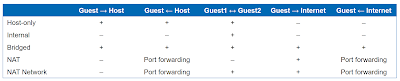
VirtualBox networking explained
VirtualBox networking is extremely flexible. With this flexibility comes the challenge of making the correct choices. In this blog, the different options are explained and some example cases are elaborated. Access between guests, host and other members of the network is explained and the required configuration is shown. This information is also available in the following presentation here.

Friday, July 13, 2018
Securely access remote content using a proxy server accessed with SSH
There are numerous occasions that I was limited in my work because of connectivity which could not be trusted. For example;
In short what you do is

- I could not download large installers due to a proxy anti virus tool which manipulated downloads causing files to become corrupted.
- I needed to visit a website to find a solution to a problem, but the local proxy server found the content offensive and disallowed me to visit the site.
- I have stayed in hotels in which I was not sure that my internet traffic was not being monitored. I was hesitant to access remote services which required credentials.
- At the airport, the public Wifi can sometimes not be trusted. Someone could run a local hotspot with the same name and become a man in the middle intercepting credentials of people connecting to it.
The method described in this blog allows you to access external resources with few limitations in a relatively secure way. It makes it easy to circumvent most content scanning/manipulation. Do mind that this method might be a violation of certain rules/regulations/policies. When in doubt, first confirm you're allowed to use it.
In short what you do is
- Run an SSH server on a different location on port 443
- On the same server which runs an SSH server, run your own HTTP/HTTPS proxy server (or use the SSH server itself as SOCKS proxy)
- Connect to the SSH server
- Map the proxy port to your local machine
- Use the configured port as proxy server in your browser configuration.

Thursday, May 17, 2018
SOA Suite 12c in Docker containers. Only a couple of commands, no installers, no third party scripts
For developers, installing a full blown local SOA Suite environment has never been a favorite (except for a select few). It is time consuming and requires you to download and run various installers after each other. If you want to start clean and haven't done your installation inside a VM and created a snapshot, you can start all over again.
There is a new and easy way to get a SOA Suite environment up and running without downloading any installers in only a couple of commands without depending on scripts provided by any party other than Oracle. The resulting environment is an Oracle Enterprise Edition database, an Admin Server and a Managed Server. All of them running in separate Docker containers with ports exposed to the host. The 3 containers can run together within an 8Gb VM.
The documentation Oracle provides in its Container Registry for the SOA Suite images, should be used as base, but since you will encounter some errors if you follow it, you can use this blog post to help you solve them quickly.

There is a new and easy way to get a SOA Suite environment up and running without downloading any installers in only a couple of commands without depending on scripts provided by any party other than Oracle. The resulting environment is an Oracle Enterprise Edition database, an Admin Server and a Managed Server. All of them running in separate Docker containers with ports exposed to the host. The 3 containers can run together within an 8Gb VM.
The documentation Oracle provides in its Container Registry for the SOA Suite images, should be used as base, but since you will encounter some errors if you follow it, you can use this blog post to help you solve them quickly.

Subscribe to:
Posts (Atom)