Showing posts with label docker. Show all posts

Friday, December 24, 2021

Vagrant + Docker Compose: A quick and easy Apache NiFi development environment

Vagrant can be used to quickly create development environments in for example VirtualBox, VMWare or Hyper-V. I decided to use Vagrant to create a quick Apache NiFi development environment. For Apache NiFi development, you also often require input/output for which Kafka can be used, the NiFi Registry to manage shared resources and of course NiFi itself. Setting this up yourself can be cumbersome. That's why I've created some scripts to help you do this quickly. You can find them here

Since manually scripting the installations of all these products can be a challenge / work, I decided to use Docker images which often already provide an automatic installation (so I don't have to do that myself) and used Docker Compose to easily allow the containers to find each other and have a docker-compose.yml which contained my environment variables so I wouldn't have to supply them on the commandline.

Sunday, March 21, 2021

OWASP ZAP: A quick introduction

OWASP ZAP or Zed Attack Proxy is an open source dynamic application security testing (DAST) tool. It is available here and has a website with documentation here. I recently encountered it when looking for open source security test tools to embed in a CI/CD pipeline (here). I was surprised by how versatile this tool is. In this blog post I'll summarize several ways how you can use it. 

Wednesday, September 23, 2020

Kubernetes: Building and deploying a Java service with Jenkins

Kubernetes has become the de facto container orchestration platform to run applications on. Java applications are no exception to this. When using a PaaS provider to give you a hosted Kubernetes, sometimes that provider also provides a CI/CD solution. However this is not always the case. When hosting Kubernetes yourself, you also need to implement a CI/CD solution.

Jenkins is a popular tool to use when implementing CI/CD solutions. Jenkins can also run quite easily in a Kubernetes environment. When you have Jenkins installed, you need to have a Git repository to deploy your code from, a Jenkins pipeline definition, tools to wrap your Java application in a container, a container registry to deploy your container to and some files to describe how the container should be deployed and run on Kubernetes. In this blog post I'll describe a simple end-to-end solution to deploy a Java service to Kubernetes. This is a minimal example so there is much room for improvement. It is meant to get you started quickly.

Monday, July 27, 2020

Scanning container images for vulnerabilities using Anchore Engine

Applications nowadays, are usually deployed inside containers. A container consists of libraries and tools which allow the application to run inside. Since there can be exploitable vulnerabilities, it is not only important to keep your application up to date but also the container it runs in. There are various tools available to scan container images for those vulnerabilities. Having little experience with them, but recognizing the importance of having such a tool, I decided to give Anchore Engine a try. Why? Because it appeared popular when looking for tools, it has an open source variant which I can appreciate and it was very easy to get started with. In addition, it provides several integration options which make using it easy, such as a Jenkins plugin and a Kubernetes Admission Controller.


Tuesday, March 31, 2020

The size of Docker images containing OpenJDK 11.0.6

When running Java applications in containers, you need to be careful with your resources. If you're not careful with layering your images (for example using Google's Jib), you can quickly get into disk-space issues, especially when your base image and/or application gets updated regularly. One of the ways you can save resources is by using small base images. In this blog post I determined the uncompressed size of several base images containing OpenJDK 11.0.6 which are available on Docker Hub.

Thursday, January 2, 2020

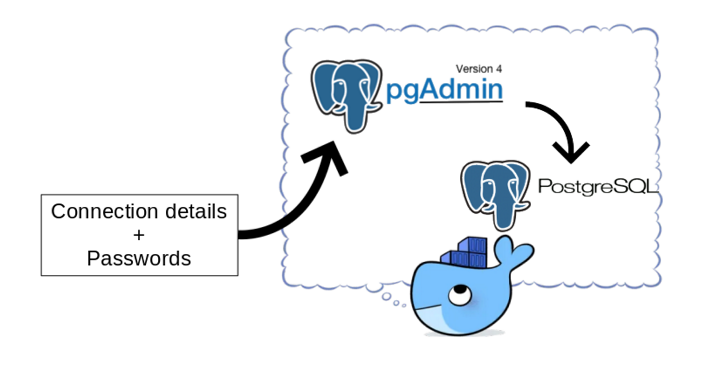
pgAdmin in Docker: Provisioning connections and passwords

pgAdmin is a popular open source and feature rich administration and development platform for PostgreSQL. When provisioning Postgres database environments using containers, it is not unusual to also provision a pgAdmin container.

The pgAdmin image provided on Docker Hub does not contain any server connection details. When your pgAdmin container changes regularly (think about changes to database connection details and keeping pgAdmin up to date), you might not want to enter the connections and passwords manually every time. This is especially true if you use a single pgAdmin instance to connect to many databases. A manual step also prevents a fully automated build process for the pgAdmin container.

You can export/import connection information, but you cannot export passwords. It is a bother, especially in development environments where the security aspect is less important, to lookup passwords every time you need them. How to fix this and make your life a little bit easier?

In this blog I'll show how to create a simple script to automate creating connections and supply password information so the pgAdmin instance is ready for use when you login to the console for the first time! This consists of provisioning the connections and provisioning the password files. You can find the files here.

Friday, September 27, 2019

Calling an Oracle DB stored procedure from Spring Boot using Apache Camel

There are different ways to create data services. The choice for a specific technology to use, depends on several factors inside the organisation which wishes to realize these services. In this blog post I'll provide a minimal sample on how you can use Spring Boot with Apache Camel to call an Oracle database procedure which returns the result of an SQL query as an XML. You can browse the code here.


Thursday, June 6, 2019

Graceful shutdown of forked workers in Python and JavaScript running in Docker containers

You might encounter a situation where you want to fork a script during execution. For example if the amount of forks is dependent on user input or another specific situation. I encountered such a situation in which I wanted to put load on a service using multiple concurrent processes. In addition, when running in a docker container, only the process with PID=1 receives a SIGTERM signal. If it has terminated, the worker processes receive a SIGKILL signal and are not allowed a graceful shutdown. In order to do a graceful shutdown of the worker processes, the main process needs to manage them and only exit after the worker processes have terminated gracefully. Why do you want processes to be terminated gracefully? In my case because I store performance data in memory (disk is too slow) and only write the data to disk when the test has completed.

This seems relatively straightforward, but there are some challenges. Also I implemented this in JavaScript running on Node and in Python. Python and JavaScript handle forking differently.

Saturday, March 23, 2019

6 tips to make your life with Vagrant even better!

HashiCorp Vagrant is a great tool to quickly get up and running with a development environment. In this blog post I'll give some tips to make your life with Vagrant even better! You can find an example which uses these tips here.

Saturday, February 16, 2019

Minikube on KVM on Linux Mint 19.1

In a previous blog post I wrote about running Minikube on Windows. I ended with the suggestion that getting Minikube working might be much easier on Linux. Thus I installed Linux Mint (as dual-boot) on my laptop and gave it a shot. The steps I took to get it working are described here.

Friday, November 23, 2018

Comparing JVM performance; Zulu, OpenJDK, Oracle JDK, GraalVM CE

There are many different choices for a JVM for your Java application. Which would be the best to use? This depends on various factors. Performance being an important one. Solid performance research however is difficult. In this blog post I'll describe a setup I created to perform tests on different JVMs at the same time and show some interesting results! I also looked at the effect of resource isolation (assigning specific CPUs and memory to the process). This effect was negligible. My test application consisted of a reactive (non-blocking) Spring Boot REST application and I've used Prometheus to poll the JVMs and Grafana for visualization.

Below is an image of the used setup. Everything was running in Docker containers except SoapUI.

Thursday, November 1, 2018

Monitoring Spring Boot applications with Prometheus and Grafana

In order to compare the performance of different JDKs for reactive Spring Boot services, I made a setup in which a Spring Boot application is wrapped in a Docker container. This makes it easy to create different containers for different JDK's with the same Spring Boot application running in it. The Spring Boot application exposes metrics to Prometheus. Grafana can read these metrics and allows to make nice visualizations from it. This blog post describes the setup. A next post will show the results. You can download the code here (in the complete folder). To indicate how easy this is, getting this setup up and running and write this blog post took me less than 1.5 hours total. I did not have much prior knowledge on Prometheus and Grafana save for a single workshop at AMIS by Lucas Jellema.


Tuesday, October 30, 2018

Running Reactive Spring Boot on GraalVM in Docker

GraalVM is an open source polyglot VM which makes it easy to mix and match different languages such as Java, Javascript and R. It has the ability (with some restrictions) to compile code to native executables. This of course offers great performance benefits. Recently, GraalVM Docker files and images have become available. See here.

Since Spring Boot is a popular Java framework and reactive (non blocking) RESTful services/clients implemented in Spring Boot are also interesting to look at, I thought; lets combine those and produce a Docker image running a reactive Spring Boot application on GraalVM.

I've used and combined the following
As a base I've used the code provided in the following Git repository here. In the 'complete' folder (the end result of the tutorial) is a sample Reactive RESTful Web Service and client.

Saturday, August 18, 2018

Docker host and bridged networking. Running library/httpd on different ports

Docker provides different networking options. When using the Docker host networking, you don't have the option to create port mappings. When using images like library/httpd:2.4, you don't have the option to update the port on which it runs; it runs by default on port 80. Suppose you want to use the host networking feature and want to run library/httpd:2.4 on different ports, how would you do this?

In this blog I'll explain 2 mechanisms by which you can expose library/httpd on different ports using host networking and how you can do the same using bridged networking. I'll describe several features of the different solutions and consequences for connectivity / host lookup options. At the end of the post I'll give some tips on how to test connectivity between containers.


Monday, August 6, 2018

Running Spring Tool Suite and other GUI applications from Docker containers

Running an application within a Docker container helps in isolating the application from the host OS. Running GUI applications like for example an IDE from a Docker container, can be challenging. I'll explain several of the issues you might encounter and how to solve them. For this I will use Spring Tool Suite as an example. The code (Dockerfile and docker-compose.yml) can also be found here. Due to (several) security concerns, this is not recommended in a production environment.


Thursday, May 17, 2018

SOA Suite 12c in Docker containers. Only a couple of commands, no installers, no third party scripts

For developers, installing a full blown local SOA Suite environment has never been a favorite (except for a select few). It is time consuming and requires you to download and run various installers after each other. If you want to start clean and haven't done your installation inside a VM and created a snapshot, you can start all over again.

There is a new and easy way to get a SOA Suite environment up and running without downloading any installers in only a couple of commands without depending on scripts provided by any party other than Oracle. The resulting environment is an Oracle Enterprise Edition database, an Admin Server and a Managed Server. All of them running in separate Docker containers with ports exposed to the host. The 3 containers can run together within an 8Gb VM.

The documentation Oracle provides in its Container Registry for the SOA Suite images, should be used as base, but since you will encounter some errors if you follow it, you can use this blog post to help you solve them quickly.

Saturday, March 17, 2018

Running Spring Boot in a Docker container on OpenJDK, Oracle JDK, Zulu on Alpine Linux, Oracle Linux, Ubuntu

Spring Boot is great for running inside a Docker container. Spring Boot applications 'just run'. A Spring Boot application has an embedded servlet engine making it independent of application servers. There is a Spring Boot Maven plugin available to easily create a JAR file which contains all required dependencies. This JAR file can be run with a single command-line like 'java -jar SpringBootApp.jar'. For running it in a Docker container, you only require a base OS and a JDK. In this blog post I'll give examples on how to get started with different OSs and different JDKs in Docker. I'll finish with an example on how to build a Docker image with a Spring Boot application in it.

Friday, December 29, 2017

Getting started with Oracle Database in a Docker container!

One of the benefits of using Docker is quick and easy provisioning. I wanted to find out first-hand if this could help me get an Oracle Enterprise Edition database quickly up and running for use in a development environment. Oracle provides Docker images for its Standard and Enterprise Edition database in the Oracle Container Registry. Lucas Jellema has already provided two blogs on this (here and here) which have been a useful starting point. In this blog I'll describe some of the choices to make and challenges I encountered. To summarize, I'm quite happy with the Docker images in the registry as they provide a very easy way to automate the install of an EE database. You can find a Vagrant provisioning shell script with the installation of Docker and Docker commands to execute here and a description on how to use it here.