Showing posts with label jenkins. Show all posts

Friday, April 16, 2021

Jenkins: Obtaining and displaying credentials

Jenkins is a solid CI/CD platform which has proven itself over the years. Many organizations use it to build, test and deploy their applications. In Jenkins it is possible to define credentials or to use an external credential store. You can then use these inside your pipelines and jobs. Direct access to credentials can be limited. Even with limited access, there are still various ways in which you can extract credentials. 

This blog post illustrates how you can display credentials in log files as base64 encoded strings so they are not masked and you can easily copy / paste / base64 decode them to obtain and (ab)use them. The method described is not specific to Jenkins but can also be used in various other CI/CD platforms on-premises and in the cloud (such as GitHub Actions and Bamboo). 

Note: this is not meant as an encouragement to break rules or laws. Often legislation does not allow you to try and access systems you are not officially authorized to. It is meant to create awareness and to allow you to think about if and how you might want to prevent this in your own CI/CD platform.

Thursday, October 15, 2020

Jenkins Pipeline: SonarQube and OWASP Dependency-Check

The OWASP top 10 has listed the following vulnerability for several years (at least in 2013 and 2017): using components with known vulnerabilities. But software nowadays can be quite complex consisting of many dependencies. How do you know the components and versions of those components do not contain known vulnerabilities? Luckily the OWASP foundation has also provided a dependency-check tool with plugins for various languages to make detecting this more easy. In this blog post I'll show how you can incorporate this in a Jenkins pipeline running on Kubernetes and using Jenkens and SonarQube to display the results of the scan.


Sunday, October 4, 2020

Surprisingly easy: Container vulnerability scanning in a Jenkins pipeline running on Kubernetes using Anchore Engine

Anchore Engine is a popular open source tool for container image inspection and vulnerability scanning. It is easily integrated in a Kubernetes environment as an admission controller or in a Jenkins build pipeline using a plugin. A while ago I took a look at Anchore Engine and created a small introductory presentation and Katacoda scenario for it. The Katacoda scenario allows you to try out Anchore Engine without having to setup your own container environment. In this blog I'll go a step further and illustrate how you can incorporate an Anchore Engine container scan inside your Java build pipeline which I illustrated here. Anchore Engine is deployed to Kubernetes, configured in Jenkins (which also runs on Kubernetes) and incorporated in a Jenkins Pipeline during a build process. Only if the container has been deemed secure by the configured Anchore Engine policy, is it allowed to be deployed to Kubernetes. I will also show how to update policies using the CLI.

Wednesday, September 23, 2020

Kubernetes: Building and deploying a Java service with Jenkins

Kubernetes has become the de facto container orchestration platform to run applications on. Java applications are no exception to this. When using a PaaS provider to give you a hosted Kubernetes, sometimes that provider also provides a CI/CD solution. However this is not always the case. When hosting Kubernetes yourself, you also need to implement a CI/CD solution.

Jenkins is a popular tool to use when implementing CI/CD solutions. Jenkins can also run quite easily in a Kubernetes environment. When you have Jenkins installed, you need to have a Git repository to deploy your code from, a Jenkins pipeline definition, tools to wrap your Java application in a container, a container registry to deploy your container to and some files to describe how the container should be deployed and run on Kubernetes. In this blog post I'll describe a simple end-to-end solution to deploy a Java service to Kubernetes. This is a minimal example so there is much room for improvement. It is meant to get you started quickly.

Friday, May 22, 2020

OpenEBS: Create persistent storage in your Charmed Kubernetes cluster

I previously wrote a blog about using StorageOS as persistent storage solution for Kubernetes here. StorageOS is dependent on etcd. I was having difficulties getting etcd up again after a reboot. Since I wanted to get a storage solution working quickly and not focus too much on external dependencies so I decided to give OpenEBS a try. In this blog I'll describe a developer installation on Charmed Kubernetes (the environment described here). I used openebs-jiva-default as storage class. This is unsuitable for production scenario's. OpenEBS also provides cStor. Most of the development effort goes there. cStor however requires a mounted block device. I have not tried this yet in my environment.

Wednesday, July 20, 2016

Oracle SOA Suite Code Quality: SonarQube Quality Gates, XML Plugin and custom XPath rules

There are several ways to do code quality checks in SOA Suite. In this blog post I will describe a minimal effort setup which uses Jenkins 2.9, SonarQube 5.6 and the SonarQube XML Plugin 1.4.1. SonarQube is a popular tool to check and visualize code quality. An XML Plugin is available for SonarQube which allows you to define custom XPath rules. At the end of this post I will shortly describe several other options which you can consider to help you improve code quality by doing automated checks.


Using SonarQube and the XML Plugin to do code quality checks on SOA Suite components has several benefits compared to other options described at the end of this post.
  • It is very flexible and relatively technology independent. It allows you to scan any XML file such as BPEL, BPMN, OSB, Mediator, Spring, composite.xml files
  • It requires only configuration of SonarQube, the SonarQube XML Plugin and the CI solution (Jenkins in this example)
  • It has few dependencies. It does not require an Oracle Home or custom JAR files on your SonarQube server. 
  • The XML Plugin has support (by SonarSource) so high probability it will still work in future versions of SonarQube.
  • Writing rules is simple; XPath expressions. it does not require you to write Java code to create checks.
What we can't do with this setup is check relations between files since the XPath expressions are executed on single documents (defined with an Ant-style file-mask). Usually though when compiling or deploying SOA Suite composites, it will fail if there are references to files which are not present.

Saturday, April 26, 2014

Comparison of Jenkins and Hudson: Options for sharing configuration among projects

Continuous Delivery is a practice which follows from the principles behind the agile manifesto (http://agilemanifesto.org/principles.html); 'Our highest priority is to satisfy the customer through early and continuous delivery of valuable software'. Continuous Integration is a part of the process of Continuous Delivery in which source code changes are integrated and tested frequently in an automated way. Hudson and Jenkins are two products which can be used to implement Continuous Integration. These tools provide build job management, security, integration for products providing reporting capabilities, integration with version control and numerous plugins are available to provide additional functionality.

Hudson and Jenkins share a history. Sun Microsystems was the owner of Hudson. Oracle took over Sun Microsystems. Some friction ensued between the original developers of the product and Oracle. Since Oracle applied for the trademark in 2010 but was not the most contributing party, several developers decided to rename/fork Hudson and Jenkins was born. Since then the projects have diverged.

In this blog post I will look at how job configuration can be reused among projects in Jenkins and Hudson. Since the projects have diverged, the solutions provided will differ. Jenkins provides the Inheritance Plugin (https://wiki.jenkins-ci.org/display/JENKINS/inheritance-plugin) and the Template Project Plugin (https://wiki.jenkins-ci.org/display/JENKINS/Template+Project+Plugin). Hudson provides a core feature called Cascading Projects (http://www.eclipse.org/hudson/the-hudson-book/book-hudson.chunked/ch06.html#section-cascading-project).

Hudson Cascading Job configuration

Monday, March 31, 2014

The Jenkins Build and Delivery Pipeline plugins

Continuous Delivery (CD) is a design practice used in software development to automate and improve the process of software delivery (http://en.wikipedia.org/wiki/Continuous_delivery). Continuous delivery uses the notion of a deployment pipeline in order to validate code. At an abstract level, a deployment pipeline is an automated manifestation of your process for getting software from version control into the hands of your users (http://www.informit.com/articles/article.aspx?p=1621865&seqNum=2). How can such a deployment pipeline be implemented?

In this blog post I'll describe the setup of my environment and my first experience with the Jenkins/Hudson Build and Delivery Pipeline plugins. What it can do to help implement a deployment pipeline and what it won't do for you.


Friday, September 6, 2013

Inform the DBA if Weblogic can't connect to a database. Automated by using Jenkins, Maven and WLST.

As described in a previous post (http://javaoraclesoa.blogspot.nl/2013/08/wlst-obtaining-parameters-recovering.html), by using a WLST script it is possible to check if a Weblogic server can connect to all databases which are configured in datasources. In this post I'll describe how this script can be used in Jenkins to automatically inform the DBA to fix their database issues. The focus will be on the left part of the below image.
The SSHExec Ant task is used to connect to a Linux/Unix machine where the Weblogic server is running. The SSHExec Ant task then executes the WLST script which checks datasource/database availability (for every managed server). To call the task with different parameters for the different environments, Maven profiles are used in a wrapper POM file. This POM is then called by using the Maven invoker plugin for every profile. In order to not make the build fail on the first database which is down, the log file in Jenkins is parsed afterwards using the Logparser plugin (https://wiki.jenkins-ci.org/display/JENKINS/Log+Parser+Plugin).

The Maven project, resume.py script and log parsing rules can be downloaded here; https://dl.dropboxusercontent.com/u/6693935/blog/checkdatasources.zip

Monday, August 27, 2012

Building BPEL / MDS applications using Jenkins and Ant

This post describes a tryout (not production ready) of a manually triggered Ant build of Oracle SOA applications using Jenkins and custom Ant scripts. I've used and expanded on the scripts mentioned in; http://javaoraclesoa.blogspot.nl/2012/08/standalone-buildtool-for-deployment-of.html

Introduction

'builds' globally consist of several steps (details can differ among different customers)

- selecting what to build. this can be based for example on a tag or status/property of a source in a version control system or a selection of tasks with a specific status (if issue management and version control are linked).
- preparing a workarea / workspace based on the above
- triggering a build (manually or automated by monitoring a version control system)
- archiving the build ('releasing')

This post will have a limited scope since putting the above into place is customer specific and requires some time (a project) to achieve a production ready setup. I will manually trigger a build for a prepared workarea. This can of course be expanded. I've chosen to call Ant from Jenkins. The following post describes how Maven can be used to wrap Ant; http://redstack.wordpress.com/2011/03/15/getting-started-with-continuous-integration-for-soa-projects/. Ant wraps Java classes to achieve deployment. Jenkins has plug-ins to directly call Ant tasks and has easy integration in the GUI (Ant output parsing). I do not see the added benefit of wrapping Ant in Maven.

I've installed Jenkins as described on; https://wiki.jenkins-ci.org/display/JENKINS/Installing+Jenkins+on+Ubuntu

I've chosen for Jenkins instead of Hudson based on http://stackoverflow.com/questions/4973981/how-to-choose-between-hudson-and-jenkins.

The Buildserver installed is an Ubuntu 12.04 server 64 bit installation.
 
Implementation

I've adapted the scripts used in my previous buildtool post slightly for this purpose. I've used a JDeveloper installation instead of 'manually' copying JAR files. This has the benefit that JDeveloper can easily be upgraded and plugins can more easily be installed using the GUI. This provides a more steady and flexible base for the buildtool then manually copying JAR files.

MDS and adf-config.xml

Also for the purpose of MDS dependencies I've expanded the build.xml file to write an application specific adf-config.xml and copy it to the relevant application directory. The adf-config is copied to the application directory and it contains placeholders; MDS_REPOSITORY and MDS_APPLICATION. These are replaced in the build.xml using;

Copy to application

                <mkdir dir="${proj.compositeDir}/${proj.compositeName}/SCA-INF/classes/META-INF"/>
                <copy file="${base.dir}/adf-config.xml" tofile="${proj.compositeDir}/${proj.compositeName}/SCA-INF/classes/META-INF/adf-config.xml"/>
    
Replace placeholders
               
                <replace file="${proj.compositeDir}/${proj.compositeName}/SCA-INF/classes/META-INF/adf-config.xml" token="MDS_REPOSITORY" value="${mds.repository}"/>
                <replace file="${proj.compositeDir}/${proj.compositeName}/SCA-INF/classes/META-INF/adf-config.xml" token="MDS_APPLICATION" value="${mds.application}"/>

Buildtool setup

I've installed JDeveloper in /home/oracle/Middleware11116. I've used the standard installer. I did however encounter the following problem when I tried to call the 32 bit JDeveloper installer on a 64 bit OS; http://stackoverflow.com/questions/2716702/no-such-file-or-directory-error-when-executing-a-binary

I've created a buildtool directory /home/oracle/Middleware11116buildtool. In this directory I've created a symlink Middleware to /home/oracle/Middleware11116. The directory structure is as followed;

-rw-rw-r--  1 oracle oracle  1911 Aug 21 09:40 adf-config.xml
drwxrwxr-x  3 oracle oracle  4096 Aug 23 16:40 build-area
-rw-rw-r--  1 oracle oracle    83 Aug 25 13:06 build.num
-rw-rw-r--  1 oracle oracle   925 Aug 25 12:59 build.properties
drwxrwxr-x 16 oracle oracle  4096 Aug 25 13:06 builds
-rw-rw-r--  1 oracle oracle 21961 Aug 25 10:54 build.xml
-rwxrwxr-x  1 oracle oracle   449 Aug 23 13:32 deployAll
-rw-rw-r--  1 oracle oracle   407 Aug 14 09:05 deployAll.bat
-rw-rw-r--  1 oracle oracle   261 Aug  5 18:07 dev.jndi.properties
drwxrwxr-x  2 oracle oracle  4096 Aug 23 13:33 junit
drwxrwxr-x  2 oracle oracle  4096 Aug 23 13:16 lib
drwxrwxr-x  2 oracle oracle  4096 Aug 25 13:06 logs
lrwxrwxrwx  1 oracle oracle    28 Aug 23 13:19 Middleware -> /home/oracle/Middleware11116

You can download the scripts here; http://dl.dropbox.com/u/6693935/blog/buildtoolscriptsincmds.zip

Jenkins setup

After the Jenkins installation I've added the Jenkins user to the oracle group (/etc/group) in order to access the buildtool, Ant, JDK, etc. After having started Jenkins, first I've configured the JDK and Ant;

I've set these to the JDeveloper JDK and Ant

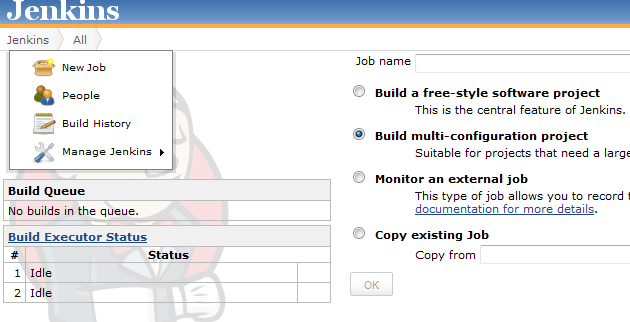
Then I've created a multiconfiguration project


I've done this in order to be able to allow different configurations to be deployed at a later stage. I've not tried this yet though.


Then I've selected the JDK ant Ant version to be used. Important here is;

- specify the base dir in which Ant is executed; base.dir=/home/oracle/Middleware11116buildtool. this makes sure Ant can find the required scripts and of course the build.properties!
- specify the build.xml file; /home/oracle/Middleware11116buildtool/build.xml.

Running

After the task is configured, it can be run. This results in the below
The different Ant tasks which are executed can be navigated to by clicking at the left side of the Console output on the specific task. Also the result is analyzed; in this case of course BUILD SUCCESFUL.