Wednesday, May 20, 2020

Charmed Kubernetes on KVM using MAAS and juju

Coming to this solution was a journey. I was looking for a Kubernetes installation which was easy to deploy and cleanup on my own laptop (I didn't want to have to pay for a hosted solution). I did want a solution which was more or less production like because I wanted to be able to play with storage solutions and deal with cluster challenges / loadbalancers. Things I couldn't do easily on environments like Minikube and Microk8s. Also, since I was running on a single piece of hardware, I needed a virtualization technology. Each one of them comes with their own challenges. On some of them it is difficult to get storage solutions to work, for example LXC/LXD (an alternative to Docker). Some of them come with networking challenges like Hyper-V and some of them just don't perform well like VirtualBox. I also needed a solution to provide some form of automation to create/destroy/access my virtual environments. A long list of requirements and this is what I ended up with. A production-like environment which is quick to create, destroy or reset, running on my laptop with easy management tools.


Thursday, April 30, 2020

Quick and easy: A multi-node Kubernetes cluster on CentOS 7 + QEMU/KVM (libvirt)

Kubernetes is a popular container orchestration platform. As a developer understanding the environment in which your application is going to run is important since this can help you use available services of the platform and fix issues.

There are several options to run Kubernetes locally to get some experience with Kubernetes as developer. For example Minikube, MicroK8s and MiniShift. These options however are not representative for a real environment. They for example usually do not have master and slave nodes. Running locally requires quite different configuration compared to running multiple nodes in VMs. Think for example about how to deal with storage and a container registry which you want to share over the different nodes. Installing a full blown environment requires a lot of work and resources. Using a cloud service usually is not free and you usually have less to no control over the environment Kubernetes is running in.

In this blog I'll describe a 'middle way'. Get an easy to manage small multi node Kubernetes environment running in different VMs. You can use this environment for example to learn what the challenges of clusters are and how to deal with them efficiently.

It uses the work done here with some minor additions to get a dashboard ready.

Wednesday, April 8, 2020

Spring: Blocking vs non-blocking: R2DBC vs JDBC and WebFlux vs Web MVC

Spring Framework version 5, released in Sept 2017, introduced Spring WebFlux. A fully reactive stack. In Dec 2019 Spring Data R2DBC, a reactive relational database driver was released. In this blog post I'll show that at high concurrency, WebFlux and R2DBC perform better. They have better response times and higher throughput. As additional benefits, they use less memory and CPU per request processed and when leaving out JPA in case of R2DBC, your fat JAR becomes a lot smaller. At high concurrency using WebFlux and R2DBC is a good idea!


Tuesday, March 31, 2020

The size of Docker images containing OpenJDK 11.0.6

When running Java applications in containers, you need to be careful with your resources. If you're not careful with layering your images (for example using Google's Jib), you can quickly get into disk-space issues, especially when your base image and/or application gets updated regularly. One of the ways you can save resources is by using small base images. In this blog post I determined the uncompressed size of several base images containing OpenJDK 11.0.6 which are available on Docker Hub.

Sunday, February 23, 2020

Secure browsing using a local SOCKS proxy server (on desktop or mobile) and an always free OCI compute instance as SSH server

Oracle provides several services as 'always free'. In contrast to Azure and Amazon, these include compute instances which remain 'forever' free to use. Although there are some limitations on CPU, disk, network resources, these instances are ideal to use as a remote SSH server and with a little effort a connection target for a locally running SOCKS proxy server. When you configure a browser to use that SOCKS proxy, your web traffic will be send through a secure channel (SSH tunnel) towards the OCI instance and the OCI instance will appear as your browsers client IP for remote sites you visit.

An SSH server in combination with a locally running SOCKS proxy server allows you to browse the internet more securely from for example public Wifi hotspots by routing your internet traffic through a secure channel via a remote server. If you combine this with DNS over HTTPS, which is currently at least available in Firefox and Chrome, it will be more difficult for other parties to analyse your traffic. Also it allows you to access resources from a server outside of a company network which can have benefits for example if you want to check how a company hosted service looks to a customer from the outside. Having a server in a different country as a proxy can also have benefits if certain services are only available from a certain country (a similar benefit as using a VPN or using Tor) or as a means to circumvent censorship.

Do check what is allowed in your company, by your ISP and is legal within your country before using such techniques though. I of course don't want you to do anything illegal and blame me for it ;)

Saturday, February 1, 2020

HTTP benchmarking using wrk. Parsing output to CSV or JSON using Python

wrk is a modern HTTP benchmarking tool. Using a simple CLI interface you can put simple load on HTTP services and determine latency, response times and the number of successfully processed requests. It has a LuaJIT scripting interface which provides extensibility. A distinguishing feature of wrk compared to for example ab (Apache Bench) is that it requires far less CPU at higher concurrency (it uses threads very efficiently). It does have less CLI features when compared to ab. You need to do scripting to achieve specific functionality. Also you need to compile wrk for yourself since no binaries are provided, which might be a barrier to people who are not used to compiling code.

Parsing the wrk output is a challenge. It would be nice to have a feature to output the results in the same units as CSV or JSON file. More people asked this question and the answer was: do some LuaJIT scripting to achieve that. Since I'm no Lua expert and to be honest, I don't have any people in my vicinity that are, I decided to parse the output using Python (my favorite language for data processing and visualization) and provide you with the code so you don't have to repeat this exercise.

You can see example Python code of this here.   

Thursday, January 2, 2020

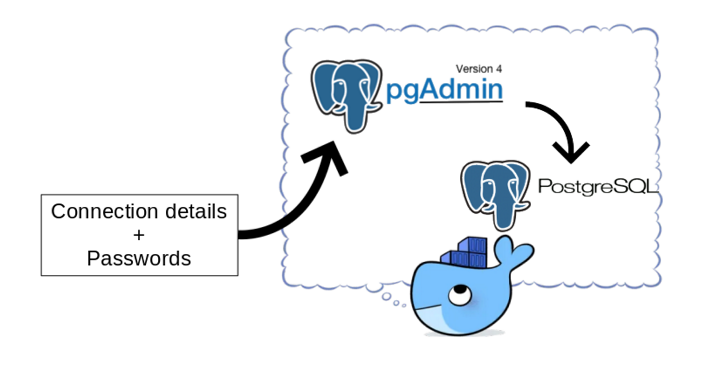
pgAdmin in Docker: Provisioning connections and passwords

pgAdmin is a popular open source and feature rich administration and development platform for PostgreSQL. When provisioning Postgres database environments using containers, it is not unusual to also provision a pgAdmin container.

The pgAdmin image provided on Docker Hub does not contain any server connection details. When your pgAdmin container changes regularly (think about changes to database connection details and keeping pgAdmin up to date), you might not want to enter the connections and passwords manually every time. This is especially true if you use a single pgAdmin instance to connect to many databases. A manual step also prevents a fully automated build process for the pgAdmin container.

You can export/import connection information, but you cannot export passwords. It is a bother, especially in development environments where the security aspect is less important, to lookup passwords every time you need them. How to fix this and make your life a little bit easier?

In this blog I'll show how to create a simple script to automate creating connections and supply password information so the pgAdmin instance is ready for use when you login to the console for the first time! This consists of provisioning the connections and provisioning the password files. You can find the files here.