The performance improvements suggested in this post are partially based on suggestions from the following book; https://beatechnologies.wordpress.com/2012/08/28/oracle-soa-suite-11g-administrators-handbook/
If you're interested in how you can improve SOA Suite performance (and of course several other aspects of SOA Suite administration), I suggest reading it.
I've used the Oracle VM which can be downloaded from http://www.oracle.com/technetwork/middleware/soasuite/learnmore/vmsoa-172279.html .
Performance
I've written about some performance suggestions earlier; http://javaoraclesoa.blogspot.nl/2012/06/increasing-bpel-performance.html.
Recently I've been doing several measures on different systems specifically concerning BPEL performance and have
updated the above post to reflect those findings. In this post I will
describe some new conclusions.
Test scenario's
I've created 5 test scenario's;
- a dummy scenarion (empty BPEL activity)
- a synchronous locally optimized webservice call
- an asynchronous locally optimized webservice call
- a synchronous not locally optimized webservice call
- a database call
Every scenario I've tested in a blocking invoke and nonblocking invoke setting. I've performed every test 200 times in a parallel executed for-each loop and measured the time by saving the start and end time in a database table.
When I'm talking about 'performance improved' or 'performance worsened, I'm talking about all scenarios. I've not found settings which improved the performance for one test scenario and decreased it for another.
I've found that testing just after a server restart caused performance measures to worsen. This is most likely due to the connection pools which need to create initial database connections (which is slow...). That's why I've done all tests at least 3 times. When testing on the Oracle VM I've purged the dehydration store after every run in order to get the same initial situation for the tests.
The settings which increased the performance on my systems can of course be system specific. If other people have different experiences concerning some of the settings described in this post, it will be interesting to know. Also keep in mind that the settings I've found to improve performance on my system, might worsen the performance if other test scenario's are used. You should always test the settings on your own system to make sure they have the desired result and to confirm system stability is not effected. I've not tested in a clustered environment.
I have results concerning the performance improvements for reducing audit and log levels. Reducing audit and other logging however and can make it harder to debug problems. Putting BPEL process audit logging on 'Development' however in a production environment is in my opinion overkill and should be avoided or only used for a short period in order to solve issues.
Results
Locally optimized webservice calls
Locally optimized calls are faster then not locally optimized calls (non locally optimized calls have among other things SOAP overhead). I've not yet looked at this behavior when working in a cluster with a load balancer. The following might be interesting and would suggest local optimizations does not work through a load balancer if the server URL differs from the load balancer URL; https://blogs.oracle.com/rammenon/entry/is_local_optimization_kicking.It would be interesting to test this and try and make it work in clustered environments since the performance increase for using locally optimized calls is (not statistically tested) significant (about 25%).
Asynchronous callbacks
I've seen in my measures that asynchronous callbacks are a lot slower (about 5 times) then synchronous interactions. This is of course to be expected since correlation data needs to be saved and incoming messages need to be matched to the correlation data. If performance is important and processes are short-running, I'd advice to avoid asynchronous constructions.
nonBlockingInvoke
Setting the nonBlockingInvoke property on a partnerlink caused a decrease in performance. This is something I had not expected based on; http://docs.oracle.com/cd/E23943_01/core.1111/e10108/bpel.htm#ASPER99890. In my tests however, the services were fast and did little. It could be that if slower services were used, an improvement could be measured when using the nonBlockingInvoke option. I have however not tested this.
Tuning datasources (SOAINFRA schema)
My measures concerning the performance changes achieved when increasing the connection pool size of the SOALocalTxDataSource and SOADataSource are not consistent. On the Oracle VM I found that increasing the connection pool size, performance was improved. When trying this setting on a customer system however, performance was worsened. On the Oracle VM, a dedicated XE database is installed which is setup to allow plenty of sessions. On the customer system, the database was not only installed on a (most likely physically) different server but also not dedicated; several SOA Suite instances used the same database for their dehydration store. At the customer, the database sessions parameter (see for example https://forums.oracle.com/forums/thread.jspa?threadID=898395) was found to be limiting in the past. An educated guess is that this caused the performance decrease on that system.
One can conclude from the above that only looking at JDBC datasource settings on the Weblogic server is not enough to achieve consistent improvement across environments. One should also look at the database settings.
JVM settings
The following settings increased performance on all systems;
In setSOADomainEnv.sh
Default
PORT_MEM_ARGS="-Xms768m -Xmx1536m"
New
PORT_MEM_ARGS="-Xms1536m -Xmx1536m -Xgcprio:throughput -XX:+HeapDumpOnOutOfMemoryError -XXtlasize:min=16k,preferred=128k,wasteLimit=8k"
The following settings decreased performance (from http://docs.oracle.com/cd/E13150_01/jrockit_jvm/jrockit/geninfo/diagnos/bestpractices.html);
-XXaggressive
-XXcallProfiling
BPEL Engine tuning
Threads
I've tried and measured several settings related to the BPEL engine. There are 4 settings related to the number of threads used by the BPEL Engine;
DispatcherSystemThreads
DispatcherEngineThreads
DispatcherInvokeThreads
DispatcherNonBlockInvokeThreads
Increasing them did not lead to performance improvements
AuditStorePolicy
I've also tried playing with the AuditStorePolicy setting. This caused errors or worsened performance when combined with several of the other audit settings I've tried (for example in combination with deferred audit logging as described in the post referred to in the introduction). I got the best results leaving this set to syncSingleWrite.
Coherence
Setting the QualityOfService from DirectWrite to CacheEnabled led to worsened performance.
OneWayDeliveryPolicy
Setting this from async.persist to async.cache improved performance
Asynchronous audit logging
See http://javaoraclesoa.blogspot.nl/2012/06/increasing-bpel-performance.html. It improves performance but check the log files to see if the audit store does not encoutner unique key constraints.
I've not tried altering audit thresholds. This can also lead to performance improvements.
Process improvements
The process of using, monitoring and maintaining the SOA Suite installation is maybe even more important in increasing the performance then providing technical tweaks.
Based on the topics discussed in the Administrators handbook (https://beatechnologies.wordpress.com/2012/08/28/oracle-soa-suite-11g-administrators-handbook/)
there are several activities which are considered to be part of the SOA
Administrators responsibilities. This might be interesting for customers to
consider. If for example a SOA Administrator has little background in application server maintenance or the SOA Suite in specific, there's a high probability project
developers are more knowledgeable in some area's. This often leads to
shift of responsibilities to developers.
Some of the tasks mentioned as part of the SOA Administrators job are listed below. These usually end up being done by developers.
- automating composite management and structuring composite deployments using ant scripts
- using and managing configuration plans
- administration of services, engines and MDS
- tuning SOA Suite 11g (operating system, application server, SOA infrastructure, database connections, dehydration store)
- monitoring (sometimes 'it's up and running!' is not enough...)
Other suggestions
The book contains several other suggestions for increasing performance. Interesting is also how the SOAINFRA database/schema can be tweaked. I've however not tested/measured this.
Since BPEL often uses services from different systems, tweaking those services can increase the performance of the process as a whole. Most noteworthy here are of course databases and JDBC settings.
Saturday, September 29, 2012


Friday, September 21, 2012
Overview monitoring tools Oracle JRockit
Several monitoring options for the JRockit JVM are available. jps, jstat and jconsole are monitoring tools provided by the Oracle (previously Sun) JDK. Jps and jstat are commandline tools for obtaining information about running JVM’s. JConsole is a GUI suitable to monitor JVM’s supporting Java Management Extensions (JMX) such as JRockit. Oracle provides JVM monitoring software for JRockit (which can also be used for other JVM's); Mission Control which consists of several tools which can help in for example detection of memory leaks.
To monitor the JRockit JVM, it has to be started with the -Xmanagement option. This option is the same as using the following startup options for the Oracle (previously Sun) JVM:
-Dcom.sun.management.jmxremote.port=7091
-Dcom.sun.management.jmxremote.authenticate=false
-Dcom.sun.management.jmxremote.ssl=false
Oracle (previously Sun) JVM tooling
Commandline tools
jps
The jps utility lists the virtual machines for the current user on the target system. The utility is useful in environments where the VM is started using the JNI Invocation API rather than the standard Java launcher. In these environments, it is not always easy to recognize the Java processes in the process list. The jps tool alleviates this problem.
The following example demonstrates the use of the jps utility. Enter jps on the command line, and the utility lists the virtual machines and process IDs for which the user has access rights
$ jps
16217 MyApplication
16342 jps
jstat
The jstat utility uses the JVM's built-in instrumentation to provide information on performance and resource consumption of running applications. The tool is useful for diagnosing performance issues, particularly issues related to heap sizing and garbage collection. jstatd is a daemon which can be used to use jstat to connect to a remote machine.
JConsole
If you start an application with JRockit in -Xmanagement mode, you'll be able to connect with Sun's jconsole tool to the JVM. See also in the introduction.
Overhead on the JVM for using JConsole is small; 3% to 4 %. See; http://weblogs.java.net/blog/emcmanus/archive/2006/07/how_much_does_i.html
Local monitoring
To monitor a local application, it must be running with the same user ID as jconsole. The command syntax to start jconsole for local monitoring is:
jconsole [processID]
where processID is the application's process ID (PID). To determine an application's PID:
On Windows systems, use Task Manager to find the PID of java or javaw.
You can also use the jps command-line utility to determine PIDs.
For example, if you determined that the process ID of the application is 2956, then you would start jconsole as follows:
jconsole 2956
Both jconsole and the application must by executed by the same user name. The management and monitoring system uses the operating system's file permissions.
If you don't specify a process ID, jconsole will automatically detect all local Java applications, and display a dialog box that lets you select the one you want to monitor.
Remote monitoring
To start jconsole for remote monitoring, use this command syntax:
jconsole [hostName:portNum]
where hostName is the name of the system running the application and portNum is the port number you specified when you enabled the JMX agent when you started the JVM.
If you do not specify a host name/port number combination, then jconsole will display a connection dialog box enabling you to enter a host name and port number.
See below, Connection options under JRockit Mission Control for more information on the type of the connection.
JRockit Mission Control
Discovery options
Local
You can connect to locally discovered JRockits if the discovered JRockit is R27.1 or later and runs Java SE 5.0 or later.
JDP
JRockit instances are discovered automatically through JDP (JRockit Discovery Protocol) if the autodiscovery parameter is set to true (-Xmanagement:autodiscovery=true). The broadcast port for JDP can be specified in the JRockit Mission Control preferences and as a parameter upon starting the JVM.
Example parameters for starting JRockit (can be added in the Weblogic script which starts the relevant domain)
java -Xmanagement:ssl=false,authenticate=false,port=7091,autodiscovery=true
Connection options
Java Management Extensions (JMX) are accessed via RMI to obtain JVM instance information.
The JMX technology provides the tools for building distributed, Web-based, modular and dynamic solutions for managing and monitoring devices, applications, and service-driven networks. By design, this standard is suitable for adapting legacy systems, implementing new management and monitoring solutions, and plugging into those of the future. Starting with the J2SE platform 5.0, JMX technology is included in the Java SE platform.
RMI (remote method invocation) can be used to connect to JMX (MXBEANS or platform MBEANS) instances. In the references section there is a link to an example on how to implement this.
JRockit Mission control toolset
Memory leak detection
BEA JRockit 1.4.2 (R26.2), BEA JRockit 5.0 sp1 and forward fully support the stand-alone Memory Leak Detector.
Memory leak detection is a tool which analyses the runtime of a JVM. Running the tool against a JVM has a small overhead cost most noticeable during garbage collection.
Memory leak detection can be used as followed;
- the Trend analyzer can be used to determine which objects have the fastest growth in bytes/second. The Trend analyzer can also help identifying targets which occupy a lot of heap space or have large numbers of instances
- once an interesting class has been identified, the Types tab can be used to identify causality and related objects
- to obtain more information about where the problem is occurring or which specific setting might cause it, specific instances can be analyzed of selected types and an allocation stack trace can be conducted. These cause more overhead to the JVM
JRockit Runtime Analyzer
The JRockit Runtime Analyzer consists of two parts. One is running inside the JVM and recording information about the JVM and the Java application currently running. This information is saved to a file which is then opened in the other part: the analyzer tool. This is a regular Java application used to visualize the information contained in the JRA recording file.
Recordings can be created from the Management Console, by using the jrcmd command line tool or by specifying recording options at the JRockit commandline.
On Windows, the commandline for jrcmd is as followed;
bin\jrcmd.exe <pid> jrarecording time=<jrarecording time>
filename=<filename>
The JRA tool provides the most extensive information on JVM usage, garbage collection, heap usage, etc. Since it is based on recording information during a set period and analyzing the data afterwards, timing becomes important if you want to use this tool to analyze runtime problems. During recording the overhead is small.
JRockit Management Console
The Management Console system and JVM behavior. It also has the option to set notifications for example, send an e-mail when a certain heap size is reached. Also the management console allows to increase the heap size at runtime to for example postpone an out of heapspace error. Also JRA recordings can be started as a result of for example high heap space usage to determine the problem.
The Management console has to be running in order to provide notifications, but using commandline options, it can be started in headless mode. Also using commandline options it can be set to connect to a JVM.
References
Jps and jstat
http://docs.oracle.com/javase/6/docs/technotes/tools/#monitor
JConsole documentation
http://download.oracle.com/javase/1.5.0/docs/tooldocs/share/jconsole.html
Oracle JRockit R28 documentation
http://www.oracle.com/technetwork/middleware/jrockit/documentation/index.html
BEA JRockit R27 documentation
http://www.oracle.com/technetwork/middleware/weblogic/documentation/weblogic-jrockit-089130.html
JMX Technology Home Page
http://www.oracle.com/technetwork/java/javase/tech/javamanagement-140525.html
Using RMI to connect to a JRockit JVM instance
https://blogs.oracle.com/pacogomez/entry/monitoring_jrockit_through_a_f
How much does it cost to monitor an app with jconsole?
http://weblogs.java.net/blog/emcmanus/archive/2006/07/how_much_does_i.html
To monitor the JRockit JVM, it has to be started with the -Xmanagement option. This option is the same as using the following startup options for the Oracle (previously Sun) JVM:
-Dcom.sun.management.jmxremote.port=7091
-Dcom.sun.management.jmxremote.authenticate=false
-Dcom.sun.management.jmxremote.ssl=false
Oracle (previously Sun) JVM tooling
Commandline tools
jps
The jps utility lists the virtual machines for the current user on the target system. The utility is useful in environments where the VM is started using the JNI Invocation API rather than the standard Java launcher. In these environments, it is not always easy to recognize the Java processes in the process list. The jps tool alleviates this problem.
The following example demonstrates the use of the jps utility. Enter jps on the command line, and the utility lists the virtual machines and process IDs for which the user has access rights
$ jps
16217 MyApplication
16342 jps
jstat
The jstat utility uses the JVM's built-in instrumentation to provide information on performance and resource consumption of running applications. The tool is useful for diagnosing performance issues, particularly issues related to heap sizing and garbage collection. jstatd is a daemon which can be used to use jstat to connect to a remote machine.
JConsole
If you start an application with JRockit in -Xmanagement mode, you'll be able to connect with Sun's jconsole tool to the JVM. See also in the introduction.
Overhead on the JVM for using JConsole is small; 3% to 4 %. See; http://weblogs.java.net/blog/emcmanus/archive/2006/07/how_much_does_i.html
Local monitoring
To monitor a local application, it must be running with the same user ID as jconsole. The command syntax to start jconsole for local monitoring is:
jconsole [processID]
where processID is the application's process ID (PID). To determine an application's PID:
On Windows systems, use Task Manager to find the PID of java or javaw.
You can also use the jps command-line utility to determine PIDs.
For example, if you determined that the process ID of the application is 2956, then you would start jconsole as follows:
jconsole 2956
Both jconsole and the application must by executed by the same user name. The management and monitoring system uses the operating system's file permissions.
If you don't specify a process ID, jconsole will automatically detect all local Java applications, and display a dialog box that lets you select the one you want to monitor.
Remote monitoring
To start jconsole for remote monitoring, use this command syntax:
jconsole [hostName:portNum]
where hostName is the name of the system running the application and portNum is the port number you specified when you enabled the JMX agent when you started the JVM.
If you do not specify a host name/port number combination, then jconsole will display a connection dialog box enabling you to enter a host name and port number.
See below, Connection options under JRockit Mission Control for more information on the type of the connection.
JRockit Mission Control
Discovery options
Local
You can connect to locally discovered JRockits if the discovered JRockit is R27.1 or later and runs Java SE 5.0 or later.
JDP
JRockit instances are discovered automatically through JDP (JRockit Discovery Protocol) if the autodiscovery parameter is set to true (-Xmanagement:autodiscovery=true). The broadcast port for JDP can be specified in the JRockit Mission Control preferences and as a parameter upon starting the JVM.
Example parameters for starting JRockit (can be added in the Weblogic script which starts the relevant domain)
java -Xmanagement:ssl=false,authenticate=false,port=7091,autodiscovery=true
Connection options
Java Management Extensions (JMX) are accessed via RMI to obtain JVM instance information.
The JMX technology provides the tools for building distributed, Web-based, modular and dynamic solutions for managing and monitoring devices, applications, and service-driven networks. By design, this standard is suitable for adapting legacy systems, implementing new management and monitoring solutions, and plugging into those of the future. Starting with the J2SE platform 5.0, JMX technology is included in the Java SE platform.
RMI (remote method invocation) can be used to connect to JMX (MXBEANS or platform MBEANS) instances. In the references section there is a link to an example on how to implement this.
JRockit Mission control toolset
Memory leak detection
BEA JRockit 1.4.2 (R26.2), BEA JRockit 5.0 sp1 and forward fully support the stand-alone Memory Leak Detector.
Memory leak detection is a tool which analyses the runtime of a JVM. Running the tool against a JVM has a small overhead cost most noticeable during garbage collection.
Memory leak detection can be used as followed;
- the Trend analyzer can be used to determine which objects have the fastest growth in bytes/second. The Trend analyzer can also help identifying targets which occupy a lot of heap space or have large numbers of instances
- once an interesting class has been identified, the Types tab can be used to identify causality and related objects
- to obtain more information about where the problem is occurring or which specific setting might cause it, specific instances can be analyzed of selected types and an allocation stack trace can be conducted. These cause more overhead to the JVM
JRockit Runtime Analyzer
The JRockit Runtime Analyzer consists of two parts. One is running inside the JVM and recording information about the JVM and the Java application currently running. This information is saved to a file which is then opened in the other part: the analyzer tool. This is a regular Java application used to visualize the information contained in the JRA recording file.
Recordings can be created from the Management Console, by using the jrcmd command line tool or by specifying recording options at the JRockit commandline.
On Windows, the commandline for jrcmd is as followed;
bin\jrcmd.exe <pid> jrarecording time=<jrarecording time>
filename=<filename>
The JRA tool provides the most extensive information on JVM usage, garbage collection, heap usage, etc. Since it is based on recording information during a set period and analyzing the data afterwards, timing becomes important if you want to use this tool to analyze runtime problems. During recording the overhead is small.
JRockit Management Console
The Management Console system and JVM behavior. It also has the option to set notifications for example, send an e-mail when a certain heap size is reached. Also the management console allows to increase the heap size at runtime to for example postpone an out of heapspace error. Also JRA recordings can be started as a result of for example high heap space usage to determine the problem.
The Management console has to be running in order to provide notifications, but using commandline options, it can be started in headless mode. Also using commandline options it can be set to connect to a JVM.
References
Jps and jstat
http://docs.oracle.com/javase/6/docs/technotes/tools/#monitor
JConsole documentation
http://download.oracle.com/javase/1.5.0/docs/tooldocs/share/jconsole.html
Oracle JRockit R28 documentation
http://www.oracle.com/technetwork/middleware/jrockit/documentation/index.html
BEA JRockit R27 documentation
http://www.oracle.com/technetwork/middleware/weblogic/documentation/weblogic-jrockit-089130.html
JMX Technology Home Page
http://www.oracle.com/technetwork/java/javase/tech/javamanagement-140525.html
Using RMI to connect to a JRockit JVM instance
https://blogs.oracle.com/pacogomez/entry/monitoring_jrockit_through_a_f
How much does it cost to monitor an app with jconsole?
http://weblogs.java.net/blog/emcmanus/archive/2006/07/how_much_does_i.html
Friday, September 7, 2012
Monitoring DataSources on Weblogic
As an Oracle SOA developer, I've often heard the phrase; 'BPEL doesn't work!'. Almost always the cause can be found in backend systems which do not function as expected. This error becomes visible when executing a service which uses a specific resource. When people start complaining about BPEL, usually this is an indication you should work on process feedback and error handling so the responsible party can quickly be identified. A trial and error mechanism is however often not what you want. A dashboard or script to monitor backend databases can help prevent such issues.
Often development and system test databases are not monitored as thoroughly as acceptance test or production environments. To be able to quickly identify for example a database which is malfunctioning (for example put down for maintenance without informing the developers) it is useful to have some tools and scripts available which you can run for the occasion. Usually this is quicker then using the Enterprise Manager. This is especially useful in complex environments where multiple systems are linked. In these scripts/tools, it is not a good idea to have the databases/users/passwords hardcoded, because that would require maintenance of the scripts in case of changes and as a lazy developer you of course don't want that.
In this article I will describe two possible options for monitoring DataSources on Weblogic servers.
- The first option is a servlet which uses JNDI to obtain JDBC DataSources. This has the drawback that if the DataSource is not loaded correctly or has been disabled, it cannot be looked up using JNDI and is not visible. It can however also be used when the Db/Aq adapter is not used. A servlet can be accessed by anyone, reducing the amount of technical knowledge required to monitor the databases.
- The second option is by using WLST to obtain DataSources defined in the DbAdapter/AqAdapter and provide statistics. This is specific to the Db/Aq adapter and it's a WLST script, so a Middleware installation and login credentials to the server are required in order to execute it.
Both methods query for available DataSources. The DataSource is used so no usernames/passwords/hostnames/sids etc are required.
Implementation
Java
The below servlet does a JNDI lookup of JDBC DataSources and does a 'select sysdate from dual' on them. If the DataSource is not available (can not be looked up via JNDI), it will not appear in the list. If for example a tablespace is full or an account is locked, you will however see it in the list as NOK (short for Not OK). It has not been extensively tested in error situations!
Output of the servlet can be for example;

When I lock the testuseraccount and reset the connectionpool;

Below is the servlet code. It can of course easily be improved (some people like colors and nice layouts while I tend to focus on functionality).
package ms.testapp;
import java.io.IOException;
import java.io.PrintWriter;
import java.io.StringWriter;
import java.sql.Connection;
import java.sql.Statement;
import java.util.ArrayList;
import java.util.Collections;
import java.util.Date;
import java.util.Hashtable;
import javax.naming.Binding;
import javax.naming.Context;
import javax.naming.InitialContext;
import javax.naming.NamingEnumeration;
import javax.naming.NamingException;
import javax.servlet.ServletException;
import javax.servlet.http.HttpServlet;
import javax.servlet.http.HttpServletRequest;
import javax.servlet.http.HttpServletResponse;
import javax.sql.DataSource;
public class CheckDb extends HttpServlet {
@SuppressWarnings("compatibility:-5693855291723951046")
private static final long serialVersionUID = 1L;
public CheckDb() {
super();
}
public void doGet(HttpServletRequest request,
HttpServletResponse response) throws ServletException,
IOException {
response.setContentType("text/html");
PrintWriter out = response.getWriter();
out.println("<!DOCTYPE HTML PUBLIC \"-//W3C//DTD HTML 4.0 " +
"Transitional//EN\">\n" +
"<HTML>\n" +
"<HEAD><TITLE>Datasource status</TITLE></HEAD>\n" +
"<BODY>\n" +
listJDBCContextTable
() + "</BODY></HTML>");
}
private Context getContext() throws NamingException {
Hashtable myCtx = new Hashtable();
myCtx.put(Context.INITIAL_CONTEXT_FACTORY,
"weblogic.jndi.WLInitialContextFactory");
Context ctx = new InitialContext(myCtx);
return ctx;
}
private String checkDataSource(DataSource ds) {
try {
Connection conn = ds.getConnection();
Statement st = conn.createStatement();
st.execute("select sysdate mydate from dual");
st.getResultSet().next();
Date mydate = st.getResultSet().getDate("mydate");
conn.close();
String date = mydate.toString();
if (date.length() == 10 && date.indexOf("-") == 4 && date.
lastIndexOf("-") == 7) {
return "OK";
} else {
return "NOK";
}
} catch (Exception e) {
return "NOK"; //getStackTrace(e);
}
}
private static String getStackTrace(Throwable e) {
StringWriter sw = new StringWriter();
PrintWriter pw = new PrintWriter(sw);
e.printStackTrace(pw);
return sw.toString();
}
private String listJDBCContextTable() {
String output = "<table>";
ArrayList<String> tab = new ArrayList<String>();
String line = "";
try {
tab = listContext((Context)getContext().lookup("jdbc"), "", tab);
Collections.sort(tab);
for (int i = 0; i < tab.size(); i++) {
output += tab.get(i);
}
output += "</table>";
return output;
} catch (NamingException e) {
return getStackTrace(e);
}
}
private ArrayList<String> listContext(Context ctx, String indent,
ArrayList<String> output) throws NamingException {
String name = "";
try {
NamingEnumeration list = ctx.listBindings("");
while (list.hasMore()) {
Binding item = (Binding)list.next();
String className = item.getClassName();
name = item.getName();
if (!(item.getObject() instanceof DataSource)) {
//output = output+indent + className + " " + name+"\n";
} else {
output.add("<tr><td>" + name + "</td><td>" +
checkDataSource((DataSource)item.getObject()) +
"</td></tr>");
}
Object o = item.getObject();
if (o instanceof javax.naming.Context) {
listContext((Context)o, indent + " ", output);
}
}
} catch (NamingException ex) {
output.add("<tr><td>" + name + "</td><td>" + getStackTrace(ex) +
"</td></tr>");
}
return output;
}
}
You can download the JDev 11.1.1.6 project here; https://dl.dropbox.com/u/6693935/blog/DbUtils.zip
Also I found that not all DataSources allow remote JDBC calls such as the MDS DataSource. When using a servlet, this is not a problem since the Java code runs on the server. When running a piece of Java code locally (from your laptop for example) however, it will not work and will throw; java.lang.UnsupportedOperationException: Remote JDBC disabled.
WLST
The below script is based on http://albinoraclesoa.blogspot.nl/2012/06/monitoring-jca-adapters-through-wlst.html and http://davidmichaelkarr.blogspot.nl/2008/10/make-wlst-scripts-more-flexible-with.html and was created by Marcel Bellinga. It contains an example on how to pass arguments to a WLST script and how to query / test DataSources from a WLST script. The DataSources for which statistics are printed, are determined by querying the DbAdapter and AqAdapter connectionpools.
import sys
import os
from java.lang import System
import getopt
user = ''
credential = ''
host = ''
port = ''
targetServerName = ''
def usage():
print "Usage:"
print "ResourceAdapterMonitor -u user -c credential -h host -p port -s serverName"
def monitorDBAdapter(serverName):
cd("ServerRuntimes/"+str(serverName)+"/ApplicationRuntimes/DbAdapter/ComponentRuntimes/DbAdapter/ConnectionPools")
connectionPools = ls(returnMap='true')
print '--------------------------------------------------------------------------------'
print 'DBAdapter Runtime details for '+ serverName
print '--------------------------------------------------------------------------------'
print '%10s %13s %15s %18s' % ('Connection Pool', 'State', 'Current', 'Created')
print '%10s %10s %24s %21s' % ('', '', 'Capacity', 'Connections')
print '--------------------------------------------------------------------------------'
for connectionPool in connectionPools:
if connectionPool!='eis/DB/SOADemo':
cd('/')
cd("ServerRuntimes/"+str(serverName)+"/ApplicationRuntimes/DbAdapter/ComponentRuntimes/DbAdapter/ConnectionPools/"+str(connectionPool))
print '%15s %15s %10s %20s' % (cmo.getName(), cmo.getState(), cmo.getCurrentCapacity(), cmo.getConnectionsCreatedTotalCount())
print '--------------------------------------------------------------------------------'
def monitorAQAdapter(serverName):
cd("ServerRuntimes/"+str(serverName)+"/ApplicationRuntimes/AqAdapter/ComponentRuntimes/AqAdapter/ConnectionPools")
connectionPools = ls(returnMap='true')
print '--------------------------------------------------------------------------------'
print 'AqAdapter Runtime details for '+ serverName
print '--------------------------------------------------------------------------------'
print '%10s %13s %15s %18s' % ('Connection Pool', 'State', 'Current', 'Created')
print '%10s %10s %24s %21s' % ('', '', 'Capacity', 'Connections')
print '--------------------------------------------------------------------------------'
for connectionPool in connectionPools:
if connectionPool!='eis/DB/SOADemo':
cd('/')
cd("ServerRuntimes/"+str(serverName)+"/ApplicationRuntimes/AqAdapter/ComponentRuntimes/AqAdapter/ConnectionPools/"+str(connectionPool))
print '%15s %15s %10s %20s' % (cmo.getName(), cmo.getState(), cmo.getCurrentCapacity(), cmo.getConnectionsCreatedTotalCount())
print '--------------------------------------------------------------------------------'
def parameters():
global user
global credential
global host
global port
global targetServerName
try:
opts, args = getopt.getopt(sys.argv[1:], "u:c:h:p:s:",
["user=", "credential=", "host=", "port=",
"targetServerName="])
except getopt.GetoptError, err:
print str(err)
usage()
sys.exit(2)
for opt, arg in opts:
if opt == "-n":
reallyDoIt = false
elif opt == "-u":
user = arg
elif opt == "-c":
credential = arg
elif opt == "-h":
host = arg
elif opt == "-p":
port = arg
elif opt == "-s":
targetServerName = arg
if user == "":
print "Missing \"-u user\" parameter."
usage()
sys.exit(2)
if credential == "":
print "Missing \"-c credential\" parameter."
usage()
sys.exit(2)
if host == "":
print "Missing \"-h host\" parameter."
usage()
sys.exit(2)
if port == "":
print "Missing \"-p port\" parameter."
usage()
sys.exit(2)
if targetServerName == "":
print "Missing \"-s targetServerName\" parameter."
usage()
sys.exit(2)
def main():
parameters()
#connect(username, password, admurl)
connect(user,credential,'t3://'+host+':'+port)
servers = cmo.getServers()
domainRuntime()
cd("/ServerLifeCycleRuntimes/" + targetServerName)
if cmo.getState() == 'RUNNING':
monitorAQAdapter(targetServerName)
monitorDBAdapter(targetServerName)
disconnect()
main()
Conclusion
There are various ways to monitor backend systems and databases . It is useful to create your own dashboards, especially when there are a lot of systems involved and you don't want to (or can't) login to the Enterprise Manager on every one of them. Make sure though such unsecured dashboards don't end up on production systems. Depending on the problem with a database, a JNDI lookup might or might not work. The DbAdapter and AqAdapter have JDBC DataSources configured. It is useful to create a script which determines the DataSources based on the DbAdapter/AqAdapter configuration since that listing contains all DataSources used by the adapter, even if they are not loaded succesfully. That is the list of DataSources that should be tested. This can be done with WLST as shown in this post. Using a servlet however is more convenient then using WLST scripts since the URL of the servlet can be mailed to for example testers so they can monitor the databases. WLST requires a usuable Middleware installation and connection properties, which are not always available. I might create a Java servlet which provides the functionality of the WLST script mentioned in this post in the near future.
Monday, September 3, 2012
JVM does not start on Windows Server 2008
A customer is using Windows Server 2008 64 bit and the Oracle JDK version 1.6.33 64 bit. Recently, the following error occurred when a (any) Java application was started;
Problem signature:
Problem Event Name: APPCRASH
Application Name: java.exe
Application Version: 6.0.330.5
Application Timestamp: 4fed0a6a
Fault Module Name: jvm.dll
Fault Module Version: 20.8.0.3
Fault Module Timestamp: 4fed2ec7
Exception Code: c0000094
Exception Offset: 0000000000309132
OS Version: 6.1.7601.2.1.0.400.8
Locale ID: 1043
Additional Information 1: 9930
Additional Information 2: 993087b8a26c90b698b0aaa7c0c9a119
Additional Information 3: 45d8
Additional Information 4: 45d86e82cdfe3714a97bde810a82a78e
Even just starting java.exe -version caused this exception. De-installing all present JDK's/JRE's and installing different (32 bit and 64 bit) versions, did not solve this problem. When we downgraded to a JDK 1.5 version however, the problem did not occur anymore but using a version 1.5 JDK was not a viable option.
The Exception Code: c0000094 is an INT_DIVIDE_BY_ZERO exception, so not much help there in clarifying the problem.
What we tried
There was no traceable change leading to this error.
We tried a clean install of the entire server (Windows reinstallation) and the JVM worked. Also after completely updating Windows, it still worked. We tried this locally with Virtualbox in a Virtual Machine instead of using the image/configuration of the machine on which the problem originally occurred. Multiple environments experienced the same problem. Also based on the below, our estimate is that this error is related to local (customer specific) policies (otherwise undoubtedly Google would have more information on this problem).
We encountered several errors when using Process Monitor; http://technet.microsoft.com/en-us/sysinternals/bb896645.aspx

What we saw was that in jvm.dll, different behavior started to occur. We could however not pinpoint the cause of this change of behavior. Decompiling the dll and running it with breakpoints on the server with Visual Studio, was not an option.
When we installed JRockit JDK, the problem was solved. To make the new JDK the default JDK used, several environment settings needed updating. We also use a Tomcat service which needed to be updated to use the new JDK.
Description
Install JRockit
First download the JRockit JDK;
Start the installer and specify the installation directory

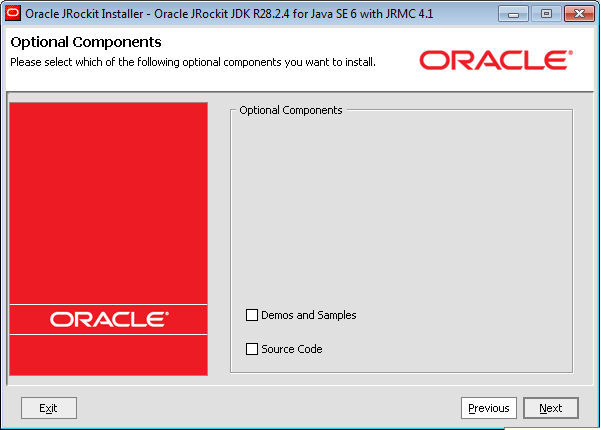
Don't install Demo's, samples and sources (unless of course you will use them)
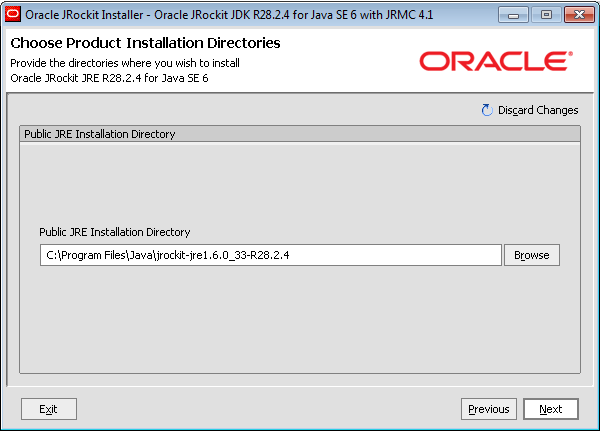
Install the public JRE (you might need the JRE some day and not the complete JDK)

Choose a directory to install the JRE
Update environment variables
Right mouse click the Computer icon, Properties (as you can see, I need a new laptop...).

Advanced system properties

Environment variables
Make sure no JAVA_HOME is present in the User variables. If JAVA_HOME is present under user variables, remove it.

If present, update and if not present, create the JAVA_HOME environment variable under System variables. Set it to be equal to the JDK installation directory. In this case; C:\Program Files\Java\jrockit-jdk1.6.0_33-R28.2.4-4.1.0.

Update the Path System variable and set as the first entry the bin directory of the JDK. In this case; C:\Program
Files\Java\jrockit-jdk1.6.0_33-R28.2.4-4.1.0\bin. Start a new command prompt (Start, cmd) and give java -version to test the Path variable and the newly installed JDK.
Update Tomcat service
We use Tomcat 6 on the Windows 2008 server. When we changed the JDK, Tomcat wouldn't start anymore when we started it from the Windows Services screen. Tomcat usually autodetects the JDK present on the system based on the JAVA_HOME, but in case of JRockit, this auto setting wouldn't work.
The JVM can be specified manually though. See; http://tomcat.apache.org/tomcat-6.0-doc/windows-service-howto.html
In case of JRockit, the following command updated the service to use the correct JDK;
tomcat6.exe //US//Tomcat6 --Jvm="C:\Program Files\Java\jrockit-jdk1.6.0_33-R28.2.4-4.1.0\jre\bin\jrockit\jvm.dll"
Tomcat6 here is the name of the service. The path to the jvm.dll file might differ depending on the location you specified when installing JRockit
Conclusion
When mysterious JVM errors start to occur when using Windows Server 2008, consider using JRockit and make sure the JVM is known to the programs using it.
Monday, August 27, 2012
Building BPEL / MDS applications using Jenkins and Ant
This post describes a tryout (not production ready) of a manually triggered Ant build of Oracle SOA applications using Jenkins and custom Ant scripts. I've used and expanded on the scripts mentioned in; http://javaoraclesoa.blogspot.nl/2012/08/standalone-buildtool-for-deployment-of.html
Introduction
'builds' globally consist of several steps (details can differ among different customers)
- selecting what to build. this can be based for example on a tag or status/property of a source in a version control system or a selection of tasks with a specific status (if issue management and version control are linked).
- preparing a workarea / workspace based on the above
- triggering a build (manually or automated by monitoring a version control system)
- archiving the build ('releasing')
This post will have a limited scope since putting the above into place is customer specific and requires some time (a project) to achieve a production ready setup. I will manually trigger a build for a prepared workarea. This can of course be expanded. I've chosen to call Ant from Jenkins. The following post describes how Maven can be used to wrap Ant; http://redstack.wordpress.com/2011/03/15/getting-started-with-continuous-integration-for-soa-projects/. Ant wraps Java classes to achieve deployment. Jenkins has plug-ins to directly call Ant tasks and has easy integration in the GUI (Ant output parsing). I do not see the added benefit of wrapping Ant in Maven.
I've installed Jenkins as described on; https://wiki.jenkins-ci.org/display/JENKINS/Installing+Jenkins+on+Ubuntu
I've chosen for Jenkins instead of Hudson based on http://stackoverflow.com/questions/4973981/how-to-choose-between-hudson-and-jenkins.
The Buildserver installed is an Ubuntu 12.04 server 64 bit installation.
Implementation
I've adapted the scripts used in my previous buildtool post slightly for this purpose. I've used a JDeveloper installation instead of 'manually' copying JAR files. This has the benefit that JDeveloper can easily be upgraded and plugins can more easily be installed using the GUI. This provides a more steady and flexible base for the buildtool then manually copying JAR files.
MDS and adf-config.xml
Also for the purpose of MDS dependencies I've expanded the build.xml file to write an application specific adf-config.xml and copy it to the relevant application directory. The adf-config is copied to the application directory and it contains placeholders; MDS_REPOSITORY and MDS_APPLICATION. These are replaced in the build.xml using;
Copy to application
<mkdir dir="${proj.compositeDir}/${proj.compositeName}/SCA-INF/classes/META-INF"/>
<copy file="${base.dir}/adf-config.xml" tofile="${proj.compositeDir}/${proj.compositeName}/SCA-INF/classes/META-INF/adf-config.xml"/>
Replace placeholders
<replace file="${proj.compositeDir}/${proj.compositeName}/SCA-INF/classes/META-INF/adf-config.xml" token="MDS_REPOSITORY" value="${mds.repository}"/>
<replace file="${proj.compositeDir}/${proj.compositeName}/SCA-INF/classes/META-INF/adf-config.xml" token="MDS_APPLICATION" value="${mds.application}"/>
Buildtool setup
I've installed JDeveloper in /home/oracle/Middleware11116. I've used the standard installer. I did however encounter the following problem when I tried to call the 32 bit JDeveloper installer on a 64 bit OS; http://stackoverflow.com/questions/2716702/no-such-file-or-directory-error-when-executing-a-binary
I've created a buildtool directory /home/oracle/Middleware11116buildtool. In this directory I've created a symlink Middleware to /home/oracle/Middleware11116. The directory structure is as followed;
-rw-rw-r-- 1 oracle oracle 1911 Aug 21 09:40 adf-config.xml
drwxrwxr-x 3 oracle oracle 4096 Aug 23 16:40 build-area
-rw-rw-r-- 1 oracle oracle 83 Aug 25 13:06 build.num
-rw-rw-r-- 1 oracle oracle 925 Aug 25 12:59 build.properties
drwxrwxr-x 16 oracle oracle 4096 Aug 25 13:06 builds
-rw-rw-r-- 1 oracle oracle 21961 Aug 25 10:54 build.xml
-rwxrwxr-x 1 oracle oracle 449 Aug 23 13:32 deployAll
-rw-rw-r-- 1 oracle oracle 407 Aug 14 09:05 deployAll.bat
-rw-rw-r-- 1 oracle oracle 261 Aug 5 18:07 dev.jndi.properties
drwxrwxr-x 2 oracle oracle 4096 Aug 23 13:33 junit
drwxrwxr-x 2 oracle oracle 4096 Aug 23 13:16 lib
drwxrwxr-x 2 oracle oracle 4096 Aug 25 13:06 logs
lrwxrwxrwx 1 oracle oracle 28 Aug 23 13:19 Middleware -> /home/oracle/Middleware11116
You can download the scripts here; http://dl.dropbox.com/u/6693935/blog/buildtoolscriptsincmds.zip
Jenkins setup
After the Jenkins installation I've added the Jenkins user to the oracle group (/etc/group) in order to access the buildtool, Ant, JDK, etc. After having started Jenkins, first I've configured the JDK and Ant;
 I've set these to the JDeveloper JDK and Ant
Then I've created a multiconfiguration project

I've done this in order to be able to allow different configurations to be deployed at a later stage. I've not tried this yet though.

Then I've selected the JDK ant Ant version to be used. Important here is;
- specify the base dir in which Ant is executed; base.dir=/home/oracle/Middleware11116buildtool. this makes sure Ant can find the required scripts and of course the build.properties!
- specify the build.xml file; /home/oracle/Middleware11116buildtool/build.xml.
Running
After the task is configured, it can be run. This results in the below
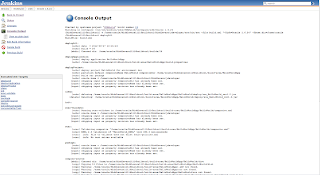 The different Ant tasks which are executed can be navigated to by clicking at the left side of the Console output on the specific task. Also the result is analyzed; in this case of course BUILD SUCCESFUL.
Introduction
'builds' globally consist of several steps (details can differ among different customers)
- selecting what to build. this can be based for example on a tag or status/property of a source in a version control system or a selection of tasks with a specific status (if issue management and version control are linked).
- preparing a workarea / workspace based on the above
- triggering a build (manually or automated by monitoring a version control system)
- archiving the build ('releasing')
This post will have a limited scope since putting the above into place is customer specific and requires some time (a project) to achieve a production ready setup. I will manually trigger a build for a prepared workarea. This can of course be expanded. I've chosen to call Ant from Jenkins. The following post describes how Maven can be used to wrap Ant; http://redstack.wordpress.com/2011/03/15/getting-started-with-continuous-integration-for-soa-projects/. Ant wraps Java classes to achieve deployment. Jenkins has plug-ins to directly call Ant tasks and has easy integration in the GUI (Ant output parsing). I do not see the added benefit of wrapping Ant in Maven.
I've installed Jenkins as described on; https://wiki.jenkins-ci.org/display/JENKINS/Installing+Jenkins+on+Ubuntu
I've chosen for Jenkins instead of Hudson based on http://stackoverflow.com/questions/4973981/how-to-choose-between-hudson-and-jenkins.
The Buildserver installed is an Ubuntu 12.04 server 64 bit installation.
Implementation
I've adapted the scripts used in my previous buildtool post slightly for this purpose. I've used a JDeveloper installation instead of 'manually' copying JAR files. This has the benefit that JDeveloper can easily be upgraded and plugins can more easily be installed using the GUI. This provides a more steady and flexible base for the buildtool then manually copying JAR files.
MDS and adf-config.xml
Also for the purpose of MDS dependencies I've expanded the build.xml file to write an application specific adf-config.xml and copy it to the relevant application directory. The adf-config is copied to the application directory and it contains placeholders; MDS_REPOSITORY and MDS_APPLICATION. These are replaced in the build.xml using;
Copy to application
<mkdir dir="${proj.compositeDir}/${proj.compositeName}/SCA-INF/classes/META-INF"/>
<copy file="${base.dir}/adf-config.xml" tofile="${proj.compositeDir}/${proj.compositeName}/SCA-INF/classes/META-INF/adf-config.xml"/>
Replace placeholders
<replace file="${proj.compositeDir}/${proj.compositeName}/SCA-INF/classes/META-INF/adf-config.xml" token="MDS_REPOSITORY" value="${mds.repository}"/>
<replace file="${proj.compositeDir}/${proj.compositeName}/SCA-INF/classes/META-INF/adf-config.xml" token="MDS_APPLICATION" value="${mds.application}"/>
Buildtool setup
I've installed JDeveloper in /home/oracle/Middleware11116. I've used the standard installer. I did however encounter the following problem when I tried to call the 32 bit JDeveloper installer on a 64 bit OS; http://stackoverflow.com/questions/2716702/no-such-file-or-directory-error-when-executing-a-binary
I've created a buildtool directory /home/oracle/Middleware11116buildtool. In this directory I've created a symlink Middleware to /home/oracle/Middleware11116. The directory structure is as followed;
-rw-rw-r-- 1 oracle oracle 1911 Aug 21 09:40 adf-config.xml
drwxrwxr-x 3 oracle oracle 4096 Aug 23 16:40 build-area
-rw-rw-r-- 1 oracle oracle 83 Aug 25 13:06 build.num
-rw-rw-r-- 1 oracle oracle 925 Aug 25 12:59 build.properties
drwxrwxr-x 16 oracle oracle 4096 Aug 25 13:06 builds
-rw-rw-r-- 1 oracle oracle 21961 Aug 25 10:54 build.xml
-rwxrwxr-x 1 oracle oracle 449 Aug 23 13:32 deployAll
-rw-rw-r-- 1 oracle oracle 407 Aug 14 09:05 deployAll.bat
-rw-rw-r-- 1 oracle oracle 261 Aug 5 18:07 dev.jndi.properties
drwxrwxr-x 2 oracle oracle 4096 Aug 23 13:33 junit
drwxrwxr-x 2 oracle oracle 4096 Aug 23 13:16 lib
drwxrwxr-x 2 oracle oracle 4096 Aug 25 13:06 logs
lrwxrwxrwx 1 oracle oracle 28 Aug 23 13:19 Middleware -> /home/oracle/Middleware11116
You can download the scripts here; http://dl.dropbox.com/u/6693935/blog/buildtoolscriptsincmds.zip
Jenkins setup
After the Jenkins installation I've added the Jenkins user to the oracle group (/etc/group) in order to access the buildtool, Ant, JDK, etc. After having started Jenkins, first I've configured the JDK and Ant;

Then I've created a multiconfiguration project
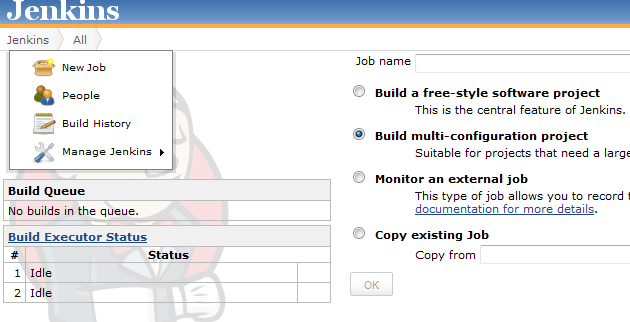
I've done this in order to be able to allow different configurations to be deployed at a later stage. I've not tried this yet though.

Then I've selected the JDK ant Ant version to be used. Important here is;
- specify the base dir in which Ant is executed; base.dir=/home/oracle/Middleware11116buildtool. this makes sure Ant can find the required scripts and of course the build.properties!
- specify the build.xml file; /home/oracle/Middleware11116buildtool/build.xml.
Running
After the task is configured, it can be run. This results in the below

Friday, August 10, 2012
Issues and solutions when testing and developing asynchronous BPEL processes
Webservices, when developed, need testing. Some difficulties with testing webservices are the following;
- asynchronous services are not easily tested outside Fusion Middleware Control if there is no service available handling the correlation
- often it is not visible directly what the raw HTTP message is which is transmitted. HTTP headers are often hidden from the monitoring tooling. Also in case for example the Oracle HTTP binding adapter is used to do a JSON call, the adapter proxies the message. This causes only the adapter call to be visible in the audit trail in the Enterprise Manager.
- metrics for load tests are often needed. the start situation needs to be reproduced for subsequent tests and thus these metrics need to allow resetting
In this post I will describe solutions to these issues. A collegue Marcel Bellinga has provided suggestions on resetting of the metrics, usage of the JDeveloper HTTP Analyzer and has solved the issue when calling an asynchronous proces using a synchronous one in JDeveloper 11.1.1.6.
Setup
I've created a synchronous HelloWorldAsync service. This service is wrapped by a synchronous HelloWorldAsyncCaller service. I want to know exactly (including HTTP headers) which message is send to the HelloWorldAsync service by the HelloWorldAsyncCaller service. In addition to this I want to be able to test the HelloWorldAsync service from SOAP-UI and collect metrics on the requests on the application server (SOAP UI can provide load tests but those are influenced by network latency and I'm not interested to take that also into account since it is time and customer dependant).
One first thing to mind in this setup is the following; when calling an asynchronous service from a synchronous one with a project created in JDeveloper 11.1.1.6, you will encounter the following error;
[2012-08-10T01:09:32.472-07:00] [AdminServer] [ERROR] [] [oracle.soa.bpel.engine.delivery] [tid: [ACTIVE].ExecuteThread: '0' for queue: 'weblogic.kernel.Default (self-tuning)'] [userId: <anonymous>] [ecid: 11d1def534ea1be0:7c9113cc:1390f864b2c:-8000-0000000000000579,0:9] [WEBSERVICE_PORT.name: HelloWorldAsyncCaller_pt] [APP: soa-infra] [composite_name: HelloWorldAsyncCaller] [J2EE_MODULE.name: fabric] [WEBSERVICE.name: helloworldasynccaller_client_ep] [J2EE_APP.name: soa-infra] No response found for the reply for conversation id urn:99E85AE0E2C211E1BF3487E7CAA738F8
And then
[2012-08-10T01:09:32.836-07:00] [AdminServer] [ERROR] [OWS-04086] [oracle.webservices.service] [tid: [ACTIVE].ExecuteThread: '0' for queue: 'weblogic.kernel.Default (self-tuning)'] [userId: <anonymous>] [ecid: 11d1def534ea1be0:7c9113cc:1390f864b2c:-8000-0000000000000579,0:9] [APP: soa-infra] [composite_name: HelloWorldAsyncCaller] javax.xml.rpc.soap.SOAPFaultException: Waiting for response has timed out. The conversation id is null. Please check the process instance for detail.[[
This is caused by the following setting in the composite.xml file;
<component name="HelloWorldAsyncCaller" version="2.0">
<implementation.bpel src="HelloWorldAsyncCaller.bpel"/>
<property name="bpel.config.transaction" type="xs:string" many="false">required</property>
</component>
If this line is removed or changed to
<property name="bpel.config.transaction" type="xs:string" many="false">requiresNew</property>
This error will not occur.
This property (Transaction in the below screenshot) is created when creating a synchronous BPEL process in JDeveloper 11.1.1.6. In previous versions (11.1.1.4 was checked), the property was not added by default.

Asynchronous correlation issues with parallel execution in foreach
In order to increase performance, parallel execution in the foreach construct in BPEL 2.0 can be used. In a synchronous process when calling asynchronous services inside a loop in which all branches are executed simultaneously, the 'Conflicting receive' error can occur. To avoid this, correlation sets can be used. Using correlation sets is however relatively complex and requires the response message to contain correlation information in the message content. In order to avoid having to use correlation sets to achieve this, it is of course possible to wrap the asynchronous service in a synchronous one as described above (if the asynchronous service doesn't take too long) and call the synchronous process from the loop in the calling synchronous process (Synchronous process with loop -> synchronous process wrapper -> asynchronous process). It is however a better solution to define the partnerlink on the level of the scope which is executed in parallel. If you define the same partnerlink in global BPEL scope and in the scope which is executed in parallel, you can assign values to the request/response messages more easily. If a partnerlink is defined locally only, this is not always possible.
Monitoring
Monitoring service calls
JDeveloper has has an HTTP Analyzer and it is possible to specify the HTTP Analyzer as proxy in Fusion Middleware Control. This causes webservice requests to be proxied by the analyzer and allows the complete request to be monitored.
Start the HTTP Analyzer


Specify the IP of the machine running the HTTP Analyzer as HTTP proxy
 Test the webservice and look at the results

I was however surprised I couldn't see the HelloWorldAsyncCaller HTTP requests to the HelloWorldAsync process. I created a simple JAX-WS webservice instead to test this. Actually, this was correct; there were no HTTP requests to find here. If a BPEL process calls another BPEL process running in the same container, the transformation to HTTP is not done, which has of course benefits for performance. Load balancing however is something to think about as it requires more then just setting the load balancer as HTTP proxy in the services.
Testing asynchronous services with SOAP-UI
SOAP-UI (http://www.soapui.org/) is a tool which is often used for testing of webservices. Testing of asynchronous services is explained on; http://www.oracle.com/technetwork/articles/soa/bpel-amadei-1518001.html.
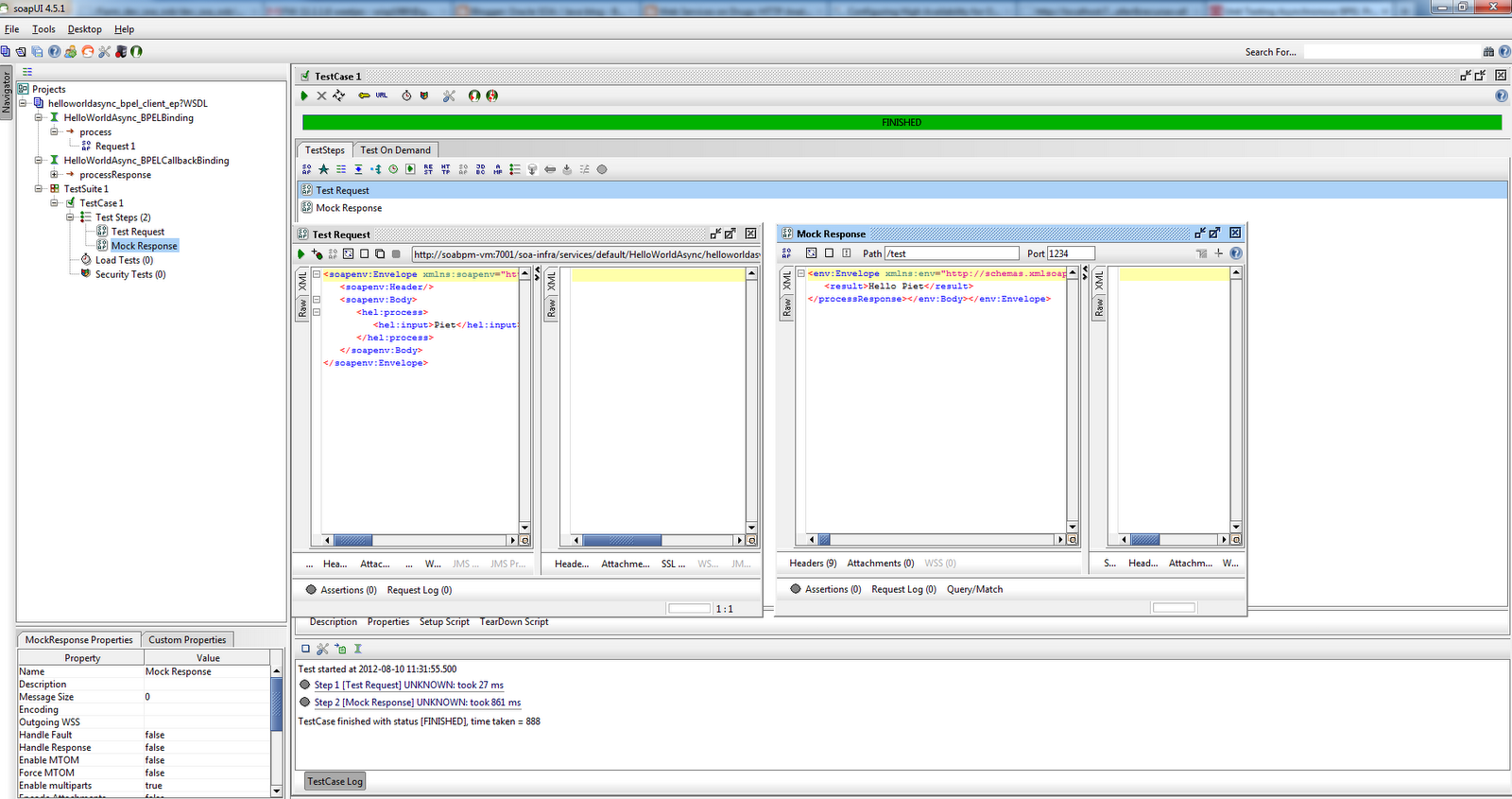
Key is creating a test suite with two steps; a request and a mock response. The request contains WS-Adressing headers and a ReplyTo indication so the response is send to the Mock Response listener in SOAP UI.

Things to mind in the previously mentioned post; the specified path in step 8 under 'Testing it' should correspond to the ReplyTo path specified in the WS-Adressing section of the request. Also the ReplyTo address should point to the machine running SOAP UI. If the development environment is not running locally, the IP address of your machine should be specified here.


Process metrics
A servlet is available to analyze process metrics. See section 6.4.1 of http://docs.oracle.com/cd/E25178_01/core.1111/e10108.pdf for more information on this DMS Spy servlet. It can be started by going to http://<host>:<port>/dms/Spy.
How these metrics can be reset, can be found on; https://blogs.oracle.com/soaproactive/entry/how_to_reset_a_soa
An example URL for resetting metrics; http://localhost:7001/dms/Spy?operation=reset&format=raw&cache=refreshall&name=/dev_soa_osb/AdminServer/soainfra/default/HelloWorldAsyncCaller&recurse=all
The sample projects can be downloaded here; https://dl.dropbox.com/u/6693935/blog/TestApp.zip
- asynchronous services are not easily tested outside Fusion Middleware Control if there is no service available handling the correlation
- often it is not visible directly what the raw HTTP message is which is transmitted. HTTP headers are often hidden from the monitoring tooling. Also in case for example the Oracle HTTP binding adapter is used to do a JSON call, the adapter proxies the message. This causes only the adapter call to be visible in the audit trail in the Enterprise Manager.
- metrics for load tests are often needed. the start situation needs to be reproduced for subsequent tests and thus these metrics need to allow resetting
In this post I will describe solutions to these issues. A collegue Marcel Bellinga has provided suggestions on resetting of the metrics, usage of the JDeveloper HTTP Analyzer and has solved the issue when calling an asynchronous proces using a synchronous one in JDeveloper 11.1.1.6.
Setup
I've created a synchronous HelloWorldAsync service. This service is wrapped by a synchronous HelloWorldAsyncCaller service. I want to know exactly (including HTTP headers) which message is send to the HelloWorldAsync service by the HelloWorldAsyncCaller service. In addition to this I want to be able to test the HelloWorldAsync service from SOAP-UI and collect metrics on the requests on the application server (SOAP UI can provide load tests but those are influenced by network latency and I'm not interested to take that also into account since it is time and customer dependant).
One first thing to mind in this setup is the following; when calling an asynchronous service from a synchronous one with a project created in JDeveloper 11.1.1.6, you will encounter the following error;
[2012-08-10T01:09:32.472-07:00] [AdminServer] [ERROR] [] [oracle.soa.bpel.engine.delivery] [tid: [ACTIVE].ExecuteThread: '0' for queue: 'weblogic.kernel.Default (self-tuning)'] [userId: <anonymous>] [ecid: 11d1def534ea1be0:7c9113cc:1390f864b2c:-8000-0000000000000579,0:9] [WEBSERVICE_PORT.name: HelloWorldAsyncCaller_pt] [APP: soa-infra] [composite_name: HelloWorldAsyncCaller] [J2EE_MODULE.name: fabric] [WEBSERVICE.name: helloworldasynccaller_client_ep] [J2EE_APP.name: soa-infra] No response found for the reply for conversation id urn:99E85AE0E2C211E1BF3487E7CAA738F8
And then
[2012-08-10T01:09:32.836-07:00] [AdminServer] [ERROR] [OWS-04086] [oracle.webservices.service] [tid: [ACTIVE].ExecuteThread: '0' for queue: 'weblogic.kernel.Default (self-tuning)'] [userId: <anonymous>] [ecid: 11d1def534ea1be0:7c9113cc:1390f864b2c:-8000-0000000000000579,0:9] [APP: soa-infra] [composite_name: HelloWorldAsyncCaller] javax.xml.rpc.soap.SOAPFaultException: Waiting for response has timed out. The conversation id is null. Please check the process instance for detail.[[
This is caused by the following setting in the composite.xml file;
<component name="HelloWorldAsyncCaller" version="2.0">
<implementation.bpel src="HelloWorldAsyncCaller.bpel"/>
<property name="bpel.config.transaction" type="xs:string" many="false">required</property>
</component>
If this line is removed or changed to
<property name="bpel.config.transaction" type="xs:string" many="false">requiresNew</property>
This error will not occur.
This property (Transaction in the below screenshot) is created when creating a synchronous BPEL process in JDeveloper 11.1.1.6. In previous versions (11.1.1.4 was checked), the property was not added by default.

Asynchronous correlation issues with parallel execution in foreach
In order to increase performance, parallel execution in the foreach construct in BPEL 2.0 can be used. In a synchronous process when calling asynchronous services inside a loop in which all branches are executed simultaneously, the 'Conflicting receive' error can occur. To avoid this, correlation sets can be used. Using correlation sets is however relatively complex and requires the response message to contain correlation information in the message content. In order to avoid having to use correlation sets to achieve this, it is of course possible to wrap the asynchronous service in a synchronous one as described above (if the asynchronous service doesn't take too long) and call the synchronous process from the loop in the calling synchronous process (Synchronous process with loop -> synchronous process wrapper -> asynchronous process). It is however a better solution to define the partnerlink on the level of the scope which is executed in parallel. If you define the same partnerlink in global BPEL scope and in the scope which is executed in parallel, you can assign values to the request/response messages more easily. If a partnerlink is defined locally only, this is not always possible.
Monitoring
Monitoring service calls
JDeveloper has has an HTTP Analyzer and it is possible to specify the HTTP Analyzer as proxy in Fusion Middleware Control. This causes webservice requests to be proxied by the analyzer and allows the complete request to be monitored.
Start the HTTP Analyzer


Specify the IP of the machine running the HTTP Analyzer as HTTP proxy


I was however surprised I couldn't see the HelloWorldAsyncCaller HTTP requests to the HelloWorldAsync process. I created a simple JAX-WS webservice instead to test this. Actually, this was correct; there were no HTTP requests to find here. If a BPEL process calls another BPEL process running in the same container, the transformation to HTTP is not done, which has of course benefits for performance. Load balancing however is something to think about as it requires more then just setting the load balancer as HTTP proxy in the services.
Testing asynchronous services with SOAP-UI
SOAP-UI (http://www.soapui.org/) is a tool which is often used for testing of webservices. Testing of asynchronous services is explained on; http://www.oracle.com/technetwork/articles/soa/bpel-amadei-1518001.html.
Key is creating a test suite with two steps; a request and a mock response. The request contains WS-Adressing headers and a ReplyTo indication so the response is send to the Mock Response listener in SOAP UI.

Things to mind in the previously mentioned post; the specified path in step 8 under 'Testing it' should correspond to the ReplyTo path specified in the WS-Adressing section of the request. Also the ReplyTo address should point to the machine running SOAP UI. If the development environment is not running locally, the IP address of your machine should be specified here.

Process metrics
A servlet is available to analyze process metrics. See section 6.4.1 of http://docs.oracle.com/cd/E25178_01/core.1111/e10108.pdf for more information on this DMS Spy servlet. It can be started by going to http://<host>:<port>/dms/Spy.
How these metrics can be reset, can be found on; https://blogs.oracle.com/soaproactive/entry/how_to_reset_a_soa
An example URL for resetting metrics; http://localhost:7001/dms/Spy?operation=reset&format=raw&cache=refreshall&name=/dev_soa_osb/AdminServer/soainfra/default/HelloWorldAsyncCaller&recurse=all
The sample projects can be downloaded here; https://dl.dropbox.com/u/6693935/blog/TestApp.zip
Sunday, August 5, 2012
Standalone Buildtool for deployment of Oracle SOA Suite 11.1.1.6 composites
Introduction
SOA Suite 11g allows deployment to environments from JDeveloper. The people installing software often don't have JDeveloper available or configured correctly. Often there is the requirement to provide a standalone package for installation which can be executed without too much configuration by someone with relatively little knowledge about what he/she is installing.
There have already been numerous posts about build automation for Oracle SOA 11g applications, such as the excellent post from Edwin Biemond; http://biemond.blogspot.nl/2009/09/deploy-soa-suite-11g-composite.html and http://redstack.wordpress.com/2011/03/15/getting-started-with-continuous-integration-for-soa-projects/
In this post I've created a standalone Buildtool for SOA Suite 11.1.1.6. This Buildtool allows compilation and deployment of various SOA artifacts. It is heavily based on http://biemond.blogspot.nl/2009/09/deploy-soa-suite-11g-composite.html however provides some added value such as;
- it's fully based on 11.1.1.6 libraries
- can be used standalone without the need to install JDeveloper or Weblogic Server
- allows applications to be packaged/configured separately and independently
- provides a script to recreate most of the Buildtool from scratch (hopefully making upgrades to the buildtool more easy)
- this buildtool compiles and installs composites. compilation is thus not dependent on the client providing a jar file; the sources can be used as source for the build.
Implementation
Install JDeveloper
Download and install JDeveloper 11.1.1.6. Install the following plugins from http://www.oracle.com/ocom/groups/public/@otn/documents/webcontent/156082.xml
This will be used as the start-point for the Buildtool.
Copy sources
The below DOS batch script copies the required libraries to the TARGETDIR (build tool base directory). The SOURCEDIR is a locally installed JDeveloper 11.1.1.6.
set SOURCEDIR=D:\dev\Middleware11116
set TARGETDIR=D:\dev\buildtool11116
rem buildtool generator 11.1.1.6
rem Maarten Smeets, 2012-08-05
mkdir %TARGETDIR%\logs
mkdir %TARGETDIR%\junit
mkdir %TARGETDIR%\builds
rem wlserver_10.3/server/lib
mkdir %TARGETDIR%\Middleware\wlserver_10.3\server\lib
xcopy /i %SOURCEDIR%\wlserver_10.3\server\lib\*.jar %TARGETDIR%\Middleware\wlserver_10.3\server\lib
rem jdeveloper\ant
mkdir %TARGETDIR%\Middleware\jdeveloper\ant
xcopy /s %SOURCEDIR%\jdeveloper\ant %TARGETDIR%\Middleware\jdeveloper\ant
rem jdeveloper\bin
mkdir %TARGETDIR%\Middleware\jdeveloper\bin
xcopy /s %SOURCEDIR%\jdeveloper\bin %TARGETDIR%\Middleware\jdeveloper\bin
rem jdeveloper\soa\modules
mkdir %TARGETDIR%\Middleware\jdeveloper\soa\modules
xcopy /s %SOURCEDIR%\jdeveloper\soa\modules %TARGETDIR%\Middleware\jdeveloper\soa\modules
rem jdeveloper\uddi
mkdir %TARGETDIR%\Middleware\jdeveloper\uddi
xcopy /s %SOURCEDIR%\jdeveloper\uddi %TARGETDIR%\Middleware\jdeveloper\uddi
rem jdk160_24
rem 11.1.1.4: jdk160_21
mkdir %TARGETDIR%\Middleware\jdk160_24
xcopy /s %SOURCEDIR%\jdk160_24 %TARGETDIR%\Middleware\jdk160_24
rem ant-contrib.jar
mkdir %TARGETDIR%\lib
xcopy %SOURCEDIR%\modules\net.sf.antcontrib_1.1.0.0_1-0b2\lib\* %TARGETDIR%\lib
rem oracle_common\webservices
mkdir %TARGETDIR%\Middleware\oracle_common\webservices
xcopy /s %SOURCEDIR%\oracle_common\webservices %TARGETDIR%\Middleware\oracle_common\webservices
rem oracle_common/modules
mkdir %TARGETDIR%\Middleware\oracle_common\modules\oracle.adf.model_11.1.1
mkdir %TARGETDIR%\Middleware\oracle_common\modules\oracle.adf.share.ca_11.1.1
mkdir %TARGETDIR%\Middleware\oracle_common\modules\oracle.adf.share_11.1.1
mkdir %TARGETDIR%\Middleware\oracle_common\modules\oracle.bali.share_11.1.1
mkdir %TARGETDIR%\Middleware\oracle_common\modules\oracle.dms_11.1.1
mkdir %TARGETDIR%\Middleware\oracle_common\modules\oracle.fabriccommon_11.1.1
mkdir %TARGETDIR%\Middleware\oracle_common\modules\oracle.javacache_11.1.1
mkdir %TARGETDIR%\Middleware\oracle_common\modules\oracle.jmx_11.1.1
mkdir %TARGETDIR%\Middleware\oracle_common\modules\oracle.jps_11.1.1
mkdir %TARGETDIR%\Middleware\oracle_common\modules\oracle.jrf_11.1.1
mkdir %TARGETDIR%\Middleware\oracle_common\modules\oracle.mds_11.1.1
mkdir %TARGETDIR%\Middleware\oracle_common\modules\oracle.nlsrtl_11.1.0
mkdir %TARGETDIR%\Middleware\oracle_common\modules\oracle.odl_11.1.1
mkdir %TARGETDIR%\Middleware\oracle_common\modules\oracle.webservices_11.1.1
mkdir %TARGETDIR%\Middleware\oracle_common\modules\oracle.wsm.common_11.1.1
mkdir %TARGETDIR%\Middleware\oracle_common\modules\oracle.xdk_11.1.0
mkdir %TARGETDIR%\Middleware\oracle_common\modules\oracle.xmlef_11.1.1
mkdir %TARGETDIR%\Middleware\oracle_common\modules\datadirect_4.1
xcopy /s %SOURCEDIR%\oracle_common\modules\oracle.adf.model_11.1.1 %TARGETDIR%\Middleware\oracle_common\modules\oracle.adf.model_11.1.1
xcopy /s %SOURCEDIR%\oracle_common\modules\oracle.adf.share.ca_11.1.1 %TARGETDIR%\Middleware\oracle_common\modules\oracle.adf.share.ca_11.1.1
xcopy /s %SOURCEDIR%\oracle_common\modules\oracle.adf.share_11.1.1 %TARGETDIR%\Middleware\oracle_common\modules\oracle.adf.share_11.1.1
xcopy /s %SOURCEDIR%\oracle_common\modules\oracle.bali.share_11.1.1 %TARGETDIR%\Middleware\oracle_common\modules\oracle.bali.share_11.1.1
xcopy /s %SOURCEDIR%\oracle_common\modules\oracle.dms_11.1.1 %TARGETDIR%\Middleware\oracle_common\modules\oracle.dms_11.1.1
xcopy /s %SOURCEDIR%\oracle_common\modules\oracle.fabriccommon_11.1.1 %TARGETDIR%\Middleware\oracle_common\modules\oracle.fabriccommon_11.1.1
xcopy /s %SOURCEDIR%\oracle_common\modules\oracle.javacache_11.1.1 %TARGETDIR%\Middleware\oracle_common\modules\oracle.javacache_11.1.1
xcopy /s %SOURCEDIR%\oracle_common\modules\oracle.jmx_11.1.1 %TARGETDIR%\Middleware\oracle_common\modules\oracle.jmx_11.1.1
xcopy /s %SOURCEDIR%\oracle_common\modules\oracle.jps_11.1.1 %TARGETDIR%\Middleware\oracle_common\modules\oracle.jps_11.1.1
xcopy /s %SOURCEDIR%\oracle_common\modules\oracle.jrf_11.1.1 %TARGETDIR%\Middleware\oracle_common\modules\oracle.jrf_11.1.1
xcopy /s %SOURCEDIR%\oracle_common\modules\oracle.mds_11.1.1 %TARGETDIR%\Middleware\oracle_common\modules\oracle.mds_11.1.1
xcopy /s %SOURCEDIR%\oracle_common\modules\oracle.nlsrtl_11.1.0 %TARGETDIR%\Middleware\oracle_common\modules\oracle.nlsrtl_11.1.0
xcopy /s %SOURCEDIR%\oracle_common\modules\oracle.odl_11.1.1 %TARGETDIR%\Middleware\oracle_common\modules\oracle.odl_11.1.1
xcopy /s %SOURCEDIR%\oracle_common\modules\oracle.webservices_11.1.1 %TARGETDIR%\Middleware\oracle_common\modules\oracle.webservices_11.1.1
xcopy /s %SOURCEDIR%\oracle_common\modules\oracle.wsm.common_11.1.1 %TARGETDIR%\Middleware\oracle_common\modules\oracle.wsm.common_11.1.1
xcopy /s %SOURCEDIR%\oracle_common\modules\oracle.xdk_11.1.0 %TARGETDIR%\Middleware\oracle_common\modules\oracle.xdk_11.1.0
xcopy /s %SOURCEDIR%\oracle_common\modules\datadirect_4.1 %TARGETDIR%\Middleware\oracle_common\modules\datadirect_4.1
xcopy /i %SOURCEDIR%\oracle_common\modules\oracle.ucp_11.1.0.jar %TARGETDIR%\Middleware\oracle_common\modules
xcopy /i %SOURCEDIR%\oracle_common\modules\org.apache.commons.beanutils_1.6.jar %TARGETDIR%\Middleware\oracle_common\modules
xcopy /i %SOURCEDIR%\oracle_common\modules\org.apache.commons.digester_1.8.jar %TARGETDIR%\Middleware\oracle_common\modules
xcopy /i %SOURCEDIR%\oracle_common\modules\org.apache.commons.logging_1.0.4.jar %TARGETDIR%\Middleware\oracle_common\modules
xcopy /i %SOURCEDIR%\oracle_common\modules\org.springframework_2.5.jar %TARGETDIR%\Middleware\oracle_common\modules
xcopy /i %SOURCEDIR%\oracle_common\modules\oracle.classloader_11.1.1.jar %TARGETDIR%\Middleware\oracle_common\modules
xcopy /i %SOURCEDIR%\oracle_common\modules\oracle.http_client_11.1.1.jar %TARGETDIR%\Middleware\oracle_common\modules
xcopy /i %SOURCEDIR%\oracle_common\modules\oracle.logging-utils_11.1.1.jar %TARGETDIR%\Middleware\oracle_common\modules
xcopy /i %SOURCEDIR%\oracle_common\modules\commonj.sdo_2.1.0.jar %TARGETDIR%\Middleware\oracle_common\modules
xcopy /i %SOURCEDIR%\oracle_common\modules\com.bea.core.xml.xmlbeans_2.1.0.0_2-5-1.jar %TARGETDIR%\Middleware\oracle_common\modules
xcopy /i %SOURCEDIR%\oracle_common\modules\com.bea.core.weblogic.security.identity_1.1.2.1.jar %TARGETDIR%\Middleware\oracle_common\modules
rem modules
mkdir %TARGETDIR%\Middleware\modules
xcopy /i %SOURCEDIR%\modules\com.bea.core.apache.commons.collections_3.2.0.jar %TARGETDIR%\Middleware\modules
xcopy /i %SOURCEDIR%\modules\com.bea.core.apache.commons.lang_2.1.0.jar %TARGETDIR%\Middleware\modules
rem 11.1.1.4
rem xcopy /i %SOURCEDIR%\modules\com.bea.core.weblogic.workmanager_1.9.0.0.jar %TARGETDIR%\Middleware\modules
xcopy /i %SOURCEDIR%\modules\com.bea.core.weblogic.workmanager_1.10.0.0.jar %TARGETDIR%\Middleware\modules
rem 11.1.1.4
rem xcopy /i %SOURCEDIR%\modules\com.bea.core.xml.beaxmlbeans_2.2.0.0_2-5-1.jar %TARGETDIR%\Middleware\modules
xcopy /i %SOURCEDIR%\modules\com.bea.core.xml.beaxmlbeans_2.3.0.0_2-5-1.jar %TARGETDIR%\Middleware\modules
xcopy /i %SOURCEDIR%\modules\commonj.sdo_1.0.0.0_1-0.jar %TARGETDIR%\Middleware\modules
xcopy /i %SOURCEDIR%\modules\glassfish.jaxb_1.0.0.0_2-1-12.jar %TARGETDIR%\Middleware\modules
xcopy /i %SOURCEDIR%\modules\javax.management.j2ee_1.0.jar %TARGETDIR%\Middleware\modules
xcopy /i %SOURCEDIR%\modules\javax.xml.rpc_1.2.1.jar %TARGETDIR%\Middleware\modules
rem 11.1.1.4
rem xcopy /i %SOURCEDIR%\modules\org.eclipse.persistence_1.0.0.0_2-1.jar %TARGETDIR%\Middleware\modules
xcopy /i %SOURCEDIR%\modules\org.eclipse.persistence_1.1.0.0_2-1.jar %TARGETDIR%\Middleware\modules
Some script files were taken from https://github.com/biemond/soa_tools/tree/master/ant and updated. The updated scriptfiles can be downloaded here; https://dl.dropbox.com/u/6693935/blog/buildtool11116scriptfiles.zip
Usage
In my case, the buildtool base dir is; D:\dev\buildtool11116. Here you can create a directory build-area (as specified in the build.properties file). In this directory you can create a structure like for example; https://dl.dropbox.com/u/6693935/blog/build-area.zip
The structure contains an example project, a deployment profile and configuration files. This is what the developer has to provide. The person installing the software has to update the following files;
- update deployAll.bat to reflect the correct locations (once)
- update build.properties to reflect the environment which is used (it is recommended the installer keeps per environment a separate build.properties file)
When deployAll.bat is executed, log files are generated in the logs directory and the deployed applications are put in the builds directory.
The build.xml is capable of calling unit tests, but since I got the following error which I couldn't fix quickly enough;
[scatest] java.lang.NoClassDefFoundError: weblogic/security/subject/AbstractSubject
and
D:\dev\buildtool11116\Middleware\jdeveloper\bin\ant-sca-test.xml:111: Problem executing test cases
weblogic/security/subject/AbstractSubject
I've decided to put this functionality in comments and maybe look at it later. wlclient.jar contains this class and it should be in the classpath.
The example build-area provides a simple deployment of a SCA composite. The supplied build.xml provides functionality for MDS deployments and partitions (Edwin Biemond has described this functionality on his blog site). Some minor changes to the script might be needed to make sure deployment of the MDS is from the build-area folder so developers can more easily provide the required files. You can download the entire 11.1.1.6 buildtool here; https://dl.dropbox.com/u/6693935/blog/buildtool11116.zip.
SOA Suite 11g allows deployment to environments from JDeveloper. The people installing software often don't have JDeveloper available or configured correctly. Often there is the requirement to provide a standalone package for installation which can be executed without too much configuration by someone with relatively little knowledge about what he/she is installing.
There have already been numerous posts about build automation for Oracle SOA 11g applications, such as the excellent post from Edwin Biemond; http://biemond.blogspot.nl/2009/09/deploy-soa-suite-11g-composite.html and http://redstack.wordpress.com/2011/03/15/getting-started-with-continuous-integration-for-soa-projects/
In this post I've created a standalone Buildtool for SOA Suite 11.1.1.6. This Buildtool allows compilation and deployment of various SOA artifacts. It is heavily based on http://biemond.blogspot.nl/2009/09/deploy-soa-suite-11g-composite.html however provides some added value such as;
- it's fully based on 11.1.1.6 libraries
- can be used standalone without the need to install JDeveloper or Weblogic Server
- allows applications to be packaged/configured separately and independently
- provides a script to recreate most of the Buildtool from scratch (hopefully making upgrades to the buildtool more easy)
- this buildtool compiles and installs composites. compilation is thus not dependent on the client providing a jar file; the sources can be used as source for the build.
Implementation
Install JDeveloper
Download and install JDeveloper 11.1.1.6. Install the following plugins from http://www.oracle.com/ocom/groups/public/@otn/documents/webcontent/156082.xml
-
Oracle BPM Studio 11g
-
Oracle SOA Composite Editor
This will be used as the start-point for the Buildtool.
Copy sources
The below DOS batch script copies the required libraries to the TARGETDIR (build tool base directory). The SOURCEDIR is a locally installed JDeveloper 11.1.1.6.
set SOURCEDIR=D:\dev\Middleware11116
set TARGETDIR=D:\dev\buildtool11116
rem buildtool generator 11.1.1.6
rem Maarten Smeets, 2012-08-05
mkdir %TARGETDIR%\logs
mkdir %TARGETDIR%\junit
mkdir %TARGETDIR%\builds
rem wlserver_10.3/server/lib
mkdir %TARGETDIR%\Middleware\wlserver_10.3\server\lib
xcopy /i %SOURCEDIR%\wlserver_10.3\server\lib\*.jar %TARGETDIR%\Middleware\wlserver_10.3\server\lib
rem jdeveloper\ant
mkdir %TARGETDIR%\Middleware\jdeveloper\ant
xcopy /s %SOURCEDIR%\jdeveloper\ant %TARGETDIR%\Middleware\jdeveloper\ant
rem jdeveloper\bin
mkdir %TARGETDIR%\Middleware\jdeveloper\bin
xcopy /s %SOURCEDIR%\jdeveloper\bin %TARGETDIR%\Middleware\jdeveloper\bin
rem jdeveloper\soa\modules
mkdir %TARGETDIR%\Middleware\jdeveloper\soa\modules
xcopy /s %SOURCEDIR%\jdeveloper\soa\modules %TARGETDIR%\Middleware\jdeveloper\soa\modules
rem jdeveloper\uddi
mkdir %TARGETDIR%\Middleware\jdeveloper\uddi
xcopy /s %SOURCEDIR%\jdeveloper\uddi %TARGETDIR%\Middleware\jdeveloper\uddi
rem jdk160_24
rem 11.1.1.4: jdk160_21
mkdir %TARGETDIR%\Middleware\jdk160_24
xcopy /s %SOURCEDIR%\jdk160_24 %TARGETDIR%\Middleware\jdk160_24
rem ant-contrib.jar
mkdir %TARGETDIR%\lib
xcopy %SOURCEDIR%\modules\net.sf.antcontrib_1.1.0.0_1-0b2\lib\* %TARGETDIR%\lib
rem oracle_common\webservices
mkdir %TARGETDIR%\Middleware\oracle_common\webservices
xcopy /s %SOURCEDIR%\oracle_common\webservices %TARGETDIR%\Middleware\oracle_common\webservices
rem oracle_common/modules
mkdir %TARGETDIR%\Middleware\oracle_common\modules\oracle.adf.model_11.1.1
mkdir %TARGETDIR%\Middleware\oracle_common\modules\oracle.adf.share.ca_11.1.1
mkdir %TARGETDIR%\Middleware\oracle_common\modules\oracle.adf.share_11.1.1
mkdir %TARGETDIR%\Middleware\oracle_common\modules\oracle.bali.share_11.1.1
mkdir %TARGETDIR%\Middleware\oracle_common\modules\oracle.dms_11.1.1
mkdir %TARGETDIR%\Middleware\oracle_common\modules\oracle.fabriccommon_11.1.1
mkdir %TARGETDIR%\Middleware\oracle_common\modules\oracle.javacache_11.1.1
mkdir %TARGETDIR%\Middleware\oracle_common\modules\oracle.jmx_11.1.1
mkdir %TARGETDIR%\Middleware\oracle_common\modules\oracle.jps_11.1.1
mkdir %TARGETDIR%\Middleware\oracle_common\modules\oracle.jrf_11.1.1
mkdir %TARGETDIR%\Middleware\oracle_common\modules\oracle.mds_11.1.1
mkdir %TARGETDIR%\Middleware\oracle_common\modules\oracle.nlsrtl_11.1.0
mkdir %TARGETDIR%\Middleware\oracle_common\modules\oracle.odl_11.1.1
mkdir %TARGETDIR%\Middleware\oracle_common\modules\oracle.webservices_11.1.1
mkdir %TARGETDIR%\Middleware\oracle_common\modules\oracle.wsm.common_11.1.1
mkdir %TARGETDIR%\Middleware\oracle_common\modules\oracle.xdk_11.1.0
mkdir %TARGETDIR%\Middleware\oracle_common\modules\oracle.xmlef_11.1.1
mkdir %TARGETDIR%\Middleware\oracle_common\modules\datadirect_4.1
xcopy /s %SOURCEDIR%\oracle_common\modules\oracle.adf.model_11.1.1 %TARGETDIR%\Middleware\oracle_common\modules\oracle.adf.model_11.1.1
xcopy /s %SOURCEDIR%\oracle_common\modules\oracle.adf.share.ca_11.1.1 %TARGETDIR%\Middleware\oracle_common\modules\oracle.adf.share.ca_11.1.1
xcopy /s %SOURCEDIR%\oracle_common\modules\oracle.adf.share_11.1.1 %TARGETDIR%\Middleware\oracle_common\modules\oracle.adf.share_11.1.1
xcopy /s %SOURCEDIR%\oracle_common\modules\oracle.bali.share_11.1.1 %TARGETDIR%\Middleware\oracle_common\modules\oracle.bali.share_11.1.1
xcopy /s %SOURCEDIR%\oracle_common\modules\oracle.dms_11.1.1 %TARGETDIR%\Middleware\oracle_common\modules\oracle.dms_11.1.1
xcopy /s %SOURCEDIR%\oracle_common\modules\oracle.fabriccommon_11.1.1 %TARGETDIR%\Middleware\oracle_common\modules\oracle.fabriccommon_11.1.1
xcopy /s %SOURCEDIR%\oracle_common\modules\oracle.javacache_11.1.1 %TARGETDIR%\Middleware\oracle_common\modules\oracle.javacache_11.1.1
xcopy /s %SOURCEDIR%\oracle_common\modules\oracle.jmx_11.1.1 %TARGETDIR%\Middleware\oracle_common\modules\oracle.jmx_11.1.1
xcopy /s %SOURCEDIR%\oracle_common\modules\oracle.jps_11.1.1 %TARGETDIR%\Middleware\oracle_common\modules\oracle.jps_11.1.1
xcopy /s %SOURCEDIR%\oracle_common\modules\oracle.jrf_11.1.1 %TARGETDIR%\Middleware\oracle_common\modules\oracle.jrf_11.1.1
xcopy /s %SOURCEDIR%\oracle_common\modules\oracle.mds_11.1.1 %TARGETDIR%\Middleware\oracle_common\modules\oracle.mds_11.1.1
xcopy /s %SOURCEDIR%\oracle_common\modules\oracle.nlsrtl_11.1.0 %TARGETDIR%\Middleware\oracle_common\modules\oracle.nlsrtl_11.1.0
xcopy /s %SOURCEDIR%\oracle_common\modules\oracle.odl_11.1.1 %TARGETDIR%\Middleware\oracle_common\modules\oracle.odl_11.1.1
xcopy /s %SOURCEDIR%\oracle_common\modules\oracle.webservices_11.1.1 %TARGETDIR%\Middleware\oracle_common\modules\oracle.webservices_11.1.1
xcopy /s %SOURCEDIR%\oracle_common\modules\oracle.wsm.common_11.1.1 %TARGETDIR%\Middleware\oracle_common\modules\oracle.wsm.common_11.1.1
xcopy /s %SOURCEDIR%\oracle_common\modules\oracle.xdk_11.1.0 %TARGETDIR%\Middleware\oracle_common\modules\oracle.xdk_11.1.0
xcopy /s %SOURCEDIR%\oracle_common\modules\datadirect_4.1 %TARGETDIR%\Middleware\oracle_common\modules\datadirect_4.1
xcopy /i %SOURCEDIR%\oracle_common\modules\oracle.ucp_11.1.0.jar %TARGETDIR%\Middleware\oracle_common\modules
xcopy /i %SOURCEDIR%\oracle_common\modules\org.apache.commons.beanutils_1.6.jar %TARGETDIR%\Middleware\oracle_common\modules
xcopy /i %SOURCEDIR%\oracle_common\modules\org.apache.commons.digester_1.8.jar %TARGETDIR%\Middleware\oracle_common\modules
xcopy /i %SOURCEDIR%\oracle_common\modules\org.apache.commons.logging_1.0.4.jar %TARGETDIR%\Middleware\oracle_common\modules
xcopy /i %SOURCEDIR%\oracle_common\modules\org.springframework_2.5.jar %TARGETDIR%\Middleware\oracle_common\modules
xcopy /i %SOURCEDIR%\oracle_common\modules\oracle.classloader_11.1.1.jar %TARGETDIR%\Middleware\oracle_common\modules
xcopy /i %SOURCEDIR%\oracle_common\modules\oracle.http_client_11.1.1.jar %TARGETDIR%\Middleware\oracle_common\modules
xcopy /i %SOURCEDIR%\oracle_common\modules\oracle.logging-utils_11.1.1.jar %TARGETDIR%\Middleware\oracle_common\modules
xcopy /i %SOURCEDIR%\oracle_common\modules\commonj.sdo_2.1.0.jar %TARGETDIR%\Middleware\oracle_common\modules
xcopy /i %SOURCEDIR%\oracle_common\modules\com.bea.core.xml.xmlbeans_2.1.0.0_2-5-1.jar %TARGETDIR%\Middleware\oracle_common\modules
xcopy /i %SOURCEDIR%\oracle_common\modules\com.bea.core.weblogic.security.identity_1.1.2.1.jar %TARGETDIR%\Middleware\oracle_common\modules
rem modules
mkdir %TARGETDIR%\Middleware\modules
xcopy /i %SOURCEDIR%\modules\com.bea.core.apache.commons.collections_3.2.0.jar %TARGETDIR%\Middleware\modules
xcopy /i %SOURCEDIR%\modules\com.bea.core.apache.commons.lang_2.1.0.jar %TARGETDIR%\Middleware\modules
rem 11.1.1.4
rem xcopy /i %SOURCEDIR%\modules\com.bea.core.weblogic.workmanager_1.9.0.0.jar %TARGETDIR%\Middleware\modules
xcopy /i %SOURCEDIR%\modules\com.bea.core.weblogic.workmanager_1.10.0.0.jar %TARGETDIR%\Middleware\modules
rem 11.1.1.4
rem xcopy /i %SOURCEDIR%\modules\com.bea.core.xml.beaxmlbeans_2.2.0.0_2-5-1.jar %TARGETDIR%\Middleware\modules
xcopy /i %SOURCEDIR%\modules\com.bea.core.xml.beaxmlbeans_2.3.0.0_2-5-1.jar %TARGETDIR%\Middleware\modules
xcopy /i %SOURCEDIR%\modules\commonj.sdo_1.0.0.0_1-0.jar %TARGETDIR%\Middleware\modules
xcopy /i %SOURCEDIR%\modules\glassfish.jaxb_1.0.0.0_2-1-12.jar %TARGETDIR%\Middleware\modules
xcopy /i %SOURCEDIR%\modules\javax.management.j2ee_1.0.jar %TARGETDIR%\Middleware\modules
xcopy /i %SOURCEDIR%\modules\javax.xml.rpc_1.2.1.jar %TARGETDIR%\Middleware\modules
rem 11.1.1.4
rem xcopy /i %SOURCEDIR%\modules\org.eclipse.persistence_1.0.0.0_2-1.jar %TARGETDIR%\Middleware\modules
xcopy /i %SOURCEDIR%\modules\org.eclipse.persistence_1.1.0.0_2-1.jar %TARGETDIR%\Middleware\modules
Some script files were taken from https://github.com/biemond/soa_tools/tree/master/ant and updated. The updated scriptfiles can be downloaded here; https://dl.dropbox.com/u/6693935/blog/buildtool11116scriptfiles.zip
Usage
In my case, the buildtool base dir is; D:\dev\buildtool11116. Here you can create a directory build-area (as specified in the build.properties file). In this directory you can create a structure like for example; https://dl.dropbox.com/u/6693935/blog/build-area.zip
The structure contains an example project, a deployment profile and configuration files. This is what the developer has to provide. The person installing the software has to update the following files;
- update deployAll.bat to reflect the correct locations (once)
- update build.properties to reflect the environment which is used (it is recommended the installer keeps per environment a separate build.properties file)
When deployAll.bat is executed, log files are generated in the logs directory and the deployed applications are put in the builds directory.
The build.xml is capable of calling unit tests, but since I got the following error which I couldn't fix quickly enough;
[scatest] java.lang.NoClassDefFoundError: weblogic/security/subject/AbstractSubject
and
D:\dev\buildtool11116\Middleware\jdeveloper\bin\ant-sca-test.xml:111: Problem executing test cases
weblogic/security/subject/AbstractSubject
I've decided to put this functionality in comments and maybe look at it later. wlclient.jar contains this class and it should be in the classpath.
The example build-area provides a simple deployment of a SCA composite. The supplied build.xml provides functionality for MDS deployments and partitions (Edwin Biemond has described this functionality on his blog site). Some minor changes to the script might be needed to make sure deployment of the MDS is from the build-area folder so developers can more easily provide the required files. You can download the entire 11.1.1.6 buildtool here; https://dl.dropbox.com/u/6693935/blog/buildtool11116.zip.
Subscribe to:
Posts (Atom)