
Wednesday, April 8, 2020
Spring: Blocking vs non-blocking: R2DBC vs JDBC and WebFlux vs Web MVC
Spring Framework version 5, released in Sept 2017, introduced Spring WebFlux. A fully reactive stack. In Dec 2019 Spring Data R2DBC, a reactive relational database driver was released. In this blog post I'll show that at high concurrency, WebFlux and R2DBC perform better. They have better response times and higher throughput. As additional benefits, they use less memory and CPU per request processed and when leaving out JPA in case of R2DBC, your fat JAR becomes a lot smaller. At high concurrency using WebFlux and R2DBC is a good idea!


Tuesday, March 31, 2020
The size of Docker images containing OpenJDK 11.0.6
When running Java applications in containers, you need to be careful with your resources. If you're not careful with layering your images (for example using Google's Jib), you can quickly get into disk-space issues, especially when your base image and/or application gets updated regularly. One of the ways you can save resources is by using small base images. In this blog post I determined the uncompressed size of several base images containing OpenJDK 11.0.6 which are available on Docker Hub.


Sunday, February 23, 2020
Secure browsing using a local SOCKS proxy server (on desktop or mobile) and an always free OCI compute instance as SSH server
Oracle provides several services as 'always free'. In contrast to Azure and Amazon, these include compute instances which remain 'forever' free to use. Although there are some limitations on CPU, disk, network resources, these instances are ideal to use as a remote SSH server and with a little effort a connection target for a locally running SOCKS proxy server. When you configure a browser to use that SOCKS proxy, your web traffic will be send through a secure channel (SSH tunnel) towards the OCI instance and the OCI instance will appear as your browsers client IP for remote sites you visit.
An SSH server in combination with a locally running SOCKS proxy server allows you to browse the internet more securely from for example public Wifi hotspots by routing your internet traffic through a secure channel via a remote server. If you combine this with DNS over HTTPS, which is currently at least available in Firefox and Chrome, it will be more difficult for other parties to analyse your traffic. Also it allows you to access resources from a server outside of a company network which can have benefits for example if you want to check how a company hosted service looks to a customer from the outside. Having a server in a different country as a proxy can also have benefits if certain services are only available from a certain country (a similar benefit as using a VPN or using Tor) or as a means to circumvent censorship.
Do check what is allowed in your company, by your ISP and is legal within your country before using such techniques though. I of course don't want you to do anything illegal and blame me for it ;)
An SSH server in combination with a locally running SOCKS proxy server allows you to browse the internet more securely from for example public Wifi hotspots by routing your internet traffic through a secure channel via a remote server. If you combine this with DNS over HTTPS, which is currently at least available in Firefox and Chrome, it will be more difficult for other parties to analyse your traffic. Also it allows you to access resources from a server outside of a company network which can have benefits for example if you want to check how a company hosted service looks to a customer from the outside. Having a server in a different country as a proxy can also have benefits if certain services are only available from a certain country (a similar benefit as using a VPN or using Tor) or as a means to circumvent censorship.
Do check what is allowed in your company, by your ISP and is legal within your country before using such techniques though. I of course don't want you to do anything illegal and blame me for it ;)
Saturday, February 1, 2020
HTTP benchmarking using wrk. Parsing output to CSV or JSON using Python
wrk is a modern HTTP benchmarking tool. Using a simple CLI interface you can put simple load on HTTP services and determine latency, response times and the number of successfully processed requests. It has a LuaJIT scripting interface which provides extensibility. A distinguishing feature of wrk compared to for example ab (Apache Bench) is that it requires far less CPU at higher concurrency (it uses threads very efficiently). It does have less CLI features when compared to ab. You need to do scripting to achieve specific functionality. Also you need to compile wrk for yourself since no binaries are provided, which might be a barrier to people who are not used to compiling code.
Parsing the wrk output is a challenge. It would be nice to have a feature to output the results in the same units as CSV or JSON file. More people asked this question and the answer was: do some LuaJIT scripting to achieve that. Since I'm no Lua expert and to be honest, I don't have any people in my vicinity that are, I decided to parse the output using Python (my favorite language for data processing and visualization) and provide you with the code so you don't have to repeat this exercise.
You can see example Python code of this here.

Parsing the wrk output is a challenge. It would be nice to have a feature to output the results in the same units as CSV or JSON file. More people asked this question and the answer was: do some LuaJIT scripting to achieve that. Since I'm no Lua expert and to be honest, I don't have any people in my vicinity that are, I decided to parse the output using Python (my favorite language for data processing and visualization) and provide you with the code so you don't have to repeat this exercise.
You can see example Python code of this here.

Thursday, January 2, 2020
pgAdmin in Docker: Provisioning connections and passwords
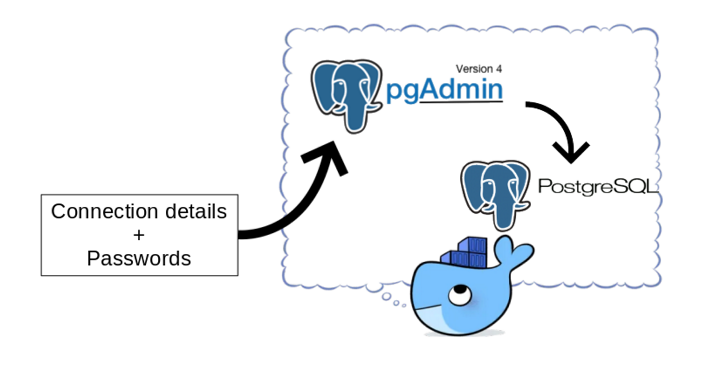
pgAdmin is a popular open source and feature rich administration and development platform for PostgreSQL. When provisioning Postgres database environments using containers, it is not unusual to also provision a pgAdmin container.
The pgAdmin image provided on Docker Hub does not contain any server connection details. When your pgAdmin container changes regularly (think about changes to database connection details and keeping pgAdmin up to date), you might not want to enter the connections and passwords manually every time. This is especially true if you use a single pgAdmin instance to connect to many databases. A manual step also prevents a fully automated build process for the pgAdmin container.
You can export/import connection information, but you cannot export passwords. It is a bother, especially in development environments where the security aspect is less important, to lookup passwords every time you need them. How to fix this and make your life a little bit easier?
In this blog I'll show how to create a simple script to automate creating connections and supply password information so the pgAdmin instance is ready for use when you login to the console for the first time! This consists of provisioning the connections and provisioning the password files. You can find the files here.
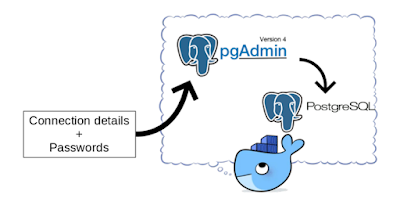
The pgAdmin image provided on Docker Hub does not contain any server connection details. When your pgAdmin container changes regularly (think about changes to database connection details and keeping pgAdmin up to date), you might not want to enter the connections and passwords manually every time. This is especially true if you use a single pgAdmin instance to connect to many databases. A manual step also prevents a fully automated build process for the pgAdmin container.
You can export/import connection information, but you cannot export passwords. It is a bother, especially in development environments where the security aspect is less important, to lookup passwords every time you need them. How to fix this and make your life a little bit easier?
In this blog I'll show how to create a simple script to automate creating connections and supply password information so the pgAdmin instance is ready for use when you login to the console for the first time! This consists of provisioning the connections and provisioning the password files. You can find the files here.
Monday, December 23, 2019
Apache Camel + Spring Boot: Different components to expose HTTP endpoints
Apache Camel is an open source integration framework that allows you to integrate technologically diverse systems using a large library of components. A common use-case is to service HTTP based endpoints. Those of course come in several flavors and there is quite a choice in components to use.
In this blog post I'll take a look at what is available and how they differ with respect to flexibility to define multiple hosts, ports and URLs to host from using a single CamelContext. Depending on your use-case you will probably be using one of these. You can find my sample project here.

In this blog post I'll take a look at what is available and how they differ with respect to flexibility to define multiple hosts, ports and URLs to host from using a single CamelContext. Depending on your use-case you will probably be using one of these. You can find my sample project here.
Friday, December 13, 2019
Java Microservices: What do you need to tweak to optimize throughput and response times
Performance tuning usually goes something like followed:
In this blog post I'll try to do just that. Of course a major disclaimer applies here since every application, environment, hardware, etc is different. The definition of performance and how to measure it is also something which you can have different opinions on. In short what I've done is look at many different variables and measuring response times and throughput of minimal implementations of microservices for every combination of those variables. I fed all that data to a machine learning model and asked the model which variables it used to do predictions of performance with. I also presented on this topic at UKOUG Techfest 2019 in Brighton, UK. You can view the presentation here.

- a performance problem occurs
- an experienced person knows what is probably the cause and suggests a specific change
- baseline performance is determined, the change is applied, and performance is measured again
- if the performance has improved compared to the baseline, keep the change, else revert the change
- if the performance is now considered sufficient, you're done. If not, return to the experienced person to ask what to change next and repeat the above steps
In this blog post I'll try to do just that. Of course a major disclaimer applies here since every application, environment, hardware, etc is different. The definition of performance and how to measure it is also something which you can have different opinions on. In short what I've done is look at many different variables and measuring response times and throughput of minimal implementations of microservices for every combination of those variables. I fed all that data to a machine learning model and asked the model which variables it used to do predictions of performance with. I also presented on this topic at UKOUG Techfest 2019 in Brighton, UK. You can view the presentation here.

Subscribe to:
Posts (Atom)